本文属于机器翻译版本。若本译文内容与英语原文存在差异,则一律以英文原文为准。
# 创建在线评估
`CreateOnlineEvaluationConfig`API 创建了一个新的在线评估配置,该配置可使用实时流量持续监控您的代理的表现。此异步操作告诉服务对正常操作期间生成的代理跟踪进行评估。
要创建在线评估,请提供唯一的配置名称,选择要监控的内容,选择最多 25 个评估者,并提供 IAM 服务角色 ARN 以供执行。数据源可以是 CloudWatch 日志(按确切的日志组名称或日志组名称前缀选择),也可以是代理端点。必需的`enableOnCreate`参数控制初始配置`executionStatus`:在中`true`启动配置`ENABLED`,然后在中`false`启动配置`DISABLED`。
**Topics**
+ [执行状态控制](#execution-status-control)
+ [选择输入日志组](#select-input-log-groups)
+ [评估者保护](#evaluator-protection)
+ [AgentCore CLI、 AgentCore SDK 和 Amazon SDK](#create-online-evaluation-code-samples)
+ [控制台](#create-online-evaluation-console)
## 执行状态控制
该`executionStatus`参数决定评估任务是否主动处理跟踪:
+ **已启用**-评估作业持续运行,处理传入的跟踪并生成评估结果。
+ **已禁用**-评估配置存在,但作业已暂停。未处理或评估任何痕迹。
您可以使用 CLI 控制执行状态:
```
# Pause a running online evaluation
agentcore pause online-eval "your_config_name"
# Resume a paused online evaluation
agentcore resume online-eval "your_config_name"
```
## 选择输入日志组
如果您的数据源是 CloudWatch Logs,请完全`dataSourceConfig.cloudWatchLogs`按照以下方式之一进行配置:
+ `logGroupNames`— 提供日志组名称的明确列表。
+ `logGroupNamePrefixes`— 提供 1—5 个日志组*名称*前缀。该服务会评估来自名称以其中一个前缀开头的任何日志组的跟踪,包括稍后创建的匹配日志组。
无论哪种情况,都要进行设置,`serviceNames`使服务可以在所选日志组中识别代理的跟踪。
如果您使用`logGroupNamePrefixes`匹配 Amazon Bedrock AgentCore 运行时日志组,请确保您的运行时将跨度发送到代理自己的日志组。对于仍在使用共享`aws/spans`日志组的代理,请在运行时`UNIFIED_TRACES_DESTINATION_ENABLED=true`进行设置。有关更多信息,请参阅 [Amazon Bedrock AgentCore 运行时中托管的代理的 Span 目标](observability-configure.md#observability-configure-unified-traces)。
```
# Match input log groups by prefix instead of exact names
dataSourceConfig={
"cloudWatchLogs": {
"logGroupNamePrefixes": ["/aws/agentcore/my-agent-"],
"serviceNames": ["my_agent.DEFAULT"]
}
}
```
有关结果和分数指标的写入位置(包括专用日志组、自定义日志组和源日志组)的更多信息,请参阅[结果和输出](results-and-output.md)。
## 评估者保护
当您创建`executionStatus`设置为的评估配置时`ENABLED`,系统会自动锁定您选择的所有自定义赋值器。锁定后:
+ **不允许修改**-您无法更新评估者的配置、提示或设置。如果需要进行更改,请克隆一个新的赋值器。
+ **不允许删除**-当任何评估作业正在使用赋值器(正在运行)时,您无法将其删除。
## AgentCore CLI、 AgentCore SDK 和 Amazon SDK
以下代码示例演示了如何使用不同的开发方法创建在线评估配置。选择最适合您的开发环境和偏好的方法。
**Example**
1.
```
# Create online evaluation configuration
agentcore add online-eval \
--name "your_config_name" \
--runtime "your_runtime_name" \
--evaluator "Builtin.GoalSuccessRate" "Builtin.Helpfulness" \
--sampling-rate 1.0 \
--enable-on-create
```
此命令将在线评估配置添加到您的本地`agentcore.json`。运行`agentcore deploy`以在您的 Amazon 帐户中创建它。
**注意**
在 AgentCore 项目目录(使用创建`agentcore create`)中运行它。
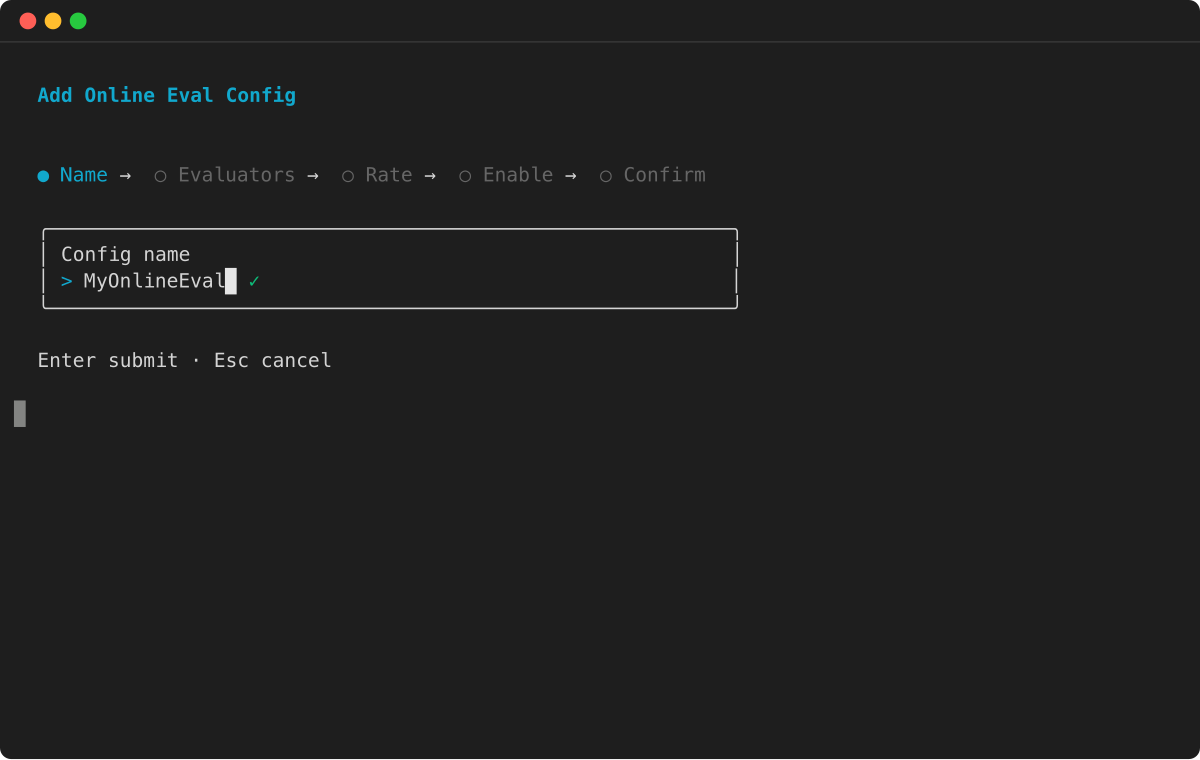
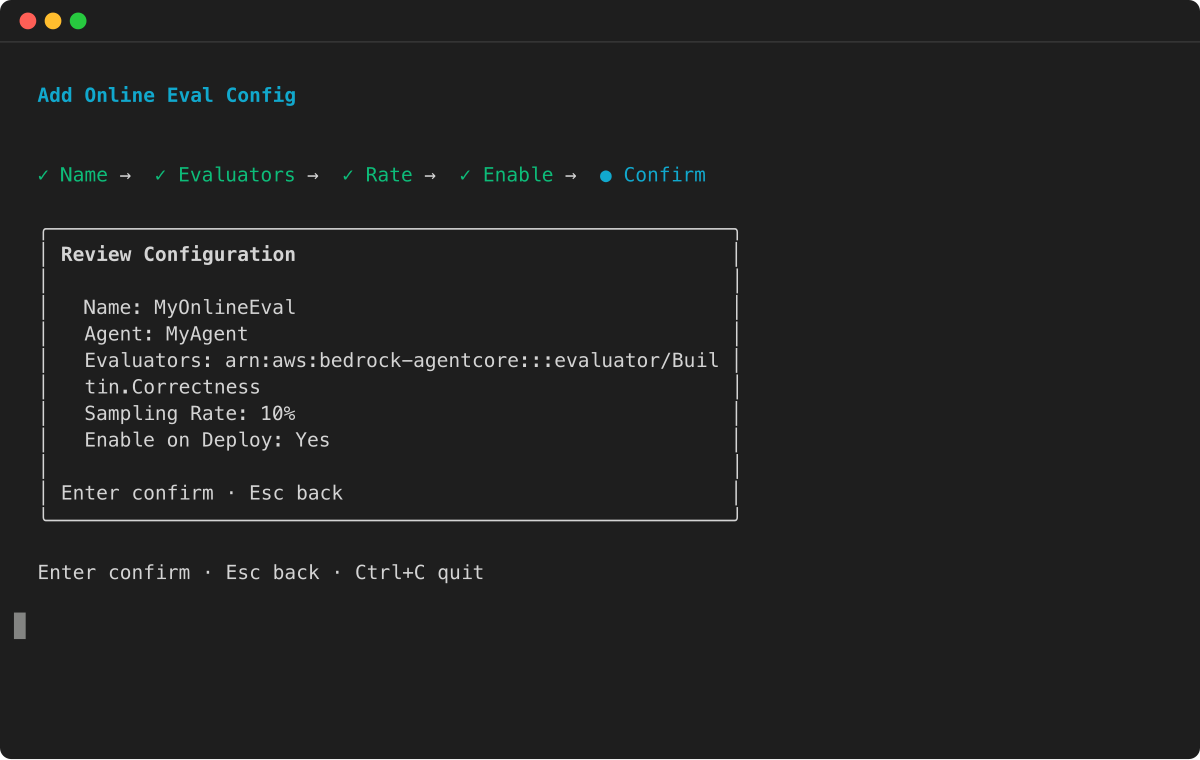
1. 输入您的在线评估配置的名称。
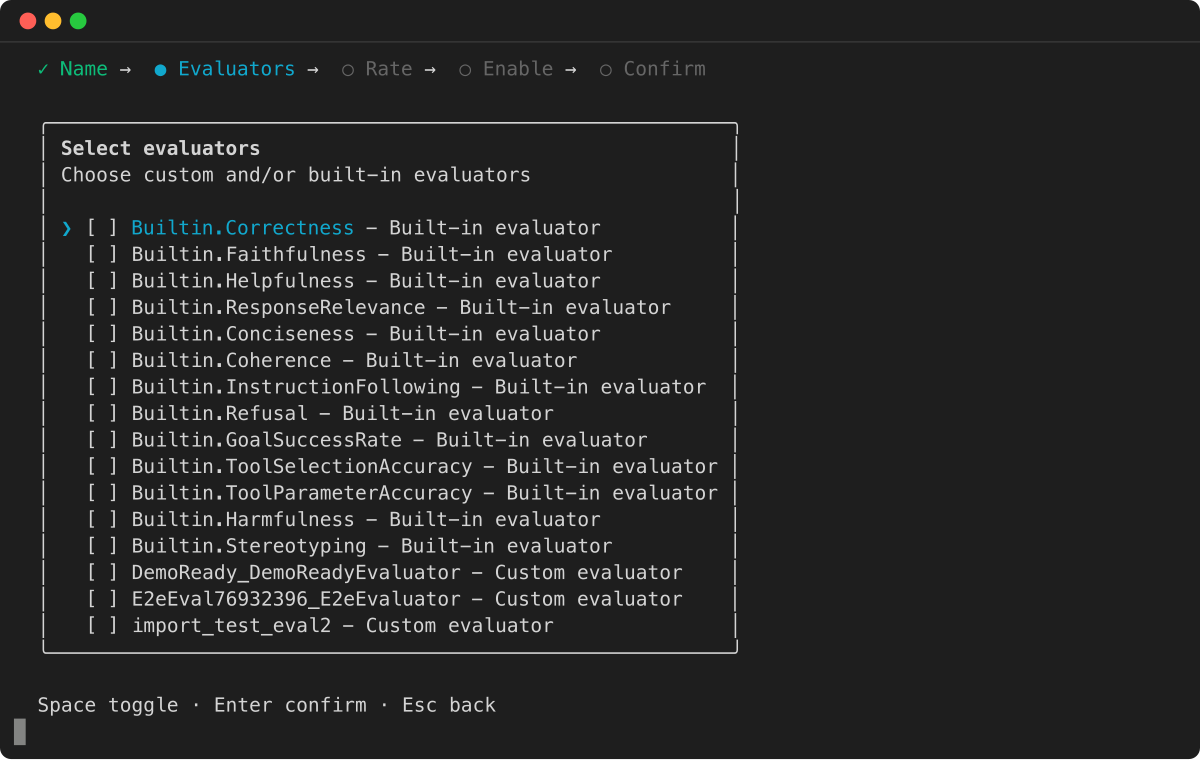
1. 选择要包括的赋值器。您可以从内置赋值器和您创建的任何自定义赋值器中进行选择。
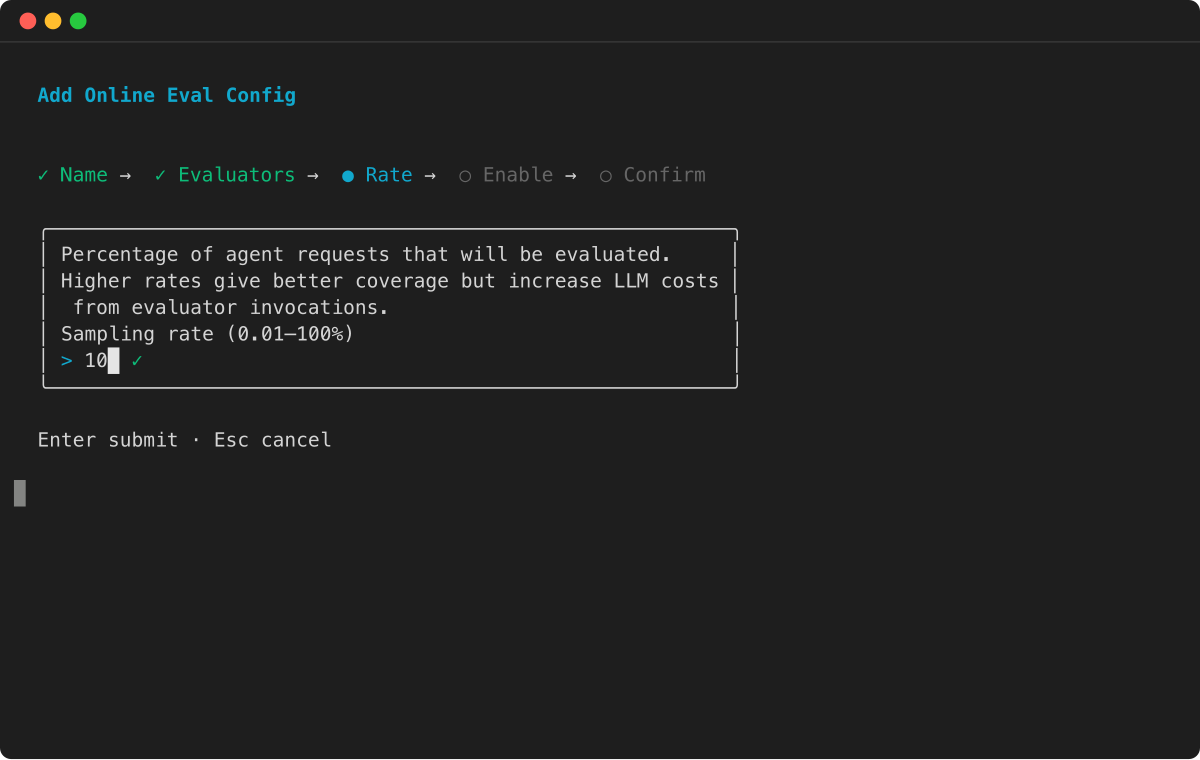
1. 设置采样率 — 将要评估的代理请求的百分比。
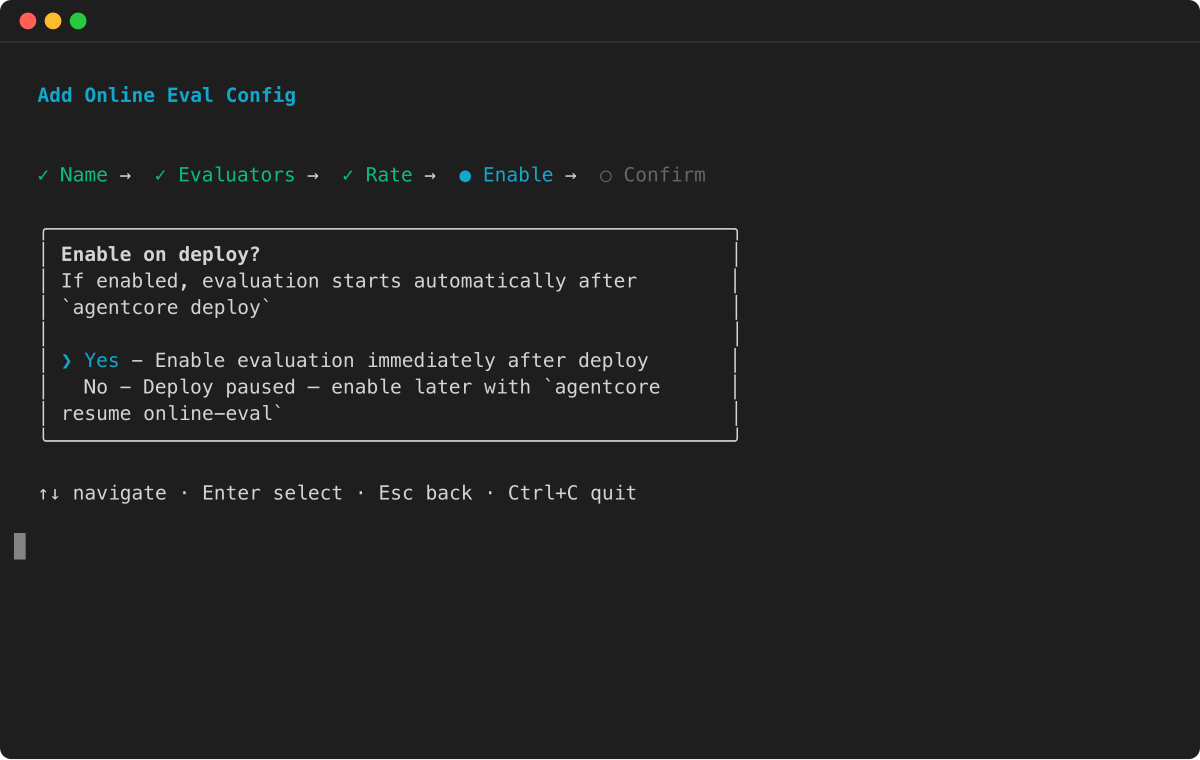
1. 选择是否在部署后自动启用评估。
1. 查看配置并按 Enter 进行确认。
1.
```
from bedrock_agentcore_starter_toolkit import Evaluation
# Initialize the evaluation client
eval_client = Evaluation()
# Replace these with your actual values
config_name = "YOUR_CONFIG_NAME"
agent_id = "YOUR_AGENT_ID" # e.g., agent_myagent-ABC123xyz
# Create online evaluation configuration
config = eval_client.create_online_config(
config_name=config_name, # Must use underscores, not hyphens
agent_id=agent_id, # Agent ID (e.g., agent_myagent-ABC123xyz)
sampling_rate=1.0, # Percentage to evaluate (0-100). 1.0 = evaluate 1% of interactions
evaluator_list=["Builtin.GoalSuccessRate", "Builtin.Helpfulness"], # List of evaluator IDs
config_description="Online Evaluation Config", # Optional description
auto_create_execution_role=True, # Automatically creates IAM role (default: True)
enable_on_create=True # Enable immediately after creation (default: True)
)
print("✅ Online evaluation configuration created!")
print(f"Config ID: {config['onlineEvaluationConfigId']}")
print(f"Status: {config['status']}")
# Save the config ID for later operations
config_id = config['onlineEvaluationConfigId']
print(f"\nSaved config_id: {config_id}")
```
1.
```
import boto3
# Your input log group that contains agent traces
LOG_GROUP_NAME = "/aws/agentcore/test-agent-traces"
# The service.name attribute from Otel
SERVICE_NAME = "strands_healthcare_single_agent.DEFAULT"
# The role created earlier with the required permissions for eval
role_arn = f"arn:aws:iam::{ACCOUNT_ID}:role/AgentCoreEvaluationRole"
client = boto3.client('bedrock-agentcore-control')
create_config_response = client.create_online_evaluation_config(
onlineEvaluationConfigName="strands_healthcare_agent_1",
description="Continuous evaluation of a healthcare agent",
rule={
"samplingConfig": {"samplingPercentage": 80.0}
},
dataSourceConfig={
"cloudWatchLogs": {
"logGroupNames": [LOG_GROUP_NAME],
"serviceNames": [SERVICE_NAME]
}
},
evaluators=[{"evaluatorId":"Builtin.Helpfulness"}],
evaluationExecutionRoleArn=role_arn,
enableOnCreate=True
)
```
1.
```
aws bedrock-agentcore-control create-online-evaluation-config \
--online-evaluation-config-name "strands_healthcare_agent_1" \
--description "Continuous evaluation of a healthcare agent" \
--rule '{"samplingConfig": {"samplingPercentage": 80.0}}' \
--data-source-config '{"cloudWatchLogs": {"logGroupNames": ["/aws/agentcore/test-agent-traces"], "serviceNames": ["strands_healthcare_single_agent.DEFAULT"]}}' \
--evaluators '[{"evaluatorId": "Builtin.Helpfulness"}]' \
--evaluation-execution-role-arn "arn:aws:iam::{YOUR_ACCOUNT_ID}:role/AgentCoreEvaluationRole" \
--enable-on-create
```
## 控制台
您可以使用 Amazon Bedrock AgentCore 控制台的可视界面创建在线评估配置。此方法提供指导表单和验证,以帮助您配置评估设置。
**创建 AgentCore 在线评估**
1. 打开 Amazon Bedrock AgentCore 控制台。
1. 在左侧导航窗格中,选择 “**评估**”。
1. 选择**创建评估配置**。
1. (可选)在**评估名称**中,输入在线评估配置的名称。
1. (可选)要在创建评估配置后将其启用,请选中评估名称下方的复选框。
1. (可选)在**评估配置描述**中,输入 AgentCore 评估配置的描述。
1. (可选)对于**会话空闲超时**,请输入介于 1 到 60 分钟之间的持续时间。默认为 15 分钟。
1. 对于**数据源**,请选择以下选项之一:
1. **使用代理端点定义**-选择您之前在 AgentCore Runtime 上创建的代理,或者通过选择**代理来创建新代理**。然后,从代理中选择一个端点。
1. **选择一个 CloudWatch 日志组**-最多选择 10 个日志组。输入您的代理为了便于观测而使用的服务名称。对于托管在 AgentCore Runtime 上的代理,服务名称遵循以下格式。 。对于在运行 AgentCore 时之外运行的代理,服务名称是在 OTEL\_RESOURCE\_ATTRIBUTIES 环境变量中配置的。
1. 对于**评估者**,每个评估配置最多可选择 25 个赋值器,包括内置和自定义赋值器。
1. (可选)对于**筛选器**,最多添加 5 个过滤器以确定要评估哪些会话。
1. (可选)对于**采样**,选择介于 0.01% 和 100% 之间的百分比以控制评估的会话百分比。默认值为 10%。
1. 对于 **Amazon Bedrock IAM 角色**,请选择以下选项之一:
**注意**
如果您的账户中启用了角色管理器,则会为您 AgentCore 附加角色,此处描述的角色选择步骤将替换为 “**自定义**” 选项。要使用其它角色,请选择**自定义**。有关更多信息,请参阅《IAM 用户指南》**中的 [IAM 角色创建](https://docs.amazonaws.cn/IAM/latest/UserGuide/id_roles_create.html)。
1. **使用现有角色**-选择已具有所需权限的 IAM 服务角色。
1. **创建新角色**-创建新的 IAM 服务角色。
1. 选择**创建评估配置**以创建 AgentCore 在线评估配置。