Amazon Web Services 文档中描述的 Amazon Web Services 服务或功能可能因区域而异。要查看适用于中国区域的差异,请参阅
中国的 Amazon Web Services 服务入门
(PDF)。
本文属于机器翻译版本。若本译文内容与英语原文存在差异,则一律以英文原文为准。
入站联邦 Lambda 触发器
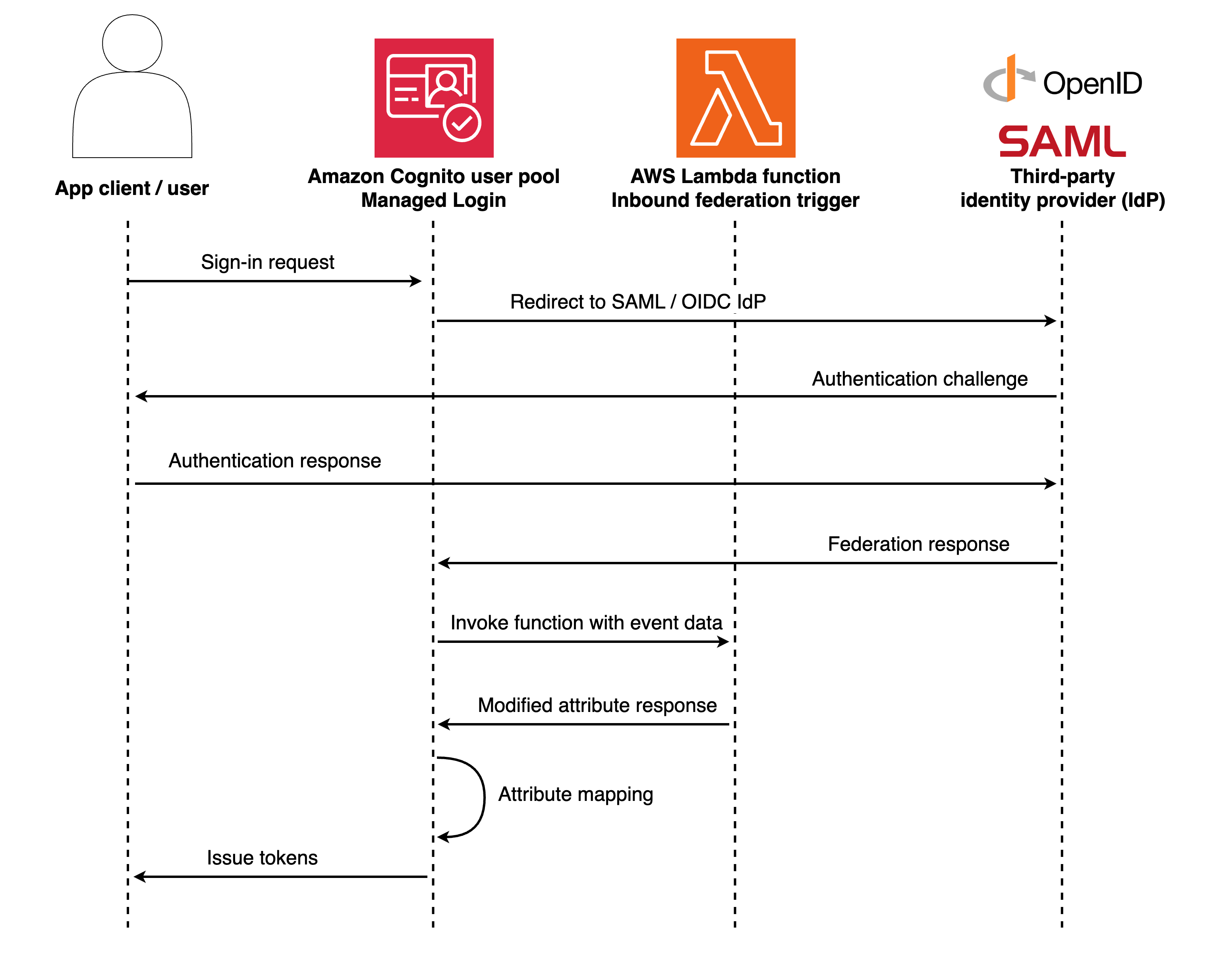
在使用外部身份提供商进行身份验证的过程中,入站联合身份触发器会转换联合用户属性。当用户通过配置的身份提供商进行身份验证时,此触发器允许您通过拦截和转换身份验证过程中的数据来修改来自外部 SAML 和 OIDC 提供商的响应,从而对 Amazon Cognito 用户池处理联合用户及其属性的方式进行编程控制。
在创建新用户或更新现有联合用户配置文件之前,使用此触发器添加、覆盖或隐藏属性。此触发器接收原始身份提供者属性作为输入,并返回 Amazon Cognito 应用于用户个人资料的修改属性。
流程概述
当用户通过外部身份提供商进行身份验证时,Amazon Cognito 会在创建或更新用户个人资料之前调用入站联合触发器。触发器从身份提供者那里接收原始属性,并可以在 Amazon Cognito 存储它们之前对其进行转换。此流程适用于新的联合用户和通过联合身份再次登录的现有用户。
入站联邦 Lambda 触发器参数
Amazon Cognito 传递给此 Lambda 函数的请求是以下参数和 Amazon Cognito 添加到所有请求中的常用参数的组合。
- JSON
-
{
    "version": "string",
    "triggerSource": "InboundFederation_ExternalProvider",
    "region": AWSRegion,
    "userPoolId": "string",
    "userName": "string",
    "callerContext": {
        "awsSdkVersion": "string",
        "clientId": "string"
    },
    "request": {
        "providerName": "string",
        "providerType": "string",
        "attributes": {
            "tokenResponse": {
                "access_token": "string",
                "token_type": "string",
                "expires_in": "string"
            },
            "idToken": {
                "sub": "string",
                "email": "string",
                "email_verified": "string"
            },
            "userInfo": {
                "email": "string",
                "given_name": "string",
                "family_name": "string"
            },
            "samlResponse": {
                "string": "string"
            }
        }
    },
    "response": {
        "userAttributesToMap": {
            "string": "string"
        }
    }
}
入站联盟请求参数
- 提供者名称
-
外部身份提供商的名称。
- 提供者类型
-
外部身份提供商的类型。有效值:OIDC、SAML、Facebook、Google、SignInWithApple、LoginWithAmazon。
- 属性
-
处理前从身份提供者那里收到的原始属性。结构因提供商类型而异。
- 属性。TokenResponse
-
来自端点的 OAuth 令牌响应数据。/token仅适用于 OIDC 和社交服务提供商。包含access_tokenid_token、refresh_token、token_type、expires_in、和scope。
- 属性.idToken
-
经过解码和验证的 ID 令牌 JWT 声明。仅适用于 OIDC 和社交服务提供商。包含经过验证的用户身份信息,包括sub(唯一用户标识符)emailname、、iss(发行者)、aud(受众)、exp(到期)和iat(发布时间)。
- 属性.userInfo
-
来自 UserInfo 端点的扩展用户配置文件信息。仅适用于 OIDC 和社交服务提供商。包含详细的配置文件属性given_name,例如、family_name、pictureaddress、和其他提供商特定的字段。如果 IdP 不支持 UserInfo 终端节点或端点调用失败,则可能为空。
- 属性.samlResponse
-
SAML 断言属性。仅适用于 SAML 提供商。包含来自 SAML 响应的属性。
入站联盟响应参数
- 用户 AttributesToMap
-
要应用于用户配置文件的用户属性。
您必须在响应中包含要保留的所有用户属性,包括您未修改的属性。任何未包含在userAttributesToMap响应中的属性都将被删除且不会存储在用户配置文件中。这适用于已修改和未修改的属性。
如果您{}为返回一个空对象userAttributesToMap,则身份提供者的所有原始属性都将保持不变。这相当于禁用操作,就像 Lambda 函数从未执行过一样。这与省略属性不同,后者会丢弃这些属性。
的结构request.attributes因而异providerType. OIDC 和社交提供者包括tokenResponseidToken、和对象。userInfoSAML 提供程序仅包含samlResponse对象。
入站联盟示例:群组成员资格管理
此示例说明如何将联合身份提供商组映射到 Amazon Cognito 用户池群组。此函数从联合响应中提取群组成员资格,并自动将用户添加到相应的 Amazon Cognito 群组,无需在身份验证后触发器。
- Node.js
-
exports.handler = async (event) => {
    const { providerType, attributes } = event.request;

    // Extract user attributes based on provider type
    let userAttributesFromIdp = {};
    if (providerType === 'SAML') {
        userAttributesFromIdp = attributes.samlResponse || {};
    } else {
        // For OIDC and Social providers, merge userInfo and idToken
        userAttributesFromIdp = {
            ...(attributes.userInfo || {}),
            ...(attributes.idToken || {})
        };
    }

    // Extract groups from federated response
    const federatedGroups = userAttributesFromIdp.groups?.split(',') || [];

    // Map federated groups to Cognito groups
    const groupMapping = {
        'Domain Admins': 'Administrators',
        'Engineering': 'Developers',
        'Sales': 'SalesTeam'
    };

    // Filter to only in-scope groups
    const mappedGroups = federatedGroups
        .map(group => groupMapping[group.trim()])
        .filter(group => group); // Remove undefined values

    // Pass through attributes with mapped groups as custom attribute
    const attributesToMap = {
        ...userAttributesFromIdp,
        'custom:user_groups': mappedGroups.join(',')
    };

    // Remove original groups attribute
    delete attributesToMap.groups;

    event.response.userAttributesToMap = attributesToMap;
    return event;
};
Amazon Cognito 将事件信息传递给 Lambda 函数。随后,该函数将相同事件对象随同响应中的任何更改返回给 Amazon Cognito。在 Lambda 控制台中,您可以设置一个测试事件,该事件包含与您的 Lambda 触发器相关的数据。以下是此代码示例的一个测试事件:
- JSON
-
{
    "userPoolId": "us-east-1_XXXXXXXXX",
    "request": {
        "providerName": "CorporateAD",
        "providerType": "SAML",
        "attributes": {
            "samlResponse": {
                "email": "jane.smith@company.com",
                "given_name": "Jane",
                "family_name": "Smith",
                "groups": "Engineering,Domain Admins",
                "department": "Engineering"
            }
        }
    },
    "response": {
        "userAttributesToMap": {}
    }
}
入站联合示例:截断大型属性
此示例说明如何截断超过 Amazon Cognito 存储限制的属性值。此函数检查身份提供商提供的每个属性。如果属性值超过 2048 个字符,则会截断该值并添加省略号以表示截断。所有其他属性均保持不变。
- Node.js
-
exports.handler = async (event) => {
    const MAX_ATTRIBUTE_LENGTH = 2048;

    // Get the identity provider attributes based on provider type
    const { providerType, attributes } = event.request;
    let idpAttributes = {};

    if (providerType === 'SAML') {
        idpAttributes = attributes.samlResponse || {};
    } else {
        // For OIDC and Social providers, merge userInfo and idToken
        idpAttributes = {
            ...(attributes.userInfo || {}),
            ...(attributes.idToken || {})
        };
    }

    const userAttributes = {};

    // Process each attribute
    for (const [key, value] of Object.entries(idpAttributes)) {
        if (typeof value === 'string' && value.length > MAX_ATTRIBUTE_LENGTH) {
            // Truncate the value and add ellipsis
            userAttributes[key] = value.substring(0, MAX_ATTRIBUTE_LENGTH - 3) + '...';
            console.log(`Truncated attribute ${key} from ${value.length} to ${userAttributes[key].length} characters`);
        } else {
            // Keep the original value
            userAttributes[key] = value;
        }
    }

    // Return the modified attributes
    event.response.userAttributesToMap = userAttributes;
    return event;
};
Amazon Cognito 将事件信息传递给 Lambda 函数。随后,该函数将相同事件对象随同响应中的任何更改返回给 Amazon Cognito。在 Lambda 控制台中,您可以设置一个测试事件,该事件包含与您的 Lambda 触发器相关的数据。以下是此代码示例的一个测试事件:
- JSON
-
{
    "version": "string",
    "triggerSource": "InboundFederation_ExternalProvider",
    "region": "us-east-1",
    "userPoolId": "us-east-1_XXXXXXXXX",
    "userName": "ExampleProvider_12345",
    "callerContext": {
        "awsSdkVersion": "string",
        "clientId": "string"
    },
    "request": {
        "providerName": "ExampleProvider",
        "providerType": "OIDC",
        "attributes": {
            "tokenResponse": {
                "access_token": "abcDE...",
                "token_type": "Bearer",
                "expires_in": "3600"
            },
            "idToken": {
                "sub": "12345",
                "email": "user@example.com"
            },
            "userInfo": {
                "email": "user@example.com",
                "given_name": "Example",
                "family_name": "User",
                "bio": "This is a very long biography that contains more than 2048 characters..."
            }
        }
    },
    "response": {
        "userAttributesToMap": {}
    }
}
入站联合示例:记录联合事件
此示例说明如何记录联合身份验证事件以进行监控和调试。此示例函数捕获有关联合用户及其属性的详细信息,从而提供对身份验证过程的可见性。
- Node.js
-
exports.handler = async (event) => {
    const { providerName, providerType, attributes } = event.request;

    // Extract user attributes based on provider type
    let userAttributesFromIdp = {};
    if (providerType === 'SAML') {
        userAttributesFromIdp = attributes.samlResponse || {};
    } else {
        // For OIDC and Social providers, merge userInfo and idToken
        userAttributesFromIdp = {
            ...(attributes.userInfo || {}),
            ...(attributes.idToken || {})
        };
    }

    // Log federated authentication details
    console.log(JSON.stringify({
        timestamp: new Date().toISOString(),
        providerName,
        providerType,
        userEmail: userAttributesFromIdp.email,
        attributeCount: Object.keys(userAttributesFromIdp).length,
        attributes: userAttributesFromIdp
    }));

    // Pass through all attributes unchanged
    event.response.userAttributesToMap = userAttributesFromIdp;
    return event;
};
Amazon Cognito 将事件信息传递给 Lambda 函数。随后,该函数将相同事件对象随同响应中的任何更改返回给 Amazon Cognito。在 Lambda 控制台中,您可以设置一个测试事件,该事件包含与您的 Lambda 触发器相关的数据。以下是此代码示例的一个测试事件:
- JSON
-
{
    "version": "string",
    "triggerSource": "InboundFederation_ExternalProvider",
    "region": "us-east-1",
    "userPoolId": "us-east-1_XXXXXXXXX",
    "userName": "CorporateAD_john.doe",
    "callerContext": {
        "awsSdkVersion": "string",
        "clientId": "string"
    },
    "request": {
        "providerName": "CorporateAD",
        "providerType": "SAML",
        "attributes": {
            "samlResponse": {
                "email": "john.doe@company.com",
                "given_name": "John",
                "family_name": "Doe",
                "department": "Engineering",
                "employee_id": "EMP12345"
            }
        }
    },
    "response": {
        "userAttributesToMap": {}
    }
}
预期的 CloudWatch 日志输出:
- JSON
-
{
    "timestamp": "2025-01-14T21:17:40.153Z",
    "providerName": "CorporateAD",
    "providerType": "SAML",
    "userEmail": "john.doe@company.com",
    "attributeCount": 5,
    "attributes": {
        "email": "john.doe@company.com",
        "given_name": "John",
        "family_name": "Doe",
        "department": "Engineering",
        "employee_id": "EMP12345"
    }
}