Setting the CPU cores and threads per CPU core for a DB instance class
You can configure the number of CPU cores and threads per core for the DB instance class when you perform the following operations:
Note
When you modify a DB instance to configure the number of CPU cores or threads per core, there is a brief outage similar to when you modify the instance class.
Set the CPU cores by using the Amazon Web Services Management Console, Amazon CLI or the RDS API.
To set the cores
Sign in to the Amazon Web Services Management Console and open the Amazon RDS console at https://console.amazonaws.cn/rds/
. Choose Create database.
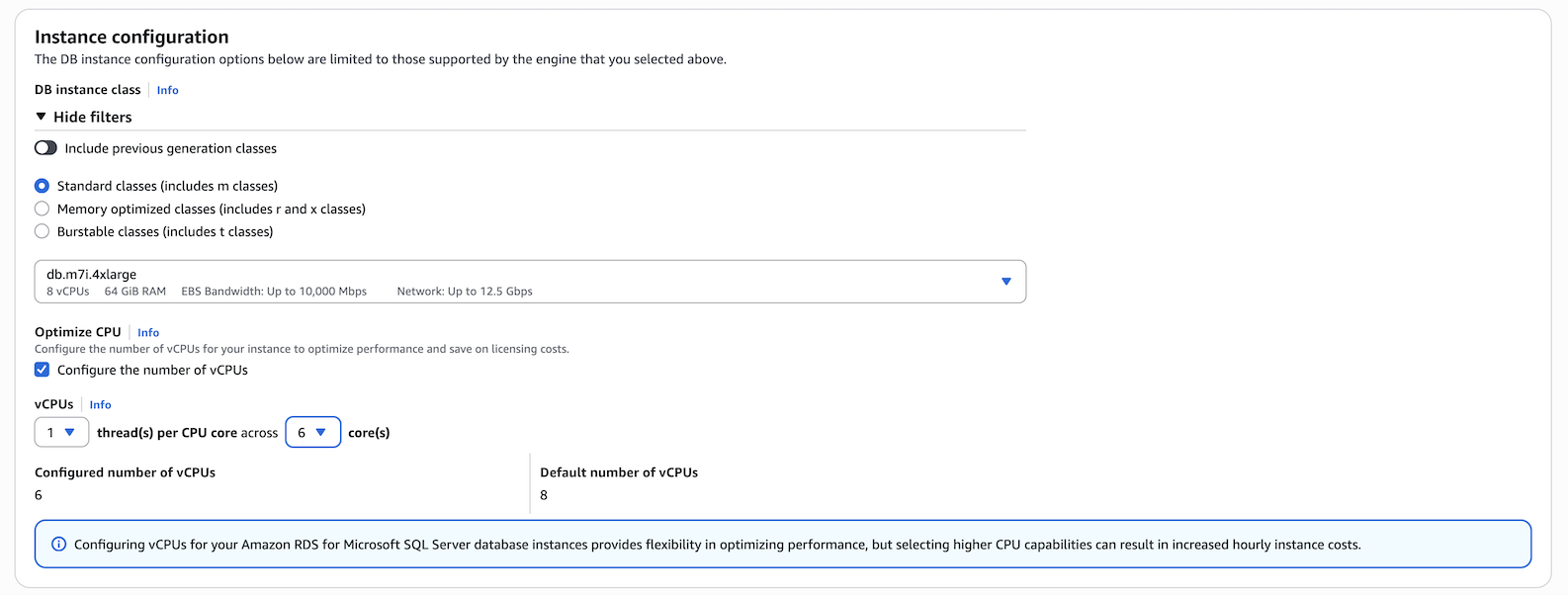
When setting the Instance configuration options:
Choose the Optimize CPU option.
Set your vCPU option by choosing the number of cores.
-
After completing other selections, select Create database.
To set the cores
To configure Optimize CPU using the Amazon CLI, include the
--processor-featuresoption in the command. Specify the number of CPU cores with thecoreCountandthreadsPerCoreas1.Use the following syntax:
aws rds create-db-instance \ --engine sqlserver-ee \ --engine-version 16.00 \ --license-model license-included \ --allocated-storage 300 \ --master-usernamemyuser\ --master-user-passwordxxxxx\ --no-multi-az \ --vpc-security-group-ids myvpcsecuritygroup \ --db-subnet-group-name mydbsubnetgroup \ --db-instance-identifier my-rds-instance \ --db-instance-class db.m7i.4xlarge \ --processor-features "Name=coreCount,Value=6" "Name=threadsPerCore,Value=1"
Example of viewing valid processor values for a DB instance class
Use the describe-orderable-db-instance-options command to show the default vCPUs, cores, and threads per core.
For example, the output for the following command shows the processor options for the db.r7i.2xlarge instance class.
aws rds describe-orderable-db-instance-options --engine sqlserver-ee \
--db-instance-class db.r7i.2xlarge

Sample output:
-------------------------------------------------------------
|            DescribeOrderableDBInstanceOptions             |
+-----------------------------------------------------------+
||               OrderableDBInstanceOptions                ||
|+------------------------------------+--------------------+|
||  DBInstanceClass                   |  db.r7i.2xlarge    ||
||  Engine                            |  sqlserver-ee      ||
||  EngineVersion                     |  13.00.6300.2.v1   ||
||  LicenseModel                      |  license-included  ||
||  MaxIopsPerDbInstance              |                    ||
||  MaxIopsPerGib                     |                    ||
||  MaxStorageSize                    |  64000             ||
||  MinIopsPerDbInstance              |                    ||
||  MinIopsPerGib                     |                    ||
||  MinStorageSize                    |  20                ||
||  MultiAZCapable                    |  True              ||
||  OutpostCapable                    |  False             ||
||  ReadReplicaCapable                |  True              ||
||  StorageType                       |  gp2               ||
||  SupportsClusters                  |  False             ||
||  SupportsDedicatedLogVolume        |  False             ||
||  SupportsEnhancedMonitoring        |  True              ||
||  SupportsGlobalDatabases           |  False             ||
||  SupportsIAMDatabaseAuthentication |  False             ||
||  SupportsIops                      |  False             ||
||  SupportsKerberosAuthentication    |  True              ||
||  SupportsPerformanceInsights       |  True              ||
||  SupportsStorageAutoscaling        |  True              ||
||  SupportsStorageEncryption         |  True              ||
||  SupportsStorageThroughput         |  False             ||
||  Vpc                               |  True              ||
|+------------------------------------+--------------------+|
|||                   AvailabilityZones                   |||
||+-------------------------------------------------------+||
|||                         Name                          |||
||+-------------------------------------------------------+||
|||  us-west-2a                                           |||
|||  us-west-2b                                           |||
|||  us-west-2c                                           |||
||+-------------------------------------------------------+||
|||              AvailableProcessorFeatures               |||
||+-----------------+-----------------+-------------------+||
|||  AllowedValues  |  DefaultValue   |       Name        |||
||+-----------------+-----------------+-------------------+||
|||  1,2,3,4        |  4              |  coreCount        |||
|||  1              |  1              |  threadsPerCore   |||
||+-----------------+-----------------+-------------------+||
In addition, you can run the following commands for DB instance class processor information:
-
describe-db-instances– Shows the processor information for the specified DB instance -
describe-db-snapshots– Shows the processor information for the specified DB snapshot -
describe-valid-db-instance-modifications– Shows the valid modifications to the processor for the specified DB instance
In the output of the preceding command, the values for the processor features are null if Optimize CPU is not configured.
Example of setting the number of CPU cores for a DB instance
The following example modifies mydbinstance by setting the
number of CPU cores to 4 threadsPerCore as 1. Apply the changes immediately by using --apply-immediately.
If you want to apply the changes during the next scheduled maintenance window, omit --apply-immediately option.
aws rds modify-db-instance \ --db-instance-identifiermydbinstance\ --db-instance-class db.r7i.8xlarge \ --processor-features "Name=coreCount,Value=4" "Name=threadsPerCore,Value=1" \ --apply-immediately
Example of returning to default processor settings for a DB instance
The following example modifies mydbinstance by returning it to the default processor values for it.
aws rds modify-db-instance \ --db-instance-identifiermydbinstance\ --db-instance-class db.r7i.8xlarge \ --use-default-processor-features \ --apply-immediately