# Reducing the cost of SSE-KMS with Amazon S3 Bucket Keys
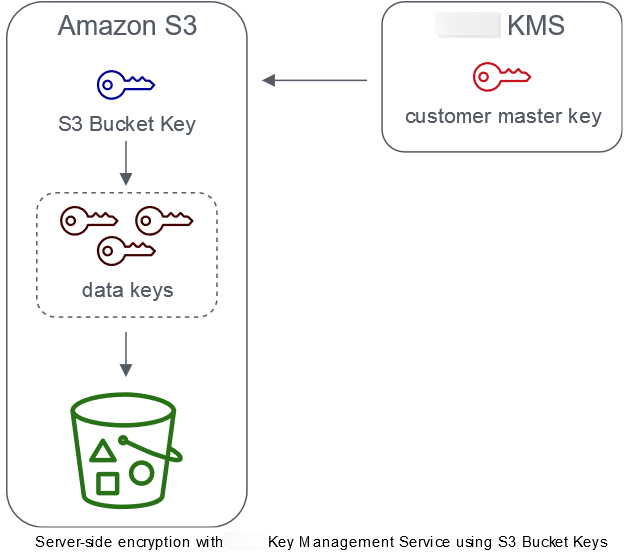
Amazon S3 Bucket Keys reduce the cost of Amazon S3 server-side encryption with Amazon Key Management Service (Amazon KMS) keys (SSE-KMS). Using a bucket-level key for SSE-KMS can reduce Amazon KMS request costs by up to 99 percent by decreasing the request traffic from Amazon S3 to Amazon KMS. With a few clicks in the Amazon Web Services Management Console, and without any changes to your client applications, you can configure your bucket to use an S3 Bucket Key for SSE-KMS encryption on new objects.
**Note**
S3 Bucket Keys aren't supported for dual-layer server-side encryption with Amazon Key Management Service (Amazon KMS) keys (DSSE-KMS).
## S3 Bucket Keys for SSE-KMS
Workloads that access millions or billions of objects encrypted with SSE-KMS can generate large volumes of requests to Amazon KMS. When you use SSE-KMS to protect your data without an S3 Bucket Key, Amazon S3 uses an individual Amazon KMS [data key](https://docs.amazonaws.cn/kms/latest/developerguide/concepts.html#data-keys) for every object. In this case, Amazon S3 makes a call to Amazon KMS every time a request is made against a KMS-encrypted object. For information about how SSE-KMS works, see [Using server-side encryption with Amazon KMS keys (SSE-KMS)](UsingKMSEncryption.md).
When you configure your bucket to use an S3 Bucket Key for SSE-KMS, Amazon generates a short-lived bucket-level key from Amazon KMS, then temporarily keeps it in S3. This bucket-level key will create data keys for new objects during its lifecycle. S3 Bucket Keys are used for a limited time period within Amazon S3, reducing the need for S3 to make requests to Amazon KMS to complete encryption operations. This reduces traffic from S3 to Amazon KMS, allowing you to access Amazon KMS-encrypted objects in Amazon S3 at a fraction of the previous cost.
Unique bucket-level keys are fetched at least once per requester to ensure that the requester's access to the key is captured in an Amazon KMS CloudTrail event. Amazon S3 treats callers as different requesters when they use different roles or accounts, or the same role with different scoping policies. Amazon KMS request savings reflect the number of requesters, request patterns, and relative age of the objects requested. For example, a fewer number of requesters, requesting multiple objects in a limited time window, and encrypted with the same bucket-level key, results in greater savings.
**Note**
Using S3 Bucket Keys allows you to save on Amazon KMS request costs by decreasing your requests to Amazon KMS for `Encrypt`, `GenerateDataKey`, and `Decrypt` operations through the use of a bucket-level key. By design, subsequent requests that take advantage of this bucket-level key do not result in Amazon KMS API requests or validate access against the Amazon KMS key policy.
When you configure an S3 Bucket Key, objects that are already in the bucket do not use the S3 Bucket Key. To configure an S3 Bucket Key for existing objects, you can use a `CopyObject` operation. For more information, see [Configuring an S3 Bucket Key at the object level](configuring-bucket-key-object.md).
Amazon S3 will only share an S3 Bucket Key for objects encrypted by the same Amazon KMS key. S3 Bucket Keys are compatible with KMS keys created by Amazon KMS, [imported key material](https://docs.amazonaws.cn/kms/latest/developerguide/importing-keys.html), and [key material backed by custom key stores](https://docs.amazonaws.cn/kms/latest/developerguide/custom-key-store-overview.html).
## Configuring S3 Bucket Keys
You can configure your bucket to use an S3 Bucket Key for SSE-KMS on new objects through the Amazon S3 console, Amazon SDKs, Amazon CLI, or REST API. With S3 Bucket Keys enabled on your bucket, objects uploaded with a different specified SSE-KMS key will use their own S3 Bucket Keys. Regardless of your S3 Bucket Key setting, you can include the `x-amz-server-side-encryption-bucket-key-enabled` header with a `true` or `false` value in your request, to override the bucket setting.
Before you configure your bucket to use an S3 Bucket Key, review [Changes to note before enabling an S3 Bucket Key](#bucket-key-changes).
### Configuring an S3 Bucket Key using the Amazon S3 console
When you create a new bucket, you can configure your bucket to use an S3 Bucket Key for SSE-KMS on new objects. You can also configure an existing bucket to use an S3 Bucket Key for SSE-KMS on new objects by updating your bucket properties.
For more information, see [Configuring your bucket to use an S3 Bucket Key with SSE-KMS for new objects](configuring-bucket-key.md).
### REST API, Amazon CLI, and Amazon SDK support for S3 Bucket Keys
You can use the REST API, Amazon CLI, or Amazon SDK to configure your bucket to use an S3 Bucket Key for SSE-KMS on new objects. You can also enable an S3 Bucket Key at the object level.
For more information, see the following:
+ [Configuring an S3 Bucket Key at the object level](configuring-bucket-key-object.md)
+ [Configuring your bucket to use an S3 Bucket Key with SSE-KMS for new objects](configuring-bucket-key.md)
The following API operations support S3 Bucket Keys for SSE-KMS:
+ [PutBucketEncryption](https://docs.amazonaws.cn/AmazonS3/latest/API/API_PutBucketEncryption.html)
+ `ServerSideEncryptionRule` accepts the `BucketKeyEnabled` parameter for enabling and disabling an S3 Bucket Key.
+ [GetBucketEncryption](https://docs.amazonaws.cn/AmazonS3/latest/API/API_GetBucketEncryption.html)
+ `ServerSideEncryptionRule` returns the settings for `BucketKeyEnabled`.
+ [PutObject](https://docs.amazonaws.cn/AmazonS3/latest/API/API_PutObject.html), [CopyObject](https://docs.amazonaws.cn/AmazonS3/latest/API/API_CopyObject.html), [CreateMultipartUpload](https://docs.amazonaws.cn/AmazonS3/latest/API/API_CreateMultipartUpload.html), and [POST Object](https://docs.amazonaws.cn/AmazonS3/latest/API/RESTObjectPOST.html)
+ The `x-amz-server-side-encryption-bucket-key-enabled` request header enables or disables an S3 Bucket Key at the object level.
+ [HeadObject](https://docs.amazonaws.cn/AmazonS3/latest/API/API_HeadObject.html), [GetObject](https://docs.amazonaws.cn/AmazonS3/latest/API/API_GetObject.html), [UploadPartCopy](https://docs.amazonaws.cn/AmazonS3/latest/API/API_UploadPartCopy.html), [UploadPart](https://docs.amazonaws.cn/AmazonS3/latest/API/API_UploadPart.html), and [CompleteMultipartUpload](https://docs.amazonaws.cn/AmazonS3/latest/API/API_CompleteMultipartUpload.html)
+ The `x-amz-server-side-encryption-bucket-key-enabled` response header indicates if an S3 Bucket Key is enabled or disabled for an object.
### Working with Amazon CloudFormation
In Amazon CloudFormation, the `AWS::S3::Bucket` resource includes an encryption property called `BucketKeyEnabled` that you can use to enable or disable an S3 Bucket Key.
For more information, see [Using Amazon CloudFormation](configuring-bucket-key.md#enable-bucket-key-cloudformation).
## Changes to note before enabling an S3 Bucket Key
Before you enable an S3 Bucket Key, note the following related changes:
### IAM or Amazon KMS key policies
If your existing Amazon Identity and Access Management (IAM) policies or Amazon KMS key policies use your object Amazon Resource Name (ARN) as the encryption context to refine or limit access to your KMS key, these policies won't work with an S3 Bucket Key. S3 Bucket Keys use the bucket ARN as encryption context. Before you enable an S3 Bucket Key, update your IAM policies or Amazon KMS key policies to use your bucket ARN as the encryption context.
For more information about the encryption context and S3 Bucket Keys, see [Encryption context](UsingKMSEncryption.md#encryption-context).
### CloudTrail events for Amazon KMS
After you enable an S3 Bucket Key, your Amazon KMS CloudTrail events log your bucket ARN instead of your object ARN. Additionally, you see fewer KMS CloudTrail events for SSE-KMS objects in your logs. Because key material is time-limited in Amazon S3, fewer requests are made to Amazon KMS.
## Using an S3 Bucket Key with replication
You can use S3 Bucket Keys with Same-Region Replication (SRR) and Cross-Region Replication (CRR).
When Amazon S3 replicates an encrypted object, it generally preserves the encryption settings of the replica object in the destination bucket. However, if the source object is not encrypted and your destination bucket uses default encryption or an S3 Bucket Key, Amazon S3 encrypts the object with the destination bucket’s configuration.
The following examples illustrate how an S3 Bucket Key works with replication. For more information, see [Replicating encrypted objects (SSE-S3, SSE-KMS, DSSE-KMS, SSE-C)](replication-config-for-kms-objects.md).
**Example 1 – Source object uses S3 Bucket Keys; destination bucket uses default encryption**
If your source object uses an S3 Bucket Key but your destination bucket uses default encryption with SSE-KMS, the replica object maintains its S3 Bucket Key encryption settings in the destination bucket. The destination bucket still uses default encryption with SSE-KMS.
**Example 2 – Source object is not encrypted; destination bucket uses an S3 Bucket Key with SSE-KMS**
If your source object is not encrypted and the destination bucket uses an S3 Bucket Key with SSE-KMS, the replica object is encrypted by using an S3 Bucket Key with SSE-KMS in the destination bucket. This results in the `ETag` of the source object being different from the `ETag` of the replica object. You must update applications that use the `ETag` to accommodate for this difference.
## Working with S3 Bucket Keys
For more information about enabling and working with S3 Bucket Keys, see the following sections:
+ [Configuring your bucket to use an S3 Bucket Key with SSE-KMS for new objects](configuring-bucket-key.md)
+ [Configuring an S3 Bucket Key at the object level](configuring-bucket-key-object.md)
+ [Viewing the settings for an S3 Bucket Key](viewing-bucket-key-settings.md)