Amazon S3 Tables integration with Amazon analytics services overview
To make tables in your account accessible by Amazon analytics services, you integrate your Amazon S3 table buckets with Amazon Glue Data Catalog. This integration allows Amazon analytics services to automatically discover and access your table data. You can use this integration to work with your tables in these services:
Note
This integration uses Amazon Glue
and Amazon Lake Formation services and might incur Amazon Glue request and storage costs. For more information,
see Amazon Glue Pricing.
Additional pricing applies for running queries on your S3 tables. For more information, see pricing information for the query engine that you're using.
How the integration works
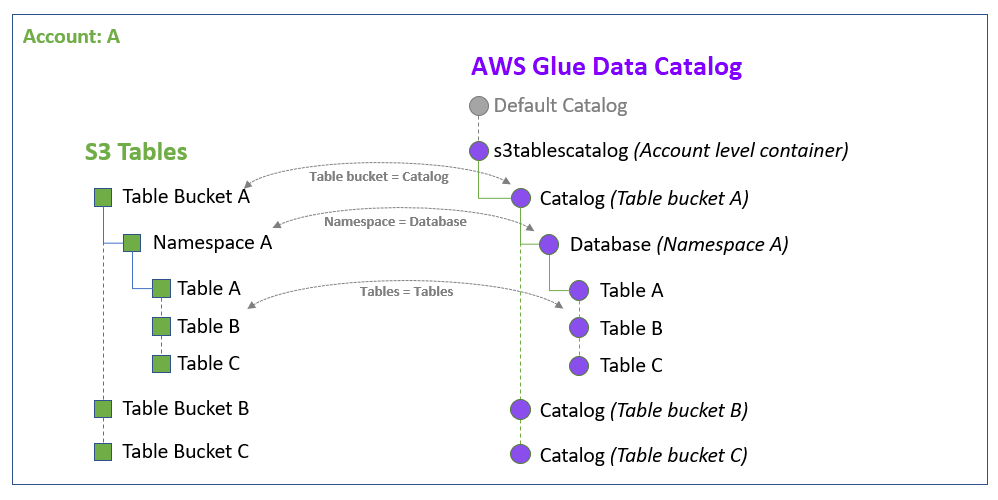
When you integrate S3 Tables with the Amazon analytics services, Amazon S3 adds the catalog named s3tablescatalog to the Amazon Glue Data Catalog in the current Region.
Adding the s3tablescatalog allows all your table buckets, namespaces, and
tables to be populated in the Data Catalog.
Note
These actions are automated through the Amazon S3 console. If you perform this integration programmatically, you must manually take these actions.
You integrate your table buckets once per Amazon Region. After the integration is completed, all current and future table buckets, namespaces, and tables are added to the Amazon Glue Data Catalog in that Region.
The following illustration shows how the s3tablescatalog catalog automatically
populates table buckets, namespaces, and tables in the current Region as corresponding objects in the
Data Catalog. Table buckets are populated as subcatalogs. Namespaces within a table bucket are populated as
databases within their respective subcatalogs. Tables are populated as tables in their respective
databases.
After integrating with Data Catalog, you can create Apache Iceberg tables in table buckets and access them through Amazon analytics engines such as Amazon Athena, Amazon EMR, as well as third-party analytics engines.
How permissions work
We recommend integrating your table buckets with Amazon analytics services so that you can work with your table data across services that use the Amazon Glue Data Catalog as a metadata store. Once the integration is enabled, you can use Amazon Identity and Access Management (IAM) permissions to grant access to S3 Tables resources and their associated Data Catalog objects.
Make sure that you follow the steps in Integrating S3 Tables with Amazon analytics services so that you have the appropriate permissions to access the Amazon Glue Data Catalog and your table resources, and to work with Amazon analytics services.
Regions supported
S3 Tables integration with Amazon analytics services uses Amazon Glue Data Catalog with IAM-based access controls in the following regions. In all other regions, the integration also requires Amazon Lake Formation.
US East (N. Virginia)
US East (Ohio)
US West (N. California)
US West (Oregon)
Africa (Cape Town)
Asia Pacific (Hong Kong)
Asia Pacific (Taipei)
Asia Pacific (Tokyo)
Asia Pacific (Seoul)
Asia Pacific (Osaka)
Asia Pacific (Mumbai)
Asia Pacific (Hyderabad)
Asia Pacific (Singapore)
Asia Pacific (Sydney)
Asia Pacific (Jakarta)
Asia Pacific (Melbourne)
Asia Pacific (Malaysia)
Asia Pacific (New Zealand)
Asia Pacific (Thailand)
Canada (Central)
Canada West (Calgary)
Europe (Frankfurt)
Europe (Zurich)
Europe (Stockholm)
Europe (Milan)
Europe (Spain)
Europe (Ireland)
Europe (London)
Europe (Paris)
Israel (Tel Aviv)
Mexico (Central)
South America (São Paulo)