# How an IAM user changes their own password
If you have been granted permission to change your own IAM user password, you can use a special page in the Amazon Web Services Management Console to do this. You can also use the Amazon CLI or Amazon API.
**Topics**
+ [Permissions required](#change-own-passwords-permissions-required)
+ [How IAM users change their own password (console)](#ManagingUserPwdSelf-Console)
+ [How IAM users change their own password (Amazon CLI or Amazon API)](#ManagingUserPwdSelf-CLIAPI)
## Permissions required
To change the password for your own IAM user, you must have the permissions from the following policy: [Amazon: Allows IAM users to change their own console password on the Security credentials page](reference_policies_examples_aws_my-sec-creds-self-manage-password-only.md).
## How IAM users change their own password (console)
The following procedure describes how IAM users can use the Amazon Web Services Management Console to change their own password.
**To change your own IAM user password (console)**
1. Use your Amazon account ID or account alias, your IAM user name, and your password to sign in to the [IAM console](https://console.amazonaws.cn/iam).
**Note**
For your convenience, the Amazon sign-in page uses a browser cookie to remember your IAM user name and account information. If you previously signed in as a different user, choose **Sign in to a different account** near the bottom of the page to return to the main sign-in page. From there, you can type your Amazon account ID or account alias to be redirected to the IAM user sign-in page for your account.
To get your Amazon Web Services account ID, contact your administrator.
1. In the navigation bar on the upper right, choose your user name, and then choose **Security credentials**.
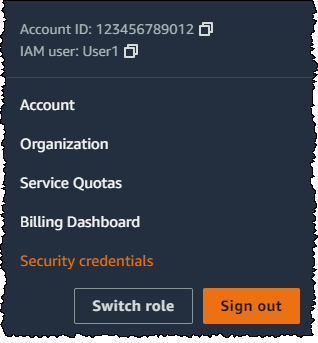
1. On the **Amazon IAM credentials** tab, choose **Update password**.
1. For **Current password**, enter your current password. Enter a new password for **New password** and **Confirm new password**. Then choose **Update password**.
**Note**
The new password must meet the requirements of the account password policy. For more information, see [Set an account password policy for IAM users](id_credentials_passwords_account-policy.md).
## How IAM users change their own password (Amazon CLI or Amazon API)
The following procedure describes how IAM users can use the Amazon CLI or Amazon API to change their own password.
**To change your own IAM password, use the following:**
+ Amazon CLI: [https://docs.amazonaws.cn/cli/latest/reference/iam/change-password.html](https://docs.amazonaws.cn/cli/latest/reference/iam/change-password.html)
+ Amazon API: [https://docs.amazonaws.cn/IAM/latest/APIReference/API_ChangePassword.html](https://docs.amazonaws.cn/IAM/latest/APIReference/API_ChangePassword.html)