# Configure TIP for an OIDC provider
Use this page to configure TIP for a new or existing OpenID Connect (OIDC) provider. First, complete the prerequisites and planning steps in [Before you configure TIP](id_roles_providers_tip_federation_configure.md#id_roles_providers_tip_federation_configure_before).
For OIDC federation, TIP configuration is stored on an IAM OIDC provider resource. To use Google, Facebook, Amazon Cognito, or another OIDC identity provider with TIP, register it as an IAM OIDC provider and configure TIP on that provider. Built-in OIDC federation paths that do not create an IAM OIDC provider resource do not support TIP configuration.
## Configure TIP when creating an OIDC provider
### Amazon Management Console
**To configure TIP when creating an OIDC provider (console)**
1. In the IAM console, choose **Identity providers**, and then choose **Add provider**.
1. For **Provider type**, choose **OpenID Connect**. Enter the **Provider URL** and **Audience** as described in [Create an OpenID Connect identity provider in IAM](id_roles_providers_create_oidc.md). Do not choose **Add provider** yet.
1. Under **Trusted identity propagation - optional**, keep **Configure trusted identity propagation** selected.

1. Under **Start from a template**, choose how to begin:
+ Choose **Okta**, **Microsoft Entra ID**, **Ping**, or **Google Workspace** to start with suggested mappings for claims commonly provided by that identity provider.
+ Choose **Custom** to configure the mappings yourself.
You can change any suggested mapping before creating the provider. A template configures only TIP mappings. It does not change the provider or role trust settings.

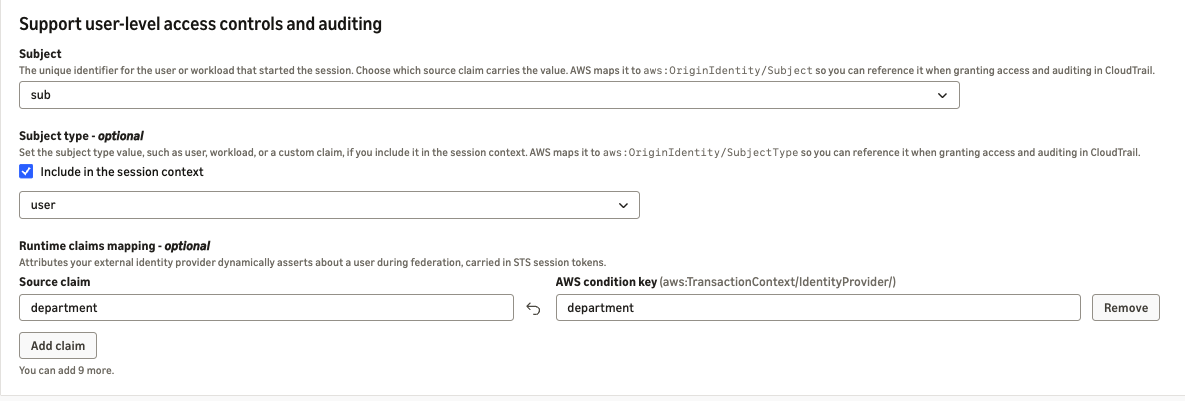
1. For **Subject**, choose one source claim that identifies the end user:
+ Choose a source claim offered by the selected template.
+ For **Custom**, enter the exact claim name from the OIDC token.
The claim must contain one value and must be present in the token. If the claim is absent, the federation request fails. TIP attaches its value to `aws:OriginIdentity/Subject`.
The IAM console requires a Subject source. If you submit the form with the Subject empty, the console displays **Subject is required.** and does not save the configuration.
Choose a stable and unique Subject. If you configure group-based access, the Subject value must match the end user's **Username** in IAM Identity Center.
1. Under **Subject type - optional**, keep **Include in the session context** selected to attach a Subject type, or clear it to omit the Subject type. If selected, choose how to identify the end user as a human user or workload. TIP attaches the selected value to `aws:OriginIdentity/SubjectType`:
+ Choose **user** or **workload** to apply a fixed value to every federated session.
+ Choose **Custom claim from your token** to derive the value from a source claim. The source claim must contain `user` or `workload`.
If you choose the custom option but leave the claim field empty, the console displays **Subject type is required.** and does not save the configuration.
1. To propagate additional context about the session, configure optional runtime-claim mappings. Under **Runtime claims mapping - optional**, choose **Add claim** for each source claim that you want TIP to attach. You can add up to 10 mappings:
+ For **Source claim**, choose a listed claim or enter a custom claim name.
+ For **Amazon condition key (aws:TransactionContext/IdentityProvider/)**, enter the target-key suffix, or leave it empty to use the source claim name as the suffix.
+ To delete an unsaved mapping, choose **Remove**.
+ If a row has no source claim when you submit the form, the console displays **Source claim is required.** and does not save the configuration.
Each mapped source claim must contain one value. IAM attaches a mapped runtime claim only when the token contains it.
Select identity context appropriate for your authorization and audit requirements. Before saving the mappings, review [Logging TIP activity with Amazon CloudTrail](id_roles_providers_tip_cloudtrail.md) to understand how selected TIP context appears in CloudTrail events, which customer account receives each event, and how governance controls prevent the context from being logged to unapproved destinations.
Before saving, confirm that each configured source value, source key, and target-key suffix meets the [source-value requirements](id_roles_providers_tip_federation_context_keys.md#id_roles_providers_tip_federation_context_keys_meet_source_value_requirements) and [key requirements](id_roles_providers_tip_federation_context_keys.md#id_roles_providers_tip_federation_context_keys_map_identity_provider_runtime_claims).
1. Under **Support group-based access for users**, keep **Allow granting permissions to groups** selected if your use case requires access based on the end user's group membership. The console hides this section when **Subject type** is fixed to `workload`.
Complete the applicable instance-selection or instance-creation path in [Configure group-based access for TIP](id_roles_providers_tip_federation_configure_group_access.md#id_roles_providers_tip_federation_configure_group_access-choose-the-iam-identity-center-setup-path).
1. Choose **Add provider**. IAM creates the OIDC provider and saves the TIP mappings configured on the form.
1. Complete the OIDC federation setup by creating a role that trusts the provider. TIP does not change or replace the role's trust-policy requirements. For instructions, see [Create a role for OpenID Connect federation](id_roles_create_for-idp_oidc.md). For a recognized shared provider, see [Identity-provider controls for shared OIDC providers](id_roles_providers_oidc_secure-by-default.md).
1. [Verify the saved TIP configuration](#id_roles_providers_tip_federation_configure_oidc-verify-the-tip-configuration).
### Create using the Amazon CLI or Amazon SDK
To create an OIDC provider with TIP programmatically, call the public [`CreateOpenIDConnectProvider`](https://docs.amazonaws.cn/IAM/latest/APIReference/API_CreateOpenIDConnectProvider.html) API. Use [`aws iam create-open-id-connect-provider`](https://docs.amazonaws.cn/cli/latest/reference/iam/create-open-id-connect-provider.html) with the Amazon CLI or [`create_open_id_connect_provider`](https://boto3.amazonaws.com/v1/documentation/api/latest/reference/services/iam/client/create_open_id_connect_provider.html) with the Amazon SDK for Python.
The request includes the existing `Url` and `ClientIDList` parameters for the OIDC provider. To configure TIP, include the `ContextProvider` parameter. If you need group-based access, also provide the ARN of the IAM Identity Center instance through the optional `IdentityCenterInstanceArn` parameter.
Amazon CLI and SDK requests do not apply the console's templates or defaults, so you must define the TIP mappings explicitly. `ContextProvider` is the TIP mapping configuration for the IAM identity provider. When the `AssumeRoleWithWebIdentity` API operation succeeds, Amazon STS uses these mappings to attach selected claims from the verified OIDC token to the resulting role session.
`ContextProvider` contains the following settings:
+ **Subject:** `SubjectSourceKey` identifies the token claim whose value becomes `aws:OriginIdentity/Subject`. This setting is required.
+ **Subject type:** `SubjectTypeValue` supplies a fixed value, or `SubjectTypeSourceKey` identifies a token claim that supplies the value. This setting is optional. Use one member, not both. The value must be `user` or `workload`.
+ **Runtime claims:** `KeyDefinitionList` optionally maps additional claims. In each mapping, `SourceKey` identifies the token claim and `TargetKey` is appended to `aws:TransactionContext/IdentityProvider/` to form the condition key.
Every configured source key and target-key suffix must meet the [key requirements](id_roles_providers_tip_federation_context_keys.md#id_roles_providers_tip_federation_context_keys_map_identity_provider_runtime_claims).
Each configured source must contain one valid value. For the supported value types, length, characters, and failure behavior, see [Source-value requirements](id_roles_providers_tip_federation_context_keys.md#id_roles_providers_tip_federation_context_keys_meet_source_value_requirements).
To map a member of an object claim nested one level, use `/` as the source key. Arrays and deeper nesting are not supported.
Follow these steps to create the OIDC provider and save its TIP configuration using the Amazon CLI or Amazon SDK:
**To configure TIP when creating an OIDC provider (Amazon CLI or Amazon SDK for Python)**
1. **Define the TIP mappings.** The following example maps `sub` to the Subject, sets the Subject type to `user`, and maps the example `department` claim to the target-key suffix `departmentName`.
```json
{
"SubjectSourceKey": "sub",
"SubjectTypeValue": "user",
"KeyDefinitionList": [
{
"SourceKey": "department",
"TargetKey": "departmentName"
}
]
}
```
Replace `department` with a claim that your OIDC provider includes in its tokens.
1. **Prepare group-based access, if needed.** Obtain the applicable IAM Identity Center instance ARN by following [Choose the IAM Identity Center setup path](id_roles_providers_tip_federation_configure_group_access.md#id_roles_providers_tip_federation_configure_group_access-choose-the-iam-identity-center-setup-path).
Pass `IdentityCenterInstanceArn` at the top level of the same `CreateOpenIDConnectProvider` request. This parameter associates the OIDC provider with the IAM Identity Center instance used for group resolution.
1. **Create the provider.** Use either the Amazon CLI or the Amazon SDK for Python.
**Amazon CLI**
Save the JSON from step 1 as `context-provider.json`. This example includes group-based access. If you do not need it, omit `IDC_INSTANCE_ARN` and `--identity-center-instance-arn`. The command stores the returned provider ARN in `OIDC_PROVIDER_ARN` because later update and verification steps use it.
```bash
OIDC_PROVIDER_URL="https://idp.example.com"
OIDC_AUDIENCE="example-application-client-id"
IDC_INSTANCE_ARN="arn:aws:sso:::instance/ssoins-0123456789abcdef"
OIDC_PROVIDER_ARN=$(aws iam create-open-id-connect-provider \
--url "$OIDC_PROVIDER_URL" \
--client-id-list "$OIDC_AUDIENCE" \
--context-provider file://context-provider.json \
--identity-center-instance-arn "$IDC_INSTANCE_ARN" \
--query 'OpenIDConnectProviderArn' \
--output text)
printf '%s\n' "$OIDC_PROVIDER_ARN"
```
A successful request prints an ARN whose provider path matches `OIDC_PROVIDER_URL`:
```
arn:aws:iam::123456789012:oidc-provider/idp.example.com
```
An empty value means that the create request did not return the provider ARN. Inspect the request error before continuing.
**Amazon SDK for Python (Boto3)**
Define the same `ContextProvider` mappings as a Python dictionary. This example includes group-based access. If you do not need it, omit `IdentityCenterInstanceArn`.
```python
import boto3
iam = boto3.client("iam")
context_provider = {
"SubjectSourceKey": "sub",
"SubjectTypeValue": "user",
"KeyDefinitionList": [
{
"SourceKey": "department",
"TargetKey": "departmentName",
}
],
}
response = iam.create_open_id_connect_provider(
Url="https://idp.example.com",
ClientIDList=["example-application-client-id"],
ContextProvider=context_provider,
IdentityCenterInstanceArn=(
"arn:aws:sso:::instance/ssoins-0123456789abcdef"
),
)
oidc_provider_arn = response["OpenIDConnectProviderArn"]
print({"OpenIDConnectProviderArn": oidc_provider_arn})
```
A successful response includes:
```
{'OpenIDConnectProviderArn': 'arn:aws:iam::123456789012:oidc-provider/idp.example.com'}
```
1. **Retain the provider ARN.** The `OpenIDConnectProviderArn` response element contains the ARN of the new provider. The create API operation does not return the saved TIP configuration or TIP status.
1. **Complete the OIDC federation setup.** Create a role that trusts the provider. TIP does not change or replace the role's trust-policy requirements. For instructions, see [Create a role for OpenID Connect federation](id_roles_create_for-idp_oidc.md). For a recognized shared provider, see [Identity-provider controls for shared OIDC providers](id_roles_providers_oidc_secure-by-default.md).
1. **Verify the TIP configuration.** Follow the [verification procedure](#id_roles_providers_tip_federation_configure_oidc-verify-the-tip-configuration).
## Add TIP to an existing OIDC provider
### Amazon Management Console
**To add TIP to an existing OIDC provider (console)**
1. In the IAM console, choose **Identity providers**, and then choose the OIDC provider for which you want to enable TIP.
1. Choose the **Identity propagation** tab. Inspect **Propagation status**. A value of **Not configured** means that you can continue with this procedure. A value of **Configured** means that TIP is already configured for the provider.
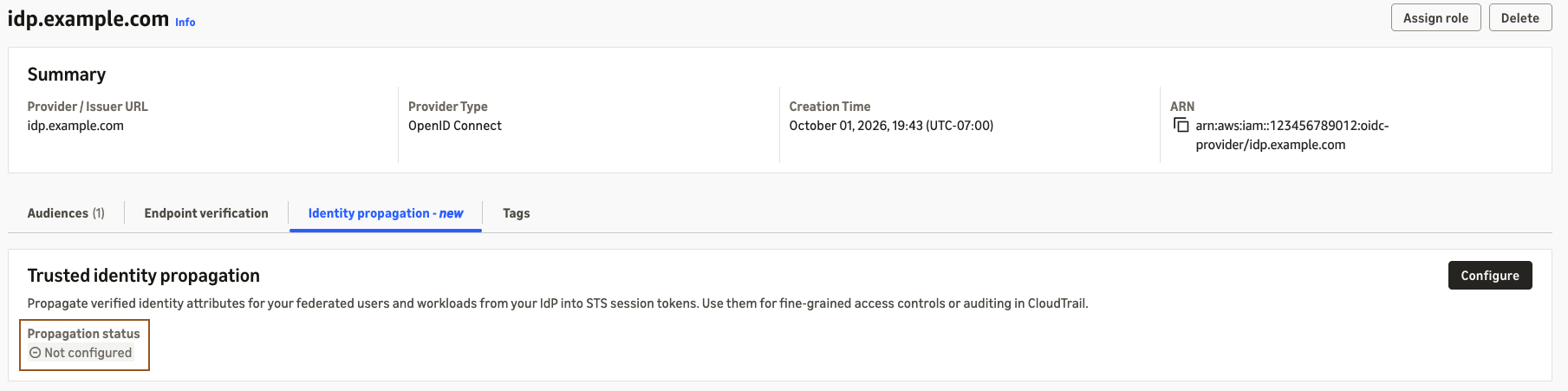
1. Choose **Configure**.
1. Configure the template, Subject, optional Subject type, and runtime claims as described under [Configure TIP when creating an OIDC provider](#id_roles_providers_tip_federation_configure_oidc-configure-tip-when-creating-an-oidc-provider), beginning with **Start from a template**.
1. If you require group-based access, keep **Allow granting permissions to groups** selected under **Support group-based access for users** and complete the applicable path in [Configure group-based access for TIP](id_roles_providers_tip_federation_configure_group_access.md#id_roles_providers_tip_federation_configure_group_access-choose-the-iam-identity-center-setup-path). The console hides this section when **Subject type** is fixed to `workload`.
1. Choose **Configure** to save the configuration.
1. [Verify the saved TIP configuration](#id_roles_providers_tip_federation_configure_oidc-verify-the-tip-configuration).
### Add using the Amazon CLI or Amazon SDK
To add TIP to an existing OIDC provider, call the `UpdateOpenIDConnectProvider` API operation. Every API request includes the required `OpenIDConnectProviderArn` request parameter, which identifies the provider to update.
IAM does not accept `ContextProvider` and `IdentityCenterInstanceArn` in the same `UpdateOpenIDConnectProvider` request. Submit them in separate requests. The following sequence saves the TIP mappings first. Wait for the `ContextProvider` request to succeed, and then submit a second request with `IdentityCenterInstanceArn` to configure group-based access.
Prepare `context-provider.json` as described in the creation procedure.
#### Amazon CLI
Use the `aws iam update-open-id-connect-provider` Amazon CLI command.
**To add TIP to an existing OIDC provider (Amazon CLI)**
1. Set `OIDC_PROVIDER_ARN` to the ARN of the existing provider.
1. Save the TIP mappings:
```bash
aws iam update-open-id-connect-provider \
--open-id-connect-provider-arn "$OIDC_PROVIDER_ARN" \
--context-provider file://context-provider.json
```
1. If you require group-based access, wait for the first command to succeed, and then associate the IAM Identity Center instance:
```bash
aws iam update-open-id-connect-provider \
--open-id-connect-provider-arn "$OIDC_PROVIDER_ARN" \
--identity-center-instance-arn "$IDC_INSTANCE_ARN"
```
1. [Verify the saved TIP configuration](#id_roles_providers_tip_federation_configure_oidc-verify-the-tip-configuration).
#### Amazon SDK for Python (Boto3)
Use the `update_open_id_connect_provider` Amazon SDK for Python method. Define the complete `ContextProvider` configuration as a Python dictionary.
```python
import boto3
iam = boto3.client("iam")
oidc_provider_arn = (
"arn:aws:iam::123456789012:oidc-provider/idp.example.com"
)
context_provider = {
"SubjectSourceKey": "sub",
"SubjectTypeValue": "user",
"KeyDefinitionList": [
{
"SourceKey": "department",
"TargetKey": "departmentName",
}
],
}
iam.update_open_id_connect_provider(
OpenIDConnectProviderArn=oidc_provider_arn,
ContextProvider=context_provider,
)
# Run this second API request only after the first request succeeds.
iam.update_open_id_connect_provider(
OpenIDConnectProviderArn=oidc_provider_arn,
IdentityCenterInstanceArn=(
"arn:aws:sso:::instance/ssoins-0123456789abcdef"
),
)
```
Omit the second API request when group-based access is not required. Then [verify the saved TIP configuration](#id_roles_providers_tip_federation_configure_oidc-verify-the-tip-configuration).
## Change TIP configuration for an OIDC provider
Use this section to change the saved Subject, optional Subject type, runtime-claim mappings, or group-based-access configuration for an OIDC provider.
### Amazon Management Console
**To change TIP configuration for an OIDC provider (console)**
1. In the IAM console, choose **Identity providers**, and then choose the OIDC provider whose TIP configuration you want to change.
1. Choose the **Identity propagation** tab and verify that **Propagation status** is **Configured**.
1. Choose **Edit**. The edit flow displays the saved Subject, optional Subject type, runtime-claim mappings, and group-based-access settings instead of applying a template again.
1. Change the settings that you want to save.
1. To change group-based access or the associated IAM Identity Center instance, follow [Change or remove group-based access](id_roles_providers_tip_federation_configure_group_access.md#id_roles_providers_tip_federation_configure_group_access-change-or-remove-group-based-access). The console hides **Support group-based access for users** when **Subject type** is fixed to `workload`.
1. Choose **Save changes**.
1. [Verify the saved TIP configuration](#id_roles_providers_tip_federation_configure_oidc-verify-the-tip-configuration).
### Change using the `UpdateOpenIDConnectProvider` API
To change TIP programmatically, call the `UpdateOpenIDConnectProvider` API operation. Every API request must include the required `OpenIDConnectProviderArn` request parameter, which identifies the provider to update.
The request parameters fall into two categories. You can submit parameters from the same row together, but you cannot combine parameters from different rows.
| What the API request updates | Request parameters that can be submitted together |
| --- | --- |
| OIDC provider and group-based access settings | Either `IdentityCenterInstanceArn` or `RemoveIdentityCenterInstance` |
| TIP mappings | Either `ContextProvider` or `RemoveContextProvider` |
IAM rejects an API request that combines parameters from different rows. Wait for each API request to succeed before submitting the next request.
#### Example: Change TIP mappings with related OIDC provider settings
The following example demonstrates this requirement by changing the TIP mappings and group-based access through two API requests. First, it saves the TIP mappings through the `ContextProvider` request parameter. After that API request succeeds, it submits the `IdentityCenterInstanceArn` request parameter. If your workflow changes only TIP mappings, submit only the first API request.
Before submitting the TIP mapping API request, prepare the complete `ContextProvider` configuration that you want to save.
##### Amazon CLI
Use the `aws iam update-open-id-connect-provider` Amazon CLI command. Save the complete `ContextProvider` configuration as `context-provider.json`.
```bash
NEW_IDC_INSTANCE_ARN="arn:aws:sso:::instance/ssoins-0123456789abcdef"
# First, change the TIP mappings.
aws iam update-open-id-connect-provider \
--open-id-connect-provider-arn "$OIDC_PROVIDER_ARN" \
--context-provider file://context-provider.json
# After the TIP mapping request succeeds, associate the
# IAM Identity Center instance.
aws iam update-open-id-connect-provider \
--open-id-connect-provider-arn "$OIDC_PROVIDER_ARN" \
--identity-center-instance-arn "$NEW_IDC_INSTANCE_ARN"
```
##### Amazon SDK for Python (Boto3)
Use the `update_open_id_connect_provider` Amazon SDK for Python method. Define the complete `ContextProvider` configuration in the `context_provider` dictionary.
```python
import boto3
iam = boto3.client("iam")
oidc_provider_arn = (
"arn:aws:iam::123456789012:oidc-provider/idp.example.com"
)
new_instance_arn = (
"arn:aws:sso:::instance/ssoins-0123456789abcdef"
)
context_provider = {
"SubjectSourceKey": "sub",
"SubjectTypeValue": "user",
"KeyDefinitionList": [
{
"SourceKey": "department",
"TargetKey": "departmentName",
}
],
}
# First, change the TIP mappings.
iam.update_open_id_connect_provider(
OpenIDConnectProviderArn=oidc_provider_arn,
ContextProvider=context_provider,
)
# After the TIP mapping request succeeds, associate the
# IAM Identity Center instance.
iam.update_open_id_connect_provider(
OpenIDConnectProviderArn=oidc_provider_arn,
IdentityCenterInstanceArn=new_instance_arn,
)
```
To change thumbprints, use the existing [`UpdateOpenIDConnectProviderThumbprint` API operation](https://docs.amazonaws.cn/IAM/latest/APIReference/API_UpdateOpenIDConnectProviderThumbprint.html) in a separate request.
#### If you remove group-based access while changing TIP mappings
If the workflow removes group-based access instead of associating an IAM Identity Center instance, reverse the order. First follow [Remove group-based access](id_roles_providers_tip_federation_configure_group_access.md#id_roles_providers_tip_federation_configure_group_access-remove-group-based-access) to submit the `RemoveIdentityCenterInstance` Boolean request parameter set to `true`. After that API request succeeds, submit the revised `ContextProvider` request parameter.
This order removes group-based access before changing the TIP mappings.
After all applicable API requests succeed, [verify the saved TIP configuration](#id_roles_providers_tip_federation_configure_oidc-verify-the-tip-configuration).
Each submitted `ContextProvider` replaces the complete saved `ContextProvider` structure. Include the Subject, optional Subject type, and every runtime-claim mapping that you want to retain. IAM removes optional members and mappings that are omitted from the submitted structure.
## Verify the TIP configuration
Creating or updating an OIDC provider does not return the saved TIP mappings or enabled status. Verify that TIP is enabled and that IAM saved the intended `ContextProvider` configuration. You can verify these results in the IAM console or programmatically by using the [`GetOpenIDConnectProvider`](https://docs.amazonaws.cn/IAM/latest/APIReference/API_GetOpenIDConnectProvider.html) and [`ListOpenIDConnectProviders`](https://docs.amazonaws.cn/IAM/latest/APIReference/API_ListOpenIDConnectProviders.html) API operations.
### Amazon Management Console
**To verify the TIP configuration (console)**
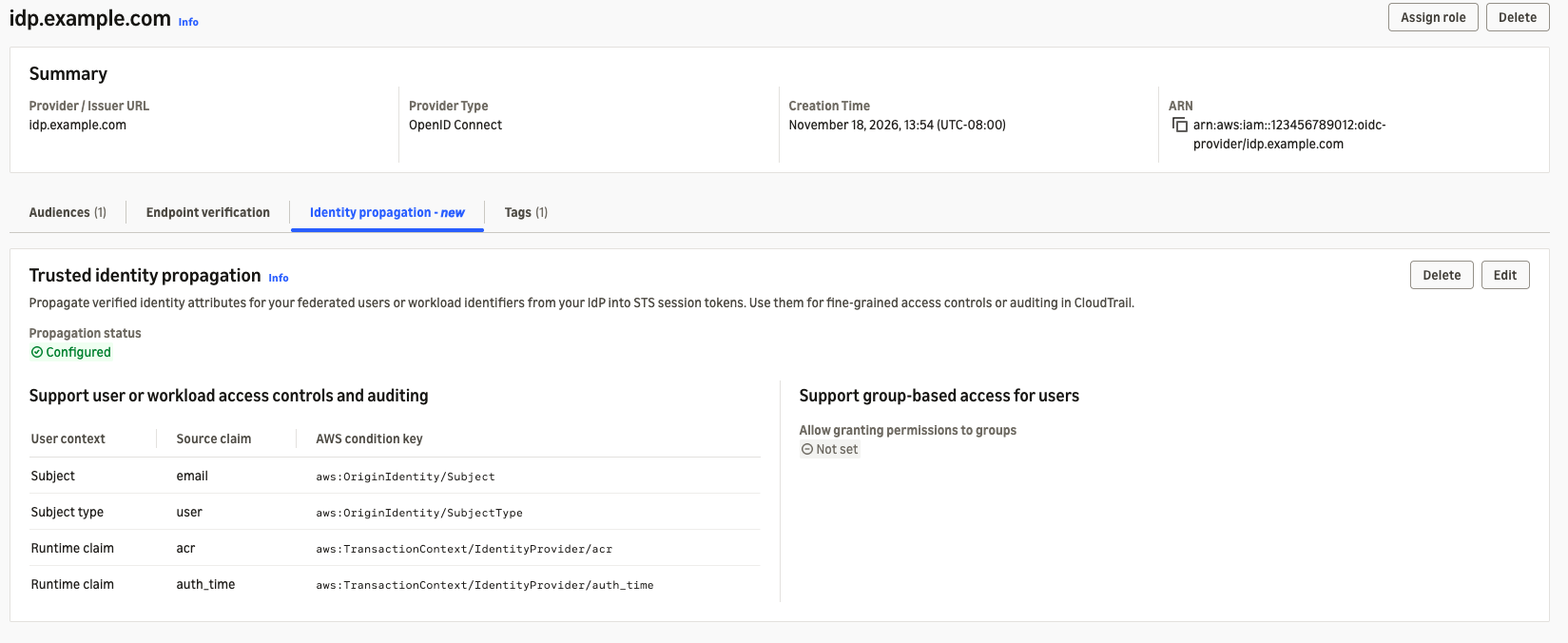
1. In the IAM console, choose **Identity providers**, choose the OIDC provider, and then choose **Identity propagation**.
1. Inspect **Propagation status**. The expected value is **Configured**. A value of **Not configured** means that TIP is not configured.
1. In **Support user or workload access controls and auditing**, compare the displayed Subject source, optional Subject type, and every runtime-claim source and target with the values that you saved.
1. If a TIP value is missing or different, choose **Edit**, correct the configuration, save it, and repeat these checks.
1. If you configured group-based access, confirm that **Connected IAM Identity Center instance** shows the intended instance. Then follow [Verify group-based access](id_roles_providers_tip_federation_configure_group_access.md#id_roles_providers_tip_federation_configure_group_access-verify-group-based-access).
### Amazon CLI
First, use the [`aws iam list-open-id-connect-providers`](https://docs.amazonaws.cn/cli/latest/reference/iam/list-open-id-connect-providers.html) Amazon CLI command to confirm that TIP is enabled:
```bash
aws iam list-open-id-connect-providers \
--query "OpenIDConnectProviderList[?Arn=='${OIDC_PROVIDER_ARN}'].{TIPEnabled:IsTrustedIdentityPropagationEnabled}" \
--output json
```
The query displays the `IsTrustedIdentityPropagationEnabled` response element using the shorter output label `TIPEnabled`. An enabled provider returns:
```json
[
{
"TIPEnabled": true
}
]
```
A value of `false` means that the provider exists but TIP is disabled. An empty array (`[]`) means that no provider matched `OIDC_PROVIDER_ARN`.
Next, use the [`aws iam get-open-id-connect-provider`](https://docs.amazonaws.cn/cli/latest/reference/iam/get-open-id-connect-provider.html) Amazon CLI command to retrieve the saved `ContextProvider` response element:
```bash
aws iam get-open-id-connect-provider \
--open-id-connect-provider-arn "$OIDC_PROVIDER_ARN" \
--query 'ContextProvider' \
--output json
```
For the example created earlier, the expected response is:
```json
{
"SubjectSourceKey": "sub",
"SubjectTypeValue": "user",
"KeyDefinitionList": [
{
"SourceKey": "department",
"TargetKey": "departmentName"
}
]
}
```
Use the response to verify the saved configuration:
+ `SubjectSourceKey` must equal `sub`.
+ `SubjectTypeValue` must equal `user`.
+ `KeyDefinitionList` must contain `department` as the source and `departmentName` as the target-key suffix.
A missing or different member means that the saved TIP configuration does not match the request.
If you configured group-based access, also follow [Verify group-based access](id_roles_providers_tip_federation_configure_group_access.md#id_roles_providers_tip_federation_configure_group_access-verify-group-based-access).
### Amazon SDK for Python (Boto3)
Use the [`get_open_id_connect_provider`](https://boto3.amazonaws.com/v1/documentation/api/latest/reference/services/iam/client/get_open_id_connect_provider.html) and [`list_open_id_connect_providers`](https://boto3.amazonaws.com/v1/documentation/api/latest/reference/services/iam/client/list_open_id_connect_providers.html) Amazon SDK for Python methods:
```python
import boto3
iam = boto3.client("iam")
oidc_provider_arn = (
"arn:aws:iam::123456789012:oidc-provider/idp.example.com"
)
expected_context = {
"SubjectSourceKey": "sub",
"SubjectTypeValue": "user",
"KeyDefinitionList": [
{
"SourceKey": "department",
"TargetKey": "departmentName",
}
],
}
saved = iam.get_open_id_connect_provider(
OpenIDConnectProviderArn=oidc_provider_arn
)
provider = next(
(
item
for item in iam.list_open_id_connect_providers()[
"OpenIDConnectProviderList"
]
if item["Arn"] == oidc_provider_arn
),
None,
)
if provider is None:
raise RuntimeError("The OIDC provider was not returned by the list operation.")
if saved.get("ContextProvider") != expected_context:
raise RuntimeError("The saved TIP mappings do not match the request.")
if provider.get("IsTrustedIdentityPropagationEnabled") is not True:
raise RuntimeError("TIP is not enabled for the OIDC provider.")
print("TIP configuration verified.")
```
For the example created earlier, the expected output is:
```
TIP configuration verified.
```
The script raises an error instead of printing the success message if the provider is missing, TIP is disabled, or the saved Subject, Subject type, or runtime-claim mappings differ from the request.
If you configured group-based access, also follow [Verify group-based access](id_roles_providers_tip_federation_configure_group_access.md#id_roles_providers_tip_federation_configure_group_access-verify-group-based-access).
## Remove TIP from an OIDC provider
Removing TIP does not delete the OIDC provider.
### Amazon Management Console
**To remove TIP from an OIDC provider (console)**
1. In the IAM console, choose **Identity providers**, and then choose the OIDC provider from which you want to remove TIP.
1. Choose the **Identity propagation** tab and verify that **Propagation status** is **Configured**.
1. Choose **Delete**.
1. Review the effects of deleting TIP, and then choose **Delete**.
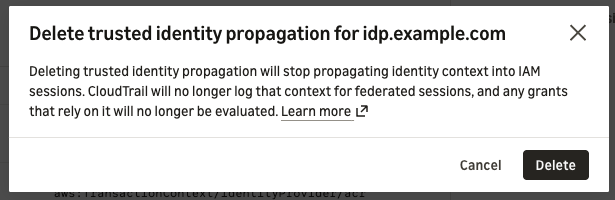
1. Return to the **Identity propagation** tab. The expected **Propagation status** is **Not configured**.
### Remove using the `UpdateOpenIDConnectProvider` API
To remove TIP programmatically, call the `UpdateOpenIDConnectProvider` API operation. Every API request must include the required `OpenIDConnectProviderArn` request parameter.
If group-based access is configured, first submit an API request with the `RemoveIdentityCenterInstance` Boolean request parameter set to `true`. After that API request succeeds, submit a second API request with the `RemoveContextProvider` Boolean request parameter set to `true`. If group-based access is not configured, submit only the `RemoveContextProvider` API request.
#### Amazon CLI
Use the `aws iam update-open-id-connect-provider` Amazon CLI command.
**To remove TIP from an OIDC provider (Amazon CLI)**
1. If group-based access is configured, run:
```bash
aws iam update-open-id-connect-provider \
--open-id-connect-provider-arn "$OIDC_PROVIDER_ARN" \
--remove-identity-center-instance
```
1. After the first command succeeds, remove the TIP mappings:
```bash
aws iam update-open-id-connect-provider \
--open-id-connect-provider-arn "$OIDC_PROVIDER_ARN" \
--remove-context-provider
```
#### Amazon SDK for Python (Boto3)
Use the `update_open_id_connect_provider` Amazon SDK for Python method:
```python
import boto3
iam = boto3.client("iam")
oidc_provider_arn = (
"arn:aws:iam::123456789012:oidc-provider/idp.example.com"
)
# Run this API request only when group-based access is configured.
iam.update_open_id_connect_provider(
OpenIDConnectProviderArn=oidc_provider_arn,
RemoveIdentityCenterInstance=True,
)
# Run this API request after the instance-association request succeeds.
iam.update_open_id_connect_provider(
OpenIDConnectProviderArn=oidc_provider_arn,
RemoveContextProvider=True,
)
```
### Verify that TIP was removed
Run the applicable Amazon CLI commands or Amazon SDK for Python methods in [Verify the TIP configuration](#id_roles_providers_tip_federation_configure_oidc-verify-the-tip-configuration).
A successful removal has these results:
+ The `IsTrustedIdentityPropagationEnabled` response element is `false`.
+ The `ContextProvider` response element is absent or `null`.
A value of `true` for `IsTrustedIdentityPropagationEnabled` or a returned `ContextProvider` means that TIP remains configured.
If you also removed group-based access, follow [Verify the removed association](id_roles_providers_tip_federation_configure_group_access.md#id_roles_providers_tip_federation_configure_group_access-verify-the-removed-association). The `IdentityCenterInstanceArn` and `IdentityStoreArn` response elements must be absent or `null`.
For TIP-specific configuration failures, see [Troubleshoot TIP configuration](id_roles_providers_tip_federation_getting_started.md#id_roles_providers_tip_federation_getting_started-troubleshoot-tip-configuration).