Scenario: A customer support AI agent using AgentCore Memory
In this section you learn how to build a customer support AI agent that uses AgentCore Memory to provide personalized assistance by maintaining conversation history and extracting long-term insights about user preferences. The topic includes code examples for the AgentCore CLI and the Amazon SDK.
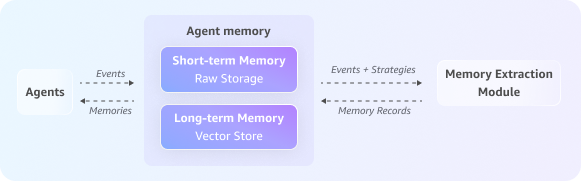
Consider a customer, Sarah, who engages with your shopping website’s support AI agent to inquire about a delayed order. The interaction flow through the AgentCore Memory APIs would look like this:
Topics
Step 1: Create an AgentCore Memory
First, you create a memory resource with both short-term and long-term memory capabilities, configuring the strategies for what long-term information to extract.
Example
If you created the memory with the AgentCore CLI, run the following code before the next steps. Replace <memory-id> with the memory ID from the agentcore status --json output.
import boto3
import time
from datetime import datetime

data_client = boto3.client('bedrock-agentcore')
memory_id = "<memory-id>"
Step 2: Start the session
When Sarah initiates the conversation, the agent creates a new, and unique, session ID to track this interaction separately.
# Unique identifier for the customer, Sarah
sarah_actor_id = "user-sarah-123"

# Unique identifier for this specific support session
support_session_id = "customer-support-session-1"

print(f"Session started for Actor ID: {sarah_actor_id}, Session ID: {support_session_id}")
Step 3: Capture the conversation history
As Sarah explains her issue, the agent captures each turn of the conversation (both her questions and the agent’s responses). This populates the full conversation in short-term memory and provides the raw data for the long-term memory strategies to process.
print("Capturing conversational events...")

full_conversation_payload = [
    {
        'conversational': {
            'role': 'USER',
            'content': {'text': "Hi, my order #ABC-456 is delayed."}
        }
    },
    {
        'conversational': {
            'role': 'ASSISTANT',
            'content': {'text': "I'm sorry to hear that, Sarah. Let me check the status for you."}
        }
    },
    {
        'conversational': {
            'role': 'USER',
            'content': {'text': "By the way, for future orders, please always use FedEx. I've had issues with other carriers."}
        }
    },
    {
        'conversational': {
            'role': 'ASSISTANT',
            'content': {'text': "Thank you for that information. I have made a note to use FedEx for your future shipments."}
        }
    }
]

data_client.create_event(
    memoryId=memory_id,
    actorId=sarah_actor_id,
    sessionId=support_session_id,
    eventTimestamp=datetime.now(),
    payload=full_conversation_payload
)

print("Conversation history has been captured in short-term memory.")
Step 4: Generate long-term memory
In the background, the asynchronous extraction process runs. This process analyzes the recent raw events using your configured memory strategies to extract long-term memories such as summaries, semantic facts, or user preferences, which are then stored for future use.
Step 5: Retrieve past interactions from short-term memory
To provide context-aware assistance, the agent loads the current conversation history. This helps the agent understand what issues Sarah has raised in the ongoing chat.
print("\nRetrieving current conversation history from short-term memory...")

response = data_client.list_events(
    memoryId=memory_id,
    actorId=sarah_actor_id,
    sessionId=support_session_id,
    maxResults=10
)

# Reverse the list of events to display them in chronological order
event_list = reversed(response.get('events', []))

for event in event_list: print(event)
Step 6: Use long-term memories for personalized assistance
The agent performs a semantic search across extracted long-term memories to find relevant insights about Sarah’s preferences, order history, or past concerns. This lets the agent provide highly personalized assistance without needing to ask Sarah to repeat information she has already shared in previous chats.
# Wait for the asynchronous extraction to finish
print("\nWaiting 60 seconds for long-term memory processing...")
time.sleep(60)

# --- Example 1: Retrieve the user's shipping preference ---
print("\nRetrieving user preferences from long-term memory...")
preference_response = data_client.retrieve_memory_records(
    memoryId=memory_id,
    namespace=f"/users/{sarah_actor_id}/preferences",
    searchCriteria={"searchQuery": "Does the user have a preferred shipping carrier?"}
)
for record in preference_response.get('memoryRecordSummaries', []):
    print(f"- Retrieved Record: {record}")

# --- Example 2: Broad query about the user's issue (across sessions with the help of namespacePath) ---
print("\nPerforming a broad search for user's reported issues...")
issue_response = data_client.retrieve_memory_records(
    memoryId=memory_id,
    namespacePath=f"/summaries/{sarah_actor_id}/",
    searchCriteria={"searchQuery": "What problem did the user report with their order?"}
)
for record in issue_response.get('memoryRecordSummaries', []):
    print(f"- Retrieved Record: {record}")
With this approach, the agent keeps context across sessions, recognizes returning customers, and recalls important details without asking the customer to repeat them.