Tutorial: WebRTC with TURN relaying using Amazon Kinesis Video Streams
In this tutorial, you build a WebRTC voice connection between a browser client and an agent running on AgentCore Runtime, using Amazon Kinesis Video Streams (KVS) managed TURN for media relaying. The agent processes audio in real-time using an Amazon Bedrock foundation model for speech-to-speech conversation.
When complete, you will have a working WebRTC connection where audio streams bidirectionally between the browser and your agent.
This tutorial requires a VPC with internet egress for connectivity to KVS TURN endpoints. For more information, see Internet access considerations . You also need the AgentCore CLI. The container image is built in Amazon CodeBuild during deployment. You need Docker, Podman, or Finch only to run the agent locally with agentcore dev. For CLI installation and permissions, see Get started with Amazon Bedrock AgentCore.
For the application code and IAM policy files, download the WebRTC Voice Agent with KVS TURNdeploy.py script. To deploy with the AgentCore CLI, use the workflow in the following section instead.
Deploy the sample with the AgentCore CLI
In the sample directory, set the deployment values. Replace the example values with your own:
export AWS_REGION=us-west-2
export ACCOUNT_ID=111122223333
export KVS_CHANNEL_NAME=voice-agent-minimal
export VPC_ID=vpc-0123456789abcdef0
export SUBNET_ID=subnet-0123456789abcdef0
export SECURITY_GROUP_ID=sg-0123456789abcdef0
The kvs-iam-policy.json and bedrock-iam-policy.json files contain the AWS_REGION, ACCOUNT_ID, and KVS_CHANNEL_NAME placeholders. The deployment attaches these files without substituting any values, so replace the placeholders first:
sed -i.bak \
  -e "s/AWS_REGION/$AWS_REGION/g" \
  -e "s/ACCOUNT_ID/$ACCOUNT_ID/g" \
  -e "s/KVS_CHANNEL_NAME/$KVS_CHANNEL_NAME/g" \
  kvs-iam-policy.json bedrock-iam-policy.json
Create an empty project and add a container-based Runtime:
agentcore create --name WebRTCVoiceAgent --template empty

cd WebRTCVoiceAgent

agentcore add runtime \
  --name VoiceAgent \
  --language python \
  --protocol HTTP \
  --network-mode VPC \
  --network-config \
  "{\"vpcId\":\"$VPC_ID\",\"subnets\":[\"$SUBNET_ID\"],\"securityGroups\":[\"$SECURITY_GROUP_ID\"]}" \
  --environment-variables \
  "{\"KVS_CHANNEL_NAME\":\"$KVS_CHANNEL_NAME\",\"AWS_REGION\":\"$AWS_REGION\"}" \
  --additional-policies kvs-iam-policy.json bedrock-iam-policy.json
Copy the sample application into the Runtime directory. When the CLI finds its Dockerfile, agentcore dev, agentcore build, or agentcore deploy changes the Runtime from a direct code build to a container build. The CLI reads the --additional-policies files from the Runtime code directory, so copy the policy files to app/VoiceAgent/:
cp ../agent/Dockerfile ../agent/requirements.txt ../agent/*.py app/VoiceAgent/

cp ../kvs-iam-policy.json ../bedrock-iam-policy.json app/VoiceAgent/
Deploy the project, then get the Runtime ARN:
agentcore deploy

agentcore status --json
The Runtime resource’s arn field contains its ARN. Enter that ARN in the sample’s browser client to connect to the deployed agent.
Architecture
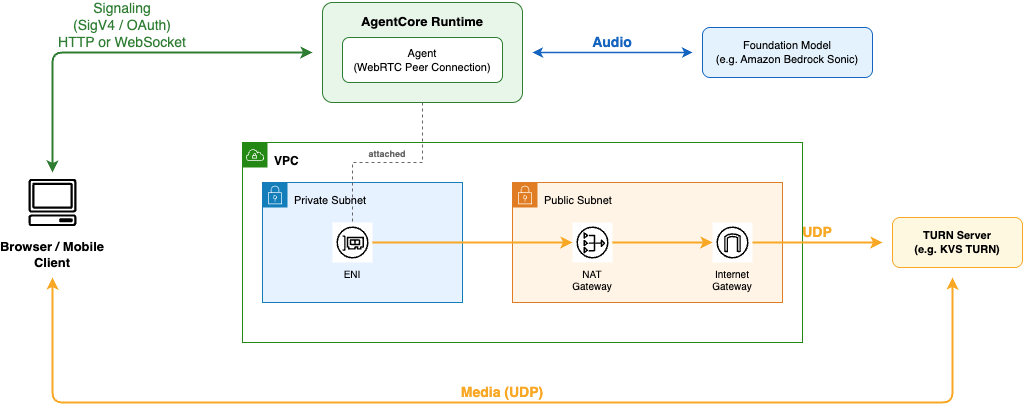
- Browser client
-
A web page that captures microphone audio using the browser WebRTC API and plays the agent’s audio response.
- AgentCore Runtime
-
Hosts the agent and attaches to the user’s VPC via an elastic network interface (ENI) in a private subnet.
- Agent
-
A Python application deployed to AgentCore Runtime that handles WebRTC signaling and TURN credential management through the
/invocationsendpoint, and streams audio between the client and a foundation model. - User VPC with internet egress
-
Provides network connectivity from the agent to the KVS TURN relay server. Traffic routes from the ENI in the private subnet through a NAT gateway and internet gateway to reach the TURN endpoints.
- KVS TURN relay server
-
Relays media traffic between the browser client and the agent. The agent obtains temporary TURN credentials from KVS using the GetIceServerConfig API.
How it works
-
The client invokes the agent to fetch KVS TURN credentials and ICE server configuration.
-
The client creates a WebRTC offer and sends it to the agent. The agent creates a peer connection configured with KVS TURN servers and returns an answer.
-
The client and agent exchange ICE candidates to establish connectivity through the TURN server.
-
Once connected, the client streams microphone audio to the agent over WebRTC. The agent forwards the audio to an Amazon Bedrock foundation model and streams the model’s spoken response back to the client.