# Configure repository notifications
You can keep repository users informed of repository events by configuring notifications. When you configure notifications, subscribed users receive emails about the events that you specify, such as when someone comments on a commit.
Notification event types are grouped into the following categories:
+ **Pull request update events**: If you select this option, users receive emails when:
+ A pull request is created or closed.
+ A pull request is updated with code changes.
+ The title or description of the pull request changes.
+ **Pull request comment events**: If you select this option, users receive emails when someone comments or replies to a comment in a pull request.
+ **Commit comment events**: If you select this option, users receive emails when someone comments on a commit outside of a pull request. This includes comments on:
+ Lines of code in a commit.
+ Files in a commit.
+ The commit itself.
For more information, see [Comment on a commit](how-to-commit-comment.md).
To use the Amazon CodeCommit console to configure notifications for a repository in CodeCommit, you must have the following managed policies or the equivalent permissions attached to your IAM user:
+ **CloudWatchEventsFullAccess**
+ **AmazonSNSFullAccess**
**Note**
Equivalent permissions are included in the **AWSCodeCommitFullAccess** policy, which is required to configure repository notifications. If you have this policy applied, you do not need the other two policies. If you have a customized policy applied, you might need to modify it to include the permissions required for CloudWatch Events and Amazon SNS.
**To configure notifications for a repository**
1. Open the CodeCommit console at [https://console.www.amazonaws.cn/codesuite/codecommit/home](https://console.www.amazonaws.cn/codesuite/codecommit/home).
1. In **Repositories**, choose the name of the repository where you want to configure notifications.
1. In the navigation pane, choose **Settings**. Choose **Notifications**.
1. Choose **Set up**.
1. Select the event types you want included in the CloudWatch Events rule for the repository.
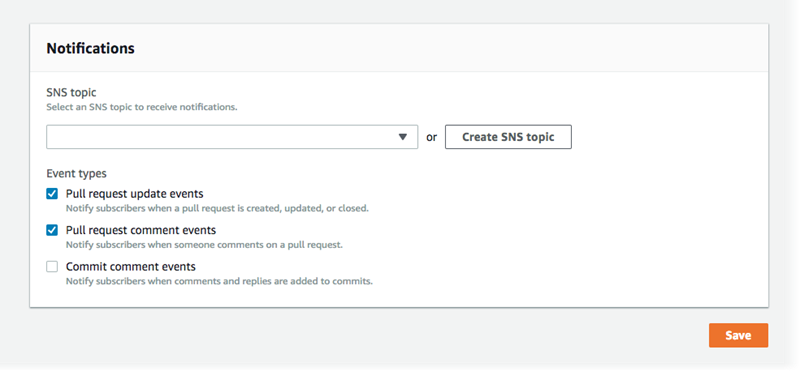
1. In **SNS topic**, either choose a topic from the list of Amazon SNS topics in your Amazon Web Services account, or create one to use for this repository.
**Note**
If you create a topic, you can manage subscriptions for that policy from the CodeCommit console. If you use an existing topic, you cannot manage subscriptions for that topic unless you have permissions to manage subscriptions for all topics in Amazon SNS. For more information, see [Amazon Simple Notification Service Developer Guide](https://docs.amazonaws.cn/sns/latest/dg/).
If you create a topic, in **Topic name**, enter a name for the topic after the underscore. (The first part of the topic name is populated for you. Keep this first part of the name.) In **Display name**, enter an optional short name. Choose **Create**.
1. To add email addresses of the repository users, in **Subscribers**, choose **Add**. In **Add email subscriber**, enter the email address of a repository user, and then choose **Save**. You can add only one email address at a time.
**Note**
A confirmation email is sent to the address as soon as you choose **Save**. However, the status of the subscription is not updated while you remain in **Manage subscriptions**.
After you have added all the email addresses to the list of subscribers, choose **Close**.
**Tip**
Amazon SNS coordinates and manages the delivery and sending of messages to subscribing endpoints and email addresses. Endpoints include web servers, email addresses, Amazon Simple Queue Service queues, and Amazon Lambda functions. For more information, see [What Is Amazon Simple Notification Service?](https://docs.amazonaws.cn/sns/latest/dg/welcome.html) and [Sending Amazon SNS Messages to HTTP/HTTPS Endpoints](https://docs.amazonaws.cn/sns/latest/dg/SendMessageToHttp.html) in the *Amazon SNS Developer Guide*.
1. To finish configuring notifications, choose **Save**.
After you have configured notifications for a repository, you can view the CloudWatch Events rule automatically created for the repository.
**Important**
Do not edit or delete this rule. Changing or deleting the rule might cause operational issues. For example, emails might not be sent to subscribers or you might not be able to change notification settings for a repository in CodeCommit.
**To view the CloudWatch Events rule for a repository**
1. Sign in to the Amazon Web Services Management Console and open the CloudWatch console at [https://console.amazonaws.cn/cloudwatch/](https://console.amazonaws.cn/cloudwatch/).
1. In the navigation bar, under **Events**, choose **Rules**.
1. Choose the rule for your repository. The rule name is displayed on the **Notifications** tab in your repository settings.
1. View the rule summary information.
**Important**
Do not edit, delete, or disable this rule.