# Geometry API
## SetCursorPoint
**Note**
This API is supported by, and only available on, Amazon DCV Windows clients only.
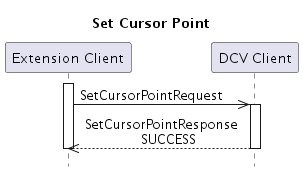
Move the local cursor pointer to a specific position over a streaming area of the Amazon DCV client. Extensions issue a `SetCursorPointRequest` and receive a synchronous `SetCursorPointResponse`.
**Helper structures:**
```
Point
+ int32 x
+ int32 y
```
**Request message:**
```
SetCursorPointRequest
+ Point point
```
+ **point**: New position for the cursor pointer expressed in local virtual screen coordinates.
**Example**
On Windows the coordinates in the virtual screen are expressed in physical pixels (no custom DPI applied) with the origin corresponding to the top left corner of the main display, displays to the left or to the top have negative coordinates.
**Response message:**
```
SetCursorPointResponse
(no fields)
```
## GetStreamingViews
This API is available only on DCV client.
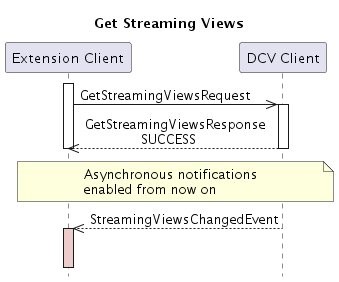
Extensions issue a `GetStreamingViewRequest` and receive a synchronous `GetStreamingViewsResponse`.
After the first GetStreamingViewsRequest is issued DCV will also start sending asynchronous `StreamingViewsChangedEvent` messages whenever the geometry of the local streaming views is changed (e.g. the client window is resized or moved) or the geometry of the remote desktop is changed (e.g. a monitor is added or removed).
**Helper structures:**
```
Point
+ int32 x
+ int32 y
```
```
Rect
+ int32 x
+ int32 y
+ uint32 width
+ uint32 height
```
```
StreamingView
+ int32 view_id
+ Rect local_area
+ double zoom_factor
+ Point remote_offset
+ bool has_focus
+ handle
```
```
StreamingViews
+ StreamingView[] streaming_view
+ bool has_focus
```
+ **view\_id**: The view ID, as returned in `IsPointInsideStreamingViewsResponse`
+ **local\_area**: Coordinates of the local streaming view in the local virtual screen.
**Example**
On Windows the coordinates in the virtual screen are expressed in physical pixels (no custom DPI applied) with the origin corresponding to the top left corner of the main display, displays to the left or to the top have negative coordinates.
+ **zoom\_factor**: Local over remote, e.g. 2.0 means that local view is twice as big as remote area
+ **remote\_offset**: Remote virtual screen coordinates, regardless of the remote operating system the origin is on the top left corner of the smallest rectangle containing all remote displays so remote virtual screen coordinates are always positive.
+ **has\_focus**: StreamingView.has\_focus indicate whether an individual streaming view has the keyboard focus or not.
**Example**
StreamingViews.has\_focus indicate whether the client window has the keyboard focus or not.
+ **handle**: ID of the window associated with the streaming view
**Request message:**
```
GetStreamingViewsRequest
(no fields)
```
**Response message:**
```
GetStreamingViewsResponse
+ StreamingViews streaming_views
```
**Event message:**
```
StreamingViewsChangedEvent
+ StreamingViews streaming_views
```
## IsPointInsideStreamingViews
This API is available only on Amazon DCV client.
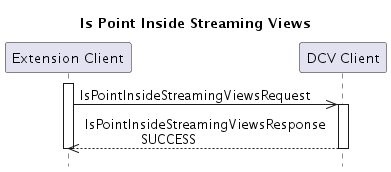
Query whether a position on the local desktop of the client host lies inside a visible part of a streaming area of the Amazon DCV client, i.e. it shows a pixel of the remote desktop. In case a point lies in a streaming view, the id of the streaming view is returned (to be matched to id’s returned in `GetStreamingViewsResponse` or `GetStreamingViewsChangedEvent`), in case the point lies outside all streaming views -1 is returned.
Extensions issue a `IsPointInsideStreamingViewsRequest` and receive a synchronous `IsPointInsideStreamingViewsResponse`.
**Helper structures:**
```
Point
+ int32 x
+ int32 y
```
**Request message:**
```
IsPointInsideStreamingViewsRequest
+ Point point
```
+ **point**: Expressed in local virtual screen coordinates.
**Example**
On Windows the coordinates in the virtual screen are expressed in physical pixels (no custom DPI applied) with the origin corresponding to the top left corner of the main display, displays to the left or to the top have negative coordinates.
**Response message:**
```
IsPointInsideStreamingViewsRequest
+ int32 view_id
```
+ **view\_id**: Identification of the streaming view in which the point lies (from `GetStreamingViewsResponse` or `GetStreamingViewsChangedEvent`), or -1 if the point lies outside all local views.