# Flat-rate pricing
**Important**
Amazon pricing is subject to change. For current pricing, see the [Amazon Direct Connect flat-rate pricing page](https://aws.amazon.com/directconnect/pricing/flat-rate/). The pricing examples in this guide are for illustration only and might not reflect current pricing.
Amazon Direct Connect offers flat-rate pricing, a simplified and predictable billing model for dedicated connections. You pay a fixed hourly rate based on your connection bandwidth and a pricing tier that you select.
A pricing tier groups all data-transfer paths that share the same geographic distance category. You define each path by a source Amazon Web Services Region and an Amazon Direct Connect location. Amazon Direct Connect assigns the path to the tier that matches its distance profile, alongside all other paths with a similar geographic span. For example, a path from `us-east-1` (N. Virginia) to the Direct Connect location in Ashburn, Virginia is a Tier 1 path because both are in the same metro. In contrast, a path from `us-east-1` to a Direct Connect location in Cape Town, South Africa falls into Tier 3 because it spans a greater geographic distance.
Each tier includes zero data transfer out (DTO) charges between your Amazon Direct Connect location and the Amazon Web Services Regions that the tier covers. DTO from a Region that is not covered by your selected tier is billed at standard Direct Connect data transfer rates. Data transfer into Amazon is never charged.
The following example shows the Amazon Web Services Regions from which data transfer out is covered under flat-rate Tier 2 for connections at two Amazon Direct Connect locations: Digital Realty LHR20 (London) and Equinix LD5 (Slough). Data transfer out from any Amazon Web Services Region not listed is billed at standard Direct Connect data transfer rates.
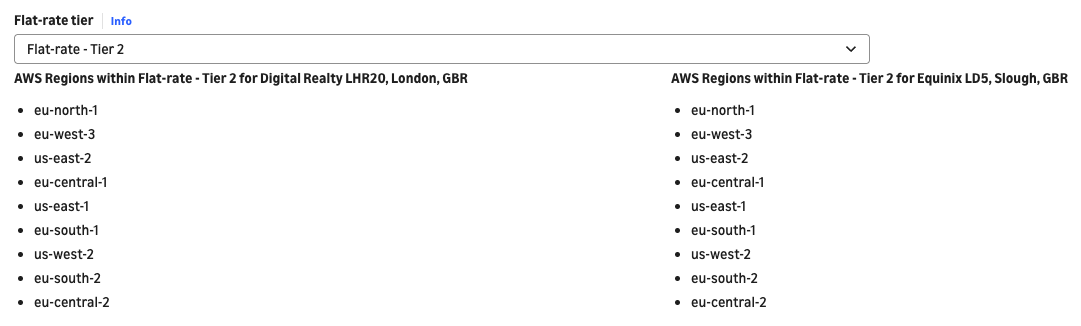
Your monthly cost is fixed: **the hourly rate for your bandwidth and tier × the hours the connection is provisioned**. Flat-rate pricing applies to **dedicated** connections only. The recommended port-pair setup includes a redundant second port at no additional charge.
**Note**
For how port-pairs, resiliency groups, and effective bandwidth work — and how to set up and operate flat-rate connections — see [Flat-rate billing for dedicated connections](https://docs.aws.amazon.com/directconnect/latest/UserGuide/flat-rate-connections.html) in the Amazon Direct Connect User Guide.
## What flat-rate pricing includes
The following table shows what is included in the flat rate and what is billed separately.
| | Included in the flat rate | Billed separately |
| --- | --- | --- |
| Port hours | Yes – the fixed hourly rate covers the port hours and data transfer costs | None |
| Data transfer out originating from Amazon Web Services Regions included in your selected tier | Yes – no per-GB charges | None |
| Data transfer into Amazon | Yes – data transfer in is never charged | None |
| Redundant second port in a port-pair | Yes – no additional charge | None |
| Data transfer out originating from Regions outside your selected tier | No | Standard Direct Connect data transfer rates |
| Amazon Direct Connect SiteLink data transfer charges | No | Standard SiteLink data transfer rates |
| Cross-connect and colocation fees | No | Billed by your colocation provider or Amazon Direct Connect Partner |
| Last-mile circuit | No | Billed by your network provider |
| Charges from other Amazon services | No | Billed by the relevant Amazon service (for example, Transit Gateway data processing) |
## Pricing tiers
Flat-rate pricing uses five tiers. Each tier includes zero data transfer out charges for traffic between your Amazon Direct Connect location and the Amazon Web Services Regions that the tier covers. Data transfer out from a Region that is not covered by your selected tier is billed at standard Direct Connect data transfer rates.
The tier you need depends on two inputs:
+ The **source Amazon Web Services Region or Regions** where your Amazon VPC traffic originates.
+ The **Amazon Direct Connect location** where your port is provisioned.
Together, these form a **path**. Greater geographic distance between the source Region and the Amazon Direct Connect location generally maps to a higher tier.
| Tier | Connectivity scope | General description |
| --- | --- | --- |
| Tier 1 | Local | Source Region in the same metro as your Amazon Direct Connect location |
| Tier 2 | Regional | Source Region in the same general geographic area, like a continent |
| Tier 3 | Continental | Source Region farther across a continental or geographical area |
| Tier 4 | Long-haul | Source Region across a large geographical area or a different continent |
| Tier 5 | Any Amazon Region globally | Source Region farther across a large geographical area or different continents |
This table is guidance only and should not be read as strict categories. To confirm the tier for a specific path, use the [Amazon Direct Connect flat-rate pricing page](https://aws.amazon.com/directconnect/pricing/flat-rate/).
## Choosing between billing modes
The following table compares pay-as-you-go and flat-rate billing modes. For how to set the billing mode and switch a connection between modes, see [Flat-rate billing for dedicated connections](https://docs.aws.amazon.com/directconnect/latest/UserGuide/flat-rate-connections.html) in the Amazon Direct Connect User Guide. For current rates in each mode, see the [Amazon Direct Connect pay-as-you-go pricing page](https://aws.amazon.com/directconnect/pricing/pay-as-you-go/) and the [Amazon Direct Connect flat-rate pricing page](https://aws.amazon.com/directconnect/pricing/flat-rate/).
| | Pay-as-you-go | Flat-rate |
| --- | --- | --- |
| Capacity charges | Per port-hour | Fixed hourly rate by bandwidth and tier |
| Data transfer out | Per-GB DTO charges apply | No DTO charges for Regions in your selected tier |
| Cost predictability | Low | High |
| Redundancy | Customer-managed; at additional cost | In-built with port-pairs |
| Eligible connections | Dedicated and hosted | Dedicated only |
## Key considerations when selecting a pricing tier
A Direct Connect connection can reach resources that span multiple Amazon Web Services Regions through Direct Connect gateways (DXGW), Transit Gateways, and Amazon Cloud WAN. Because these resources can route traffic to more than one Region, a flat-rate connection with these resources attached might receive traffic from Regions that your selected tier does not cover.
Review your tier before attaching a multi-Region resource to a flat-rate connection. Confirm that the tier covers every Amazon Web Services Region you want included under flat-rate pricing.
**Expansion to new Regions.** Extending your topology to a new Region after provisioning might require a tier change. Traffic from a Region outside your tier is billed at standard data transfer rates until the tier is raised.
**SiteLink data transfer is not covered by the flat rate.** SiteLink data transfer is not covered by any pricing tier. SiteLink sends data between Direct Connect locations without traversing an Amazon Web Services Region, so it falls outside the tier model. SiteLink data transfer is billed at standard SiteLink rates regardless of your tier.
## Pricing examples
The following examples use the illustrative rates in this guide. Substitute current published rates before you rely on any figure.
### Example 1 – Single-Region workload
You create a 10 Gbps Amazon Direct Connect flat-rate port-pair at the Direct Connect location in Equinix DC2, Ashburn (Northern Virginia). Amazon provisions two ports on different devices, so your usable bandwidth is 10 Gbps.
You attach your Amazon VPC in US East (N. Virginia), `us-east-1`, to a Direct Connect gateway through a virtual private gateway (VGW), and route traffic over the port-pair to your on-premises network.
Your source Region metro (IAD) and your Amazon Direct Connect location metro (IAD) are the same, so you select **Tier 1**.
| | |
| --- |--- |
| Path | us-east-1 ↔ Equinix DC2 Ashburn (Tier 1) |
| Usable bandwidth | 10 Gbps |
| Data transfer out charges | None |
Your cost is the same whether you transfer 10 TB or 500 TB, because a flat-rate connection has no separate per-GB data transfer charge for Regions in your selected tier.
### Example 2 – Multi-Region workload and the tier trade-off
You create a 100 Gbps Amazon Direct Connect flat-rate port-pair at the Direct Connect location in San Francisco. You attach the port-pair to a Direct Connect gateway to reach Amazon VPCs in both US East (N. Virginia), `us-east-1`, and Europe (Frankfurt), `eu-central-1`. Workloads in both Regions can now send traffic through the San Francisco port-pair.
Your topology contains two paths, and they fall in different tiers:
| Source Region | Path | Tier |
| --- | --- | --- |
| us-east-1 (N. Virginia) | us-east-1 ↔ SF DX Location | Tier 3 |
| eu-central-1 (Frankfurt) | eu-central-1 ↔ SF DX Location | Tier 4 |
You have two options:
| Option | Trade-off |
| --- | --- |
| Option A – Select Tier 3 | Flat-rate pricing covers the N. Virginia path, which carries the bulk of your traffic. Data transfer out on the Frankfurt path is billed at standard Direct Connect data transfer rates. This is the better choice when your Frankfurt volume is modest. |
| Option B – Select Tier 4 | Flat-rate pricing covers both paths, because a higher tier includes every Region covered by lower tiers. This is the better choice when your Frankfurt volume is high enough that standard data transfer charges on that path would exceed the monthly cost difference to Tier 3 pricing. |
The trade-off is the core decision in flat-rate pricing: pay more for broader tier coverage, or keep a lower tier and pay standard data transfer rates on the paths outside it.
## Frequently asked questions
**Does the flat rate include data transfer?**
Yes, for the Amazon Web Services Regions covered by your selected pricing tier. There are no per-gigabyte data transfer out charges on those paths. Data transfer out from a Region outside your selected tier is billed at standard Direct Connect data transfer rates. Data transfer into Amazon is never charged.
**What kinds of traffic are included in my flat-rate pricing?**
Private and public traffic. Transit and SiteLink traffic are not covered as part of flat-rate pricing.
**What do I get besides bandwidth?**
Every flat-rate port-pair includes a redundant second port on a different device at no additional charge, so resiliency is built into the flat rate.
**Is the pricing tier assigned automatically?**
No. You select the tier when you create the connection, and you set it per connection. Choose the tier that covers all the Amazon Web Services Regions you want included under flat-rate pricing.
**What happens if my traffic originates from a Region outside my tier?**
That traffic is billed at standard Direct Connect data transfer rates.
**Does the flat rate cover Amazon Direct Connect SiteLink?**
No. SiteLink data transfer is billed at standard SiteLink data transfer rates, and no pricing tier includes it.
**Am I responsible for any other costs?**
Yes. You remain responsible for your relationship with any colocation or network providers, including cross-connect fees and last-mile circuit charges for their side of the connection. Charges from other Amazon services that you use over the connection, such as Transit Gateway data processing, also still apply.