Help improve this page
To contribute to this user guide, choose the Edit this page on GitHub link that is located in the right pane of every page.
Learn more about Kubecost
Amazon EKS provides an Amazon optimized bundle of Kubecost for cluster cost visibility. Amazon EKS supports Kubecost, which you can use to monitor your costs broken down by Kubernetes resources including Pods, nodes, namespaces, and labels.
This topic covers the available versions of Kubecost, and the differences between the available tiers. EKS supports Kubecost Version 1, Version 2, and Version 3. Each version is available in different tiers. You can use Amazon EKS optimized Kubecost bundle for your Amazon EKS clusters at no additional cost. You may be charged for use of associated Amazon services, such as Amazon Managed Service for Prometheus. Also, you can use your existing Amazon support agreements to obtain support.
As a Kubernetes platform administrator and finance leader, you can use Kubecost to visualize a breakdown of Amazon EKS charges, allocate costs, and charge back organizational units such as application teams. You can provide your internal teams and business units with transparent and accurate cost data based on their actual Amazon bill. Moreover, you can also get customized recommendations for cost optimization based on their infrastructure environment and usage patterns within their clusters. For more information about Kubecost, see the Kubecost
What is the difference between the custom bundle of Kubecost and the free version of Kubecost (also known as OpenCost)?
Amazon and Kubecost collaborated to offer a customized version of Kubecost. This version includes a subset of commercial features at no additional charge. See the tables below for features that are included in the custom bundle of Kubecost.
Kubecost v3
What is the difference between Kubecost v2 and v3?
Kubecost 3.0 is a major architectural upgrade that delivers dramatically faster performance, enhanced scalability, and proactive optimization capabilities. The most significant change is the migration to a ClickHouse database, replacing DuckDB from version 2.8, which provides substantially faster queries and more reliable performance at scale. Kubecost 3.0 also introduces a unified agent that combines Kubecost and Cloudability functionality, eliminating the Prometheus dependency and reducing memory footprint while maintaining OpenCost compatibility.
Important
Review the Kubecost documentation before upgrading to v3.public.ecr.aws/kubecost/kubecost.
Key architectural improvements in v3:
-
ClickHouse Database: Replaces DuckDB for dramatically faster queries and better scalability
-
Unified Agent: Combines Kubecost and Cloudability functionality, eliminating Prometheus dependency
-
S3-Compatible Storage for Multi-Cluster: For multi-cluster deployments, v3 uses S3-compatible object storage (Amazon S3 for EKS customers) instead of Prometheus-compatible storage like Amazon Managed Service for Prometheus. The FinOps agent pulls metrics from the Kubernetes API and pushes to S3-compatible storage, then the Aggregator pulls that data, performs derivation steps, and displays results in the frontend. For more information, see Multi-Cluster Installation
and Secondary Clusters Guide in the Kubecost documentation. -
Reduced Memory Footprint: Substantially lower resource requirements while maintaining functionality
-
Simplified Architecture: Single-container pod topology for independent scaling and improved resiliency
-
Enhanced Automation: Automated Container Request Sizing with multi-cluster awareness and custom profiles
Amazon EKS optimized bundle benefits in v3:
The Amazon EKS optimized Kubecost bundle continues to be available at no additional charge and is exempt from the new $100,000 USD spend limit introduced in Kubecost v3 free tier. EKS users retain full access to all Kubernetes spend functionality regardless of spend levels.
Core features comparison:
| Feature | Kubecost free tier 3.0 | Amazon EKS optimized Kubecost bundle 3.0 | Kubecost Enterprise 3.0 |
|---|---|---|---|
|
Cluster cost visibility |
Unlimited clusters, gated at $100k USD spend over 30 days |
Unified multi-cluster without spend limits |
Unified and unlimited number of clusters across unlimited numbers of environments (i.e. multi-cloud) |
|
Database backend |
ClickHouse (local) |
ClickHouse with S3-compatible storage for multi-cluster metrics |
ClickHouse with custom database options |
|
Performance |
Substantially faster queries vs v2 |
Substantially faster queries vs v2 |
Substantially faster queries vs v2 |
|
Memory footprint |
Reduced vs v2 (no Prometheus dependency) |
Reduced vs v2 (no Prometheus dependency) |
Reduced vs v2 (no Prometheus dependency) |
|
Automated Container Request Sizing |
Available (limited to 250 cores) |
Available without core limits |
Available without core limits |
|
Spend limits |
$100k USD over 30 days |
No spend limits |
No spend limits |
|
Multi-cluster automation |
Limited |
Full multi-cluster awareness with secure messaging |
Full multi-cluster awareness with secure messaging |
Kubecost v2
What is the difference between Kubecost v1 and v2?
Kubecost 2.0 is a major upgrade from previous versions and includes major new features including a brand new API Backend. Note the Allocation
Important
Review the Kubecost documentation before upgrading.
Core features comparison:
| Feature | Kubecost free tier 2.0 | Amazon EKS optimized Kubecost bundle 2.0 | Kubecost Enterprise 2.0 |
|---|---|---|---|
|
Cluster cost visibility |
Unlimited clusters up to 250 cores |
Unified multi-cluster without core limits when integrated with Amazon Managed Service for Prometheus |
Unified and unlimited number of clusters across unlimited numbers of environments (i.e. multi-cloud) |
|
Deployment |
User hosted |
User hosted |
User hosted, Kubecost hosted (dedicated tenant), SaaS |
|
Databases supported |
Local Prometheus |
Amazon Managed Service for Prometheus or Local Prometheus |
Any prometheus flavor and custom databases |
|
Database retention support (raw metrics) |
15 days |
Unlimited historical data |
Unlimited historical data |
|
Kubecost API and UI retention (ETL) |
15 days |
15 days |
Unlimited |
|
Hybrid cloud visibility |
- |
Amazon EKS and Amazon EKS Anywhere clusters |
Multi-cloud and hybrid cloud |
|
Alerts and recurring reports |
Only supported on the primary cluster, limited to 250 cores |
Efficiency alerts, budget alerts, spend change alerts, and more supported |
Efficiency alerts, budget alerts, spend change alerts, and more supported |
|
Saved reports |
- |
Reports using 15 days of metrics |
Reports using unlimited historical data and metrics |
|
Cloud billing integration |
Only supported on the primary cluster, limited to 250 cores |
Custom pricing support for Amazon (including multiple clusters and multiple accounts) |
Custom pricing support for any cloud |
|
Savings recommendations |
Only supported on the primary cluster, limited to 250 cores |
Primary cluster insights, but there is no 250 core limit |
Multi-cluster insights |
|
Governance: Audits |
- |
- |
Audit historical cost events |
|
Single sign-on (SSO) support |
- |
Amazon Cognito supported |
Okta, Auth0, PingID, KeyCloak, and anything else custom |
|
Role-based access control (RBAC) with SAML 2.0 |
- |
- |
Okta, Auth0, PingID, KeyCloak, and anything else custom |
|
Enterprise training and onboarding |
- |
- |
Full-service training and FinOps onboarding |
|
Teams |
- |
- |
Yes |
New Features:
The following features have metric limits:
-
Kubecost Aggregator
-
Network Monitoring
-
Kubecost Actions
-
Collections
-
Anomaly detection
-
Container Request Right-Sizing
-
Kubecost Forecasting
-
Autocomplete for filtering and aggregation
Metric limits:
| Metric | Kubecost Free Tier 2.0 | Amazon EKS optimized Kubecost bundle 2.0 | Kubecost Enterprise 2.0 |
|---|---|---|---|
|
Cluster size |
Unlimited clusters up to 250 cores |
Unlimited |
Unlimited |
|
Metric retention |
15 days |
15 days |
Unlimited |
|
Multi-cluster support |
Not available |
Available |
Available |
|
Core limits |
250 cores per cluster |
No core limits |
No core limits |
Kubecost v1
| Feature | Kubecost free tier | Amazon EKS optimized Kubecost bundle | Kubecost Enterprise |
|---|---|---|---|
|
Deployment |
User hosted |
User hosted |
User hosted or Kubecost hosted (SaaS) |
|
Number of clusters supported |
Unlimited |
Unlimited |
Unlimited |
|
Databases supported |
Local Prometheus |
Local Prometheus or Amazon Managed Service for Prometheus |
Prometheus, Amazon Managed Service for Prometheus, Cortex, or Thanos |
|
Database retention support |
15 days |
Unlimited historical data |
Unlimited historical data |
|
Kubecost API retention (ETL) |
15 days |
15 days |
Unlimited historical data |
|
Cluster cost visibility |
Single clusters |
Unified multi-cluster |
Unified multi-cluster |
|
Hybrid cloud visibility |
- |
Amazon EKS and Amazon EKS Anywhere clusters |
Multi-cloud and hybrid-cloud support |
|
Alerts and recurring reports |
- |
Efficiency alerts, budget alerts, spend change alerts, and more supported |
Efficiency alerts, budget alerts, spend change alerts, and more supported |
|
Saved reports |
- |
Reports using 15 days data |
Reports using unlimited historical data |
|
Cloud billing integration |
Required for each individual cluster |
Custom pricing support for Amazon (including multiple clusters and multiple accounts) |
Custom pricing support for Amazon (including multiple clusters and multiple accounts) |
|
Savings recommendations |
Single cluster insights |
Single cluster insights |
Multi-cluster insights |
|
Governance: Audits |
- |
- |
Audit historical cost events |
|
Single sign-on (SSO) support |
- |
Amazon Cognito supported |
Okta, Auth0, PingID, KeyCloak |
|
Role-based access control (RBAC) with SAML |
- |
- |
Okta, Auth0, PingID, Keycloak |
|
Enterprise training and onboarding |
- |
- |
Full-service training and FinOps onboarding |
Frequently asked questions
See the following common questions and answers about using Kubecost with Amazon EKS.
What is the Kubecost API retention (ETL) feature?
The Kubecost ETL feature aggregates and organizes metrics to surface cost visibility at various levels of granularity (such as namespace-level, pod-level, and deployment-level). For Amazon EKS optimized Kubecost bundle, customers get data and insights from metrics for the last 15 days.
What is the alerts and recurring reports feature? What alerts and reports does it include?
Kubecost alerts allow teams to receive updates on real-time Kubernetes spend as well as cloud spend. Recurring reports enable teams to receive customized views of historical Kubernetes and cloud spend. Both are configurable using the Kubecost UI or Helm values. They support email, Slack, and Microsoft Teams.
What do saved reports include?
Kubecost saved reports are predefined views of cost and efficiency metrics. They include cost by cluster, namespace, label, and more.
What is cloud billing integration?
Integration with Amazon billing APIs allows Kubecost to display out-of-cluster costs (such as Amazon S3). Additionally, it allows Kubecost to reconcile Kubecost’s in-cluster predictions with actual billing data to account for spot usage, savings plans, and enterprise discounts.
What do savings recommendations include?
Kubecost provides insights and automation to help users optimize their Kubernetes infrastructure and spend.
Is there a charge for this functionality?
No. You can use Amazon EKS optimized Kubecost bundle at no additional charge. If you want additional Kubecost capabilities that aren’t included, you can buy an Enterprise License of Kubecost through the Amazon Marketplace, or from Kubecost directly.
Is support available for Amazon EKS optimized Kubecost bundle?
Yes, only if you are using the Amazon EKS optimized Kubecost bundle.
How do I get support for Amazon EKS optimized Kubecost bundle?
You can open a support case with the Amazon Support team at Contact Amazon
Do I need a license to use Kubecost features provided by the Amazon EKS integration?
No.
Can I integrate Kubecost with Amazon Cost and Usage Report for more accurate reporting?
Yes. You can configure Kubecost to ingest data from Amazon Cost and Usage Report to get accurate cost visibility, including discounts, Spot pricing, reserved instance pricing, and others. For more information, see Amazon Cloud Billing Integration
Does this version support cost management of self-managed Kubernetes clusters on Amazon EC2?
No. Amazon EKS optimized Kubecost bundle is only compatible with Amazon EKS clusters.
Can Kubecost track costs for Amazon EKS on Amazon Fargate?
Kubecost provides best effort to show cluster cost visibility for Amazon EKS on Fargate, but with lower accuracy than with Amazon EKS on Amazon EC2. This is primarily due to the difference in how you’re billed for your usage. With Amazon EKS on Fargate, you’re billed for consumed resources. With Amazon EKS on Amazon EC2 nodes, you’re billed for provisioned resources. Kubecost calculates the cost of an Amazon EC2 node based on the node specification, which includes CPU, RAM, and ephemeral storage. With Fargate, costs are calculated based on the requested resources for the Fargate Pods.
How can I get updates and new versions of Kubecost?
You can upgrade your Kubecost version using standard Helm upgrade procedures. For Kubecost v3, the latest versions are available at the new Helm chart location public.ecr.aws/kubecost/kubecost. Previous versions (v1 and v2) remain available in the Amazon ECR Public Gallery
Important
When upgrading to Kubecost v3, note that the Helm chart location has changed from public.ecr.aws/kubecost/cost-analyzer to public.ecr.aws/kubecost/kubecost. Update your Helm repository references accordingly.
Is the kubectl-cost CLI supported? How do I install it?
Yes. Kubectl-cost is an open source tool by Kubecost (Apache 2.0 License) that provides CLI access to Kubernetes cost allocation metrics. To install kubectl-cost, see Installation
Is the Kubecost user interface supported? How do I access it?
Kubecost provides a web dashboard that you can access through kubectl port forwarding, an ingress, or a load balancer. You can also use the Amazon Load Balancer Controller to expose Kubecost and use Amazon Cognito for authentication, authorization, and user management. For more information, see How to use Application Load Balancer and Amazon Cognito to authenticate users for your Kubernetes web apps
Does the new $100k spend limit in Kubecost v3 affect Amazon EKS users?
No. The $100,000 USD spend limit over 30 days introduced in Kubecost v3 free tier does not apply to Amazon EKS optimized Kubecost bundle users. EKS users retain full access to all Kubernetes spend functionality regardless of spend levels.
What are the main performance improvements in Kubecost v3?
Kubecost v3 introduces substantial performance improvements through its ClickHouse database backend, which provides dramatically faster queries compared to the DuckDB used in v2.8. Additionally, the unified agent architecture eliminates the Prometheus dependency, reducing memory footprint while maintaining full functionality and OpenCost compatibility.
What storage backend does Kubecost v3 use for multi-cluster deployments?
Kubecost v3 uses S3-compatible object storage (Amazon S3 for EKS customers) for multi-cluster metrics storage, replacing the Prometheus-compatible storage used in v2. The FinOps agent collects metrics from the Kubernetes API and pushes them to S3-compatible storage. The Aggregator then retrieves this data, performs cost calculations, and displays the results in the frontend. For detailed multi-cluster setup instructions, see Multi-Cluster Installation
Can I upgrade directly from Kubecost v1 to v3?
No. Direct upgrade from v1 to v3 is not supported. You must first upgrade to v2, then migrate to v3. Review the Kubecost documentation for detailed migration guidance, as the process requires careful planning and may impact report availability during transition.
Additional Kubecost Features
-
The following features are available in Kubecost v1, v2, and v3.
-
Export cost metrics – Amazon EKS optimized cost monitoring is deployed with Kubecost. In v1 and v2, Kubecost integrates with Prometheus for metrics storage and processing. In v3, Kubecost uses a ClickHouse database for dramatically improved performance while maintaining OpenCost compatibility. For multi-cluster deployments in v3, metrics are stored in S3-compatible object storage (Amazon S3 for EKS customers) instead of Prometheus-compatible storage. Kubecost reads metrics, performs cost allocation calculations, and provides data through its APIs and user interface. The architecture varies by version but maintains consistent functionality.
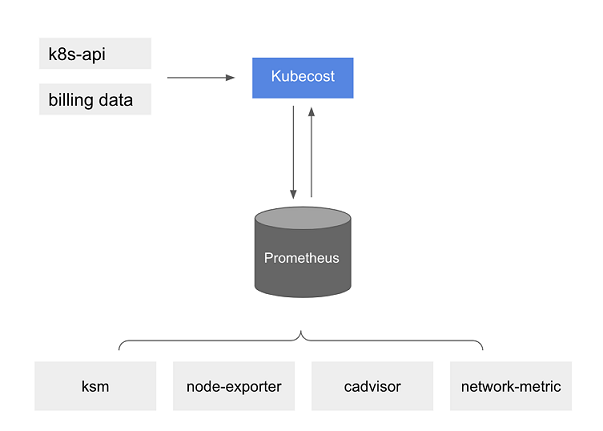
You can write queries to ingest Kubecost data into your current business intelligence system for further analysis. You can also use it as a data source for your current Grafana
dashboard to display Amazon EKS cluster costs that your internal teams are familiar with. To learn more about how to write queries, see the OpenCost Configuration documentation or use the example Grafana JSON models in the Kubecost GitHub repository as references. -
Amazon Cost and Usage Report integration – To perform cost allocation calculations for your Amazon EKS cluster, Kubecost retrieves the public pricing information of Amazon services and Amazon resources from the Amazon Price List API. You can also integrate Kubecost with Amazon Cost and Usage Report to enhance the accuracy of the pricing information specific to your Amazon account. This information includes enterprise discount programs, reserved instance usage, savings plans, and spot usage. To learn more about how the Amazon Cost and Usage Report integration works, see Amazon Cloud Billing Integration
in the Kubecost documentation.
-