Using the Troubleshooting Agent
Supported deployment modes
The Apache Spark Troubleshooting Agent for Amazon EMR supports comprehensive analysis of failed Spark workloads, including automated error diagnosis, root cause analysis, code recommendations, and actionable suggestions to fix the failure, for the following Spark deployment modes:
-
EMR on EC2
-
EMR Serverless
-
EMR on EKS
-
Amazon Glue
For the detailed features, capabilities, and limitations, see Troubleshooting features and capabilities.
Supported interfaces
Troubleshooting cells within Amazon SageMaker notebooks
A demonstration of the troubleshooting experience with Amazon SageMaker notebooks. For any notebook cell failure, you can ask the Amazon SageMaker Notebook Agent to troubleshoot the failure and request the analysis, followed by a possible code fix if the error resulted from code, by choosing the Fix with AI button.
Troubleshooting Amazon Glue and EMR Spark applications with Kiro CLI
Start Kiro CLI or your MCP client and verify the loaded tools for the troubleshooting process.
...
 sagemaker-unified-studio-mcp-code-rec (MCP)
 - spark_code_recommendation    not trusted

 sagemaker-unified-studio-mcp-troubleshooting (MCP)
 - analyze_spark_workload       not trusted
...
You are now ready to start the Spark troubleshooting workflow.
A demonstration of the troubleshooting experience with Kiro CLI. You can start the troubleshooting process with the following prompt:
Analyze my Glue job. The job name is "xxx" and the job run id is "xxx"
For example prompts on each platform, see Troubleshooting prompt examples.
To use the agent with other MCP clients, such as Cline, Claude Code, or GitHub Copilot, see Set up the Apache Spark agents.
Troubleshoot from the console
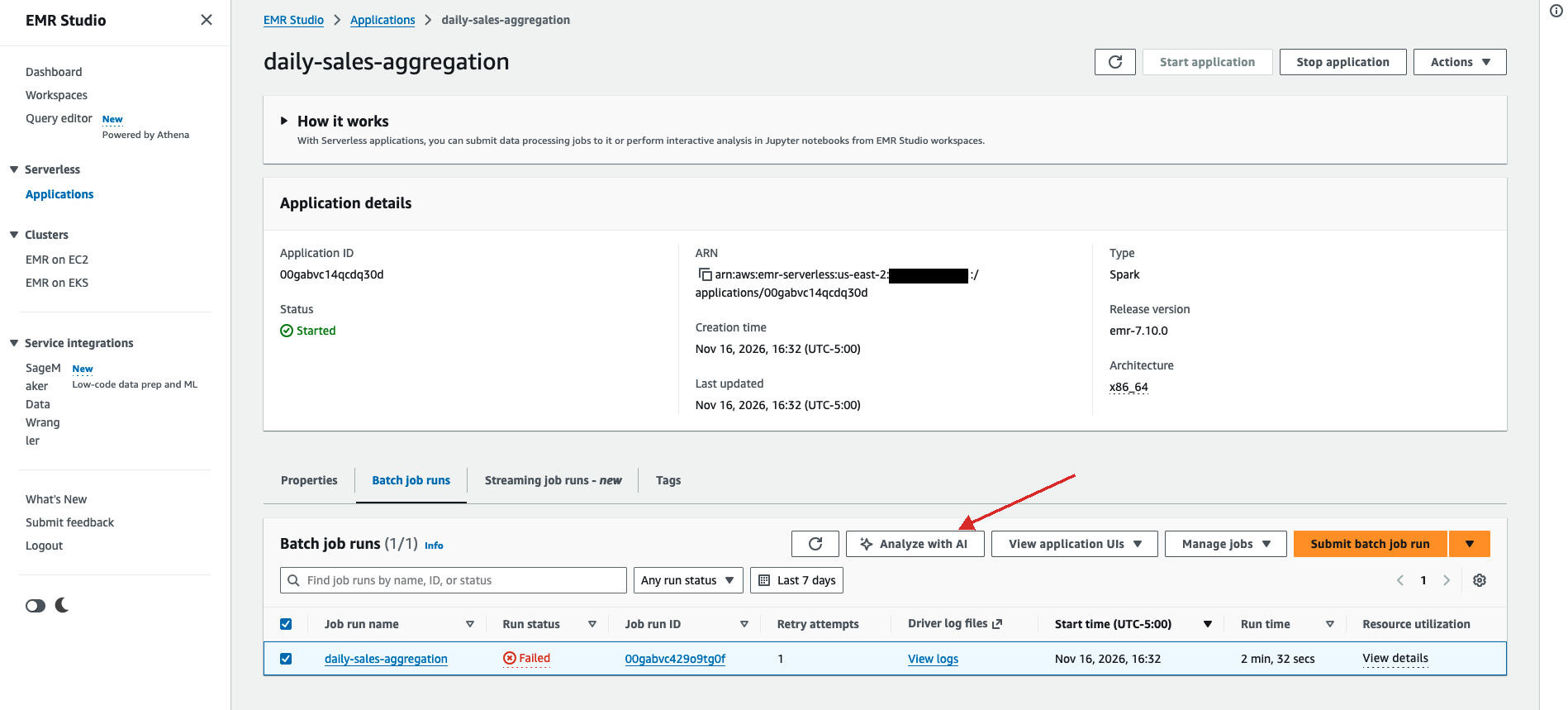
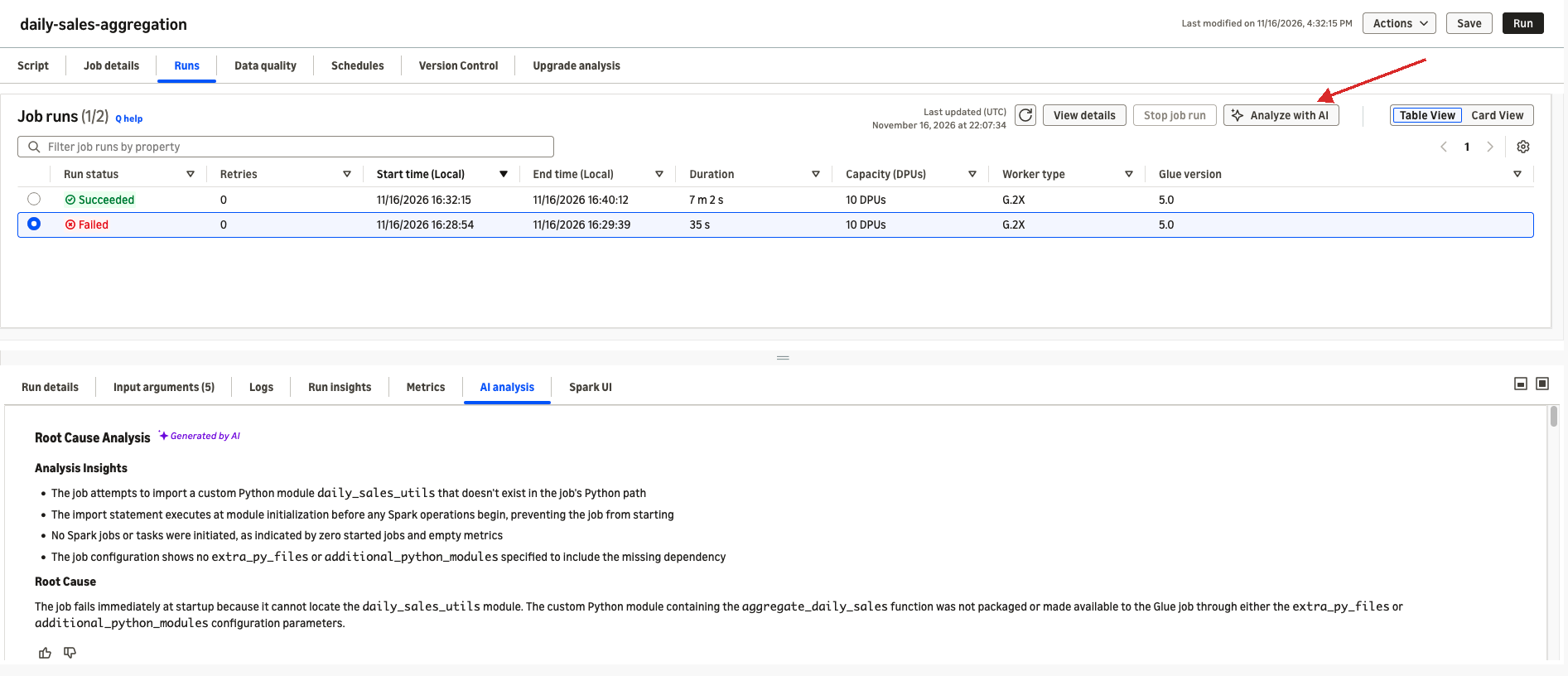
You can start the troubleshooting agent directly from the console. Choose Troubleshoot with AI on EMR on EC2 and EMR on EKS, or choose Analyze with AI on EMR Serverless and Amazon Glue.
Troubleshoot with AI button for the EMR on EC2 console
Open the Amazon EMR console at https://console.amazonaws.cn/elasticmapreduce/home
The following video shows how to use the Troubleshoot with AI button for EMR on EC2.
Analyze with AI button for the EMR Serverless console
Open the Amazon EMR console at https://console.amazonaws.cn/elasticmapreduce/home
The root cause analysis appears on the AI analysis tab of the job run.
The following screenshot shows the Analyze with AI button for a failed job run in EMR Studio.
Analyze with AI button for the Amazon Glue console
Open the Amazon Glue console at https://console.aws.amazon.com/glue/
The root cause analysis appears on the AI analysis tab of the job run.
The following screenshot shows the Analyze with AI button for a failed job run in the Amazon Glue console.
Troubleshoot with AI button for the EMR on EKS console
Open the Amazon EMR console at https://console.amazonaws.cn/elasticmapreduce/home
The following video shows how to use the Troubleshoot with AI button for EMR on EKS.