coreMQTT connection sharing demo
Important
This is an archived version of the FreeRTOS User Guide for use with FreeRTOS release 202012.00. For the latest version of this document, see the FreeRTOS User Guide.
Introduction
The coreMQTT connection sharing demo project shows you how to use a multithreaded application to establish
a connection to the Amazon MQTT broker using TLS with mutual authentication between the client and the server.
This demo uses an mbedTLS-based transport interface implementation to establish a server and
client-authenticated TLS connection, and demonstrates the subscribe-publish workflow of MQTT at the
QoS 1
Note
To set up and run the FreeRTOS demos, follow the steps in Getting Started with FreeRTOS.
This demo uses a thread safe queue to hold commands to interact with the MQTT API. There are four tasks to take note of in this demo.
-
A command (main) task takes commands from the command queue and processes them. The other tasks place commands in this queue to be processed. This task enters a loop, during which it processes the commands. If a termination command is received, this task will break out of the loop.
-
A synchronous publisher task creates a series of publish operations and pushes them to the command queue. These operations are then run by the command task. This task uses synchronous publishing, which means that this task will wait for each publish operation to complete before scheduling the next one.
-
An asynchronous publisher task creates a series of publish operations and pushes them to the command queue. These operations are then run by the command task. The difference between this task and the previous one is that it will not wait for a publish operation to complete before it schedules the next one. It checks the status of each publish operation after all of its publish operations have been added to the queue. Note that the distinction between synchronous and asynchronous publishing is only in the behavior of these tasks. There are no differences in the actual publish commands.
-
A subscriber task creates an MQTT subscription to a topic filter that matches the topics of all messages which the two publisher tasks publish. This task enters a loop and waits to receive back the messages that were published by the other tasks.
Tasks can have queues to hold received messages. The command task will push incoming messages to the queue of any task that is subscribed to the incoming topic.
This demo uses a TLS connection with mutual authentication to connect to Amazon. If the network unexpectedly disconnects during the demo, then the client attempts to reconnect using exponential backoff logic. If the client successfully reconnects, but the broker can't resume the prior session, then the client will resubscribe to the same topics as the previous session.
Single threaded vs multithreaded
There are two coreMQTT usage models, single threaded and multithreaded (multitasking). This demo shows
you how to create your own multithreading scheme. There is also another multithreaded example that runs
the MQTT protocol in the background within an agent (or daemon) task. For more information, see
MWTT Agent and Demos using coreMQTTMQTT_ProcessLoop function. Also, if you use an agent task, multiple
application tasks can share a single MQTT connection without the need for synchronization primitives,
such as mutexes.
Source code
The demo source file is named mqtt_demo_connection_sharing.c and can be found in
the freertos/demos/coreMQTT/
Functionality
This demo creates four tasks in total: three that request MQTT API calls, and one that processes those requests, which is the primary task. In this demo, the primary task enters a loop that creates the three subtasks, calls the processing loop, and cleans up afterwards. The primary task creates a single MQTT connection to the broker that is shared among the subtasks. Two of the subtasks publish messages to the broker, and the third receives the messages back, using an MQTT subscription to a topic filter that matches all of the topics of the messages published.
Typedefs
The demo defines the following structures, enums, and function pointers.
- Commands
-
Rather than making the MQTT API calls directly, the tasks use
Command_tstructures to create commands that instruct the main task to call the appropriate API operation for them. Commands have the following types:-
PROCESSLOOP -
PUBLISH -
SUBSCRIBE -
UNSUBSCRIBE -
PING -
DISCONNECT -
RECONNECT -
TERMINATE
The
TERMINATEcommand doesn't have a corresponding MQTT API operation. It's used in the demo to instruct the main task to stop processing commands and begin cleanup operations. Because some additional information, for example, publish or subscribe information, is required for some MQTT commands such asMQTT_Publish,MQTT_Subscribe, andMQTT_Unsubscribe, we use theCommandContext_tfield. This field is required for these three commands, and it's optional for the others.Because this context is required for these commands, don't change this value once the command has been placed in the queue, until the command completes. When a command completes, an optional callback can be invoked. In this demo, we use a callback that creates a task notification to inform the calling task that the command has completed. For MQTT operations that require acknowledgments (subscribes, unsubscribes, and publishes with QoS greater than 0), the command is considered completed once the acknowledgment has been received. Otherwise, the command is completed once the corresponding MQTT API call has returned.
The following definitions can be found in the
mqtt_demo_connection_sharing.cfile:-
Command_t
struct -
CommandContext_t
struct -
CommandType_t
enum -
CommandCallback_t
function pointer
-
- Acknowledgments
-
Because some MQTT operations require an acknowledgment, they use an array of AckInfo_t
that contains the packet identifier of the expected acknowledgment, and the original command that is expecting it, so that its completion callback can be invoked. - Subscriptions
-
This demo can track subscriptions for each task. To do so, each task that requests a subscription must provide a message queue where it will receive back the published messages (SubscriptionElement_t
). Multiple tasks can subscribe to the same topic filter, because they're expected to use separate response queues. - Received published messages
-
Because tasks run in parallel with the main task, it would be difficult and time consuming for the main task to have to wait for each subscribed task to read a received published message. Therefore, each message received is copied to the response queue of any task that is subscribed to the published message's topic (PublishElement_t
). Because publish packets received from the MQTT client contain pointers to the client's network buffer, the payload and topic name of the incoming message are copied into separate buffers before they're inserted into a response queue. This way, the subscribed task can still read the received information after the MQTT client has cleared its network buffer.
Main task
The main application task,
RunCoreMQTTConnectionSharingDemoclean session flag set, then disconnects and
reconnects with the flag unset. After the processing loop has terminated, it disconnects from the broker,
and loops again from the point at which it made the network reconnection.
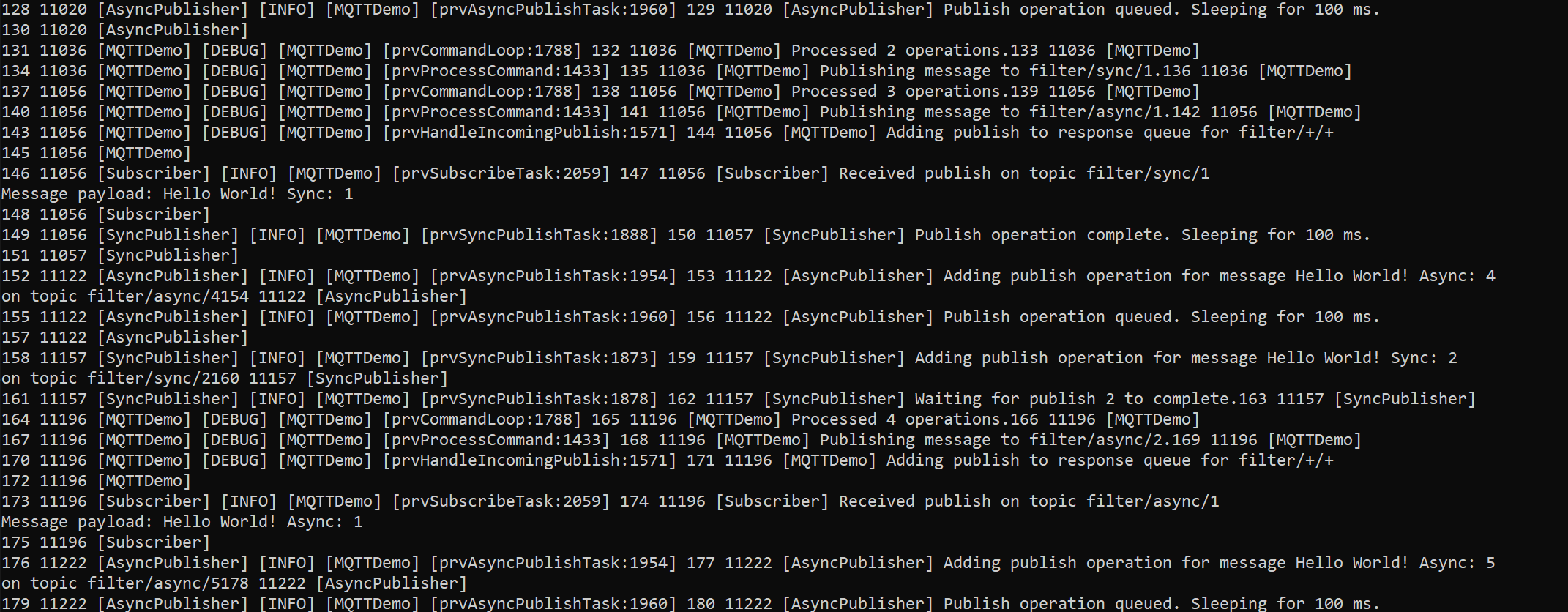
A successful completion of the demo will generate an output similar to the following image.
- Command loop
-
The command loop, prvCommandLoop
, waits for commands to be placed in the command queue, and then calls the appropriate MQTT API. All commands except for DISCONNECTandTERMINATEresult inMQTT_ProcessLoopbeing called as well. This demo sets a socket wakeup callback to add aPROCESSLOOPcommand to the queue when data is available on the socket. However, there might be many commands ahead of it in the queue at that point. To make sure that we don't neglect incoming data while other commands are processed,MQTT_ProcessLoopis called for a single iteration after each command. - Processing commands
-
See the prvProcessCommand
function.
Synchronous publisher task
The synchronous publisher task,
prvSyncPublishTaskPUBLISH operations synchronously, and waits for each
operation to complete before scheduling the next one. This demo uses QoS 1 to publish messages, which means
that these operations aren't considered completed until the publish acknowledgment packet has been
received.
Asynchronous publisher task
The asynchronous publisher task,
prvAsyncPublishTask
Subscriber task
The subscriber task,
prvSubscribeTaskTERMINATE operation that signals
the main task to end the command loop.