# Working with Ray jobs in Amazon Glue
**Important**
Amazon Glue for Ray is no longer open to new customers. Existing customers can continue to use the service as normal. For more information, see [Amazon Glue for Ray end of support](https://docs.amazonaws.cn/glue/latest/dg/awsglue-ray-jobs-availability-change.html).
This section provides information about using Amazon Glue for Ray jobs. For more information about writing Amazon Glue for Ray scripts, consult the [Programming Ray scripts](aws-glue-programming-ray.md) section.
**Topics**
+ [Getting started with Amazon Glue for Ray](#author-job-ray-using)
+ [Supported Ray runtime environments](#author-job-ray-runtimes)
+ [Accounting for workers in Ray jobs](#author-job-ray-worker-accounting)
+ [Using job parameters in Ray jobs](author-job-ray-job-parameters.md)
+ [Monitoring Ray jobs with metrics](author-job-ray-monitor.md)
## Getting started with Amazon Glue for Ray
To work with Amazon Glue for Ray, you use the same Amazon Glue jobs and interactive sessions that you use with Amazon Glue for Spark. Amazon Glue jobs are designed for running the same script on a recurring cadence, while interactive sessions are designed to let you run snippets of code sequentially against the same provisioned resources.
Amazon Glue ETL and Ray are different underneath, so in your script, you have access to different tools, features, and configuration. As a new computation framework managed by Amazon Glue, Ray has a different architecture and uses different vocabulary to describe what it does. For more information, see [Architecture Whitepapers](https://docs.ray.io/en/latest/ray-contribute/whitepaper.html) in the Ray documentation.
**Note**
Amazon Glue for Ray is available in US East (N. Virginia), US East (Ohio), US West (Oregon), Asia Pacific (Tokyo), and Europe (Ireland).
### Ray jobs in the Amazon Glue Studio console
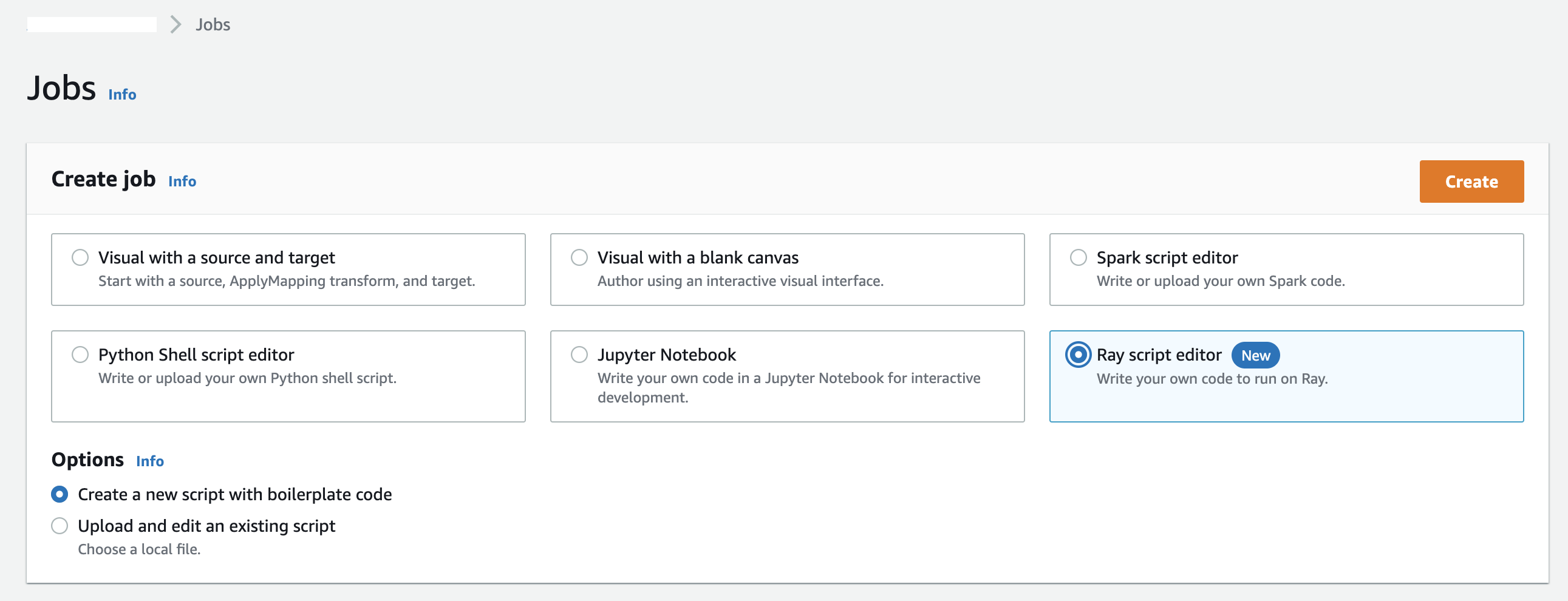
On the **Jobs** page in the Amazon Glue Studio console, you can select a new option when you're creating a job in Amazon Glue Studio—**Ray script editor**. Choose this option to create a Ray job in the console. For more information about jobs and how they're used, see [Building visual ETL jobs](author-job-glue.md).
### Ray jobs in the Amazon CLI and SDK
Ray jobs in the Amazon CLI use the same SDK actions and parameters as other jobs. Amazon Glue for Ray introduces new values for certain parameters. For more information in the Jobs API, see [Jobs](aws-glue-api-jobs-job.md).
## Supported Ray runtime environments
In Spark jobs, `GlueVersion` determines the versions of Apache Spark and Python available in an Amazon Glue for Spark job. The Python version indicates the version that is supported for jobs of type Spark. This is not how Ray runtime environments are configured.
For Ray jobs, you should set `GlueVersion` to `4.0` or greater. However, the versions of Ray, Python, and additional libraries that are available in your Ray job are determined by the `Runtime` field in the job definition.
The `Ray2.4` runtime environment will be available for a minimum of 6 months after release. As Ray rapidly evolves, you will be able to incorporate Ray updates and improvements through future runtime environment releases.
Valid values: `Ray2.4`
| Runtime value | Ray and Python versions |
| --- | --- |
| Ray2.4 (for Amazon Glue 4.0\+) | Ray 2.4.0
Python 3.9 |
**Additional information**
+ For release notes that accompany Amazon Glue on Ray releases, see [Amazon Glue versions](release-notes.md#release-notes-versions).
+ For Python libraries that are provided in a runtime environment, see [Modules provided with Ray jobs](edit-script-ray-env-dependencies.md#edit-script-ray-modules-provided).
## Accounting for workers in Ray jobs
Amazon Glue runs Ray jobs on new Graviton-based EC2 worker types, which are only available for Ray jobs. To appropriately provision these workers for the workloads Ray is designed for, we provide a different ratio of compute resources to memory resources from most workers. In order to account for these resources, we use the memory-optimized data processing unit (M-DPU) rather than the standard data processing unit (DPU).
+ One M-DPU corresponds to 4 vCPUs and 32 GB of memory.
+ One DPU corresponds to 4 vCPUs and 16 GB of memory. DPUs are used to account for resources in Amazon Glue with Spark jobs and corresponding workers.
Ray jobs currently have access to one worker type, `Z.2X`. The `Z.2X` worker maps to 2 M-DPUs (8 vCPUs, 64 GB of memory) and has 128 GB of disk space. A `Z.2X` machine provides 8 Ray workers (one per vCPU).
The number of M-DPUs that you can use concurrently in an account is subject to a service quota. For more information about your Amazon Glue account limits, see [Amazon Glue endpoints and quotas](https://docs.amazonaws.cn/general/latest/gr/glue.html).
You specify the number of worker nodes that are available to a Ray job with `--number-of-workers (NumberOfWorkers)` in the job definition. For more information about Ray values in the Jobs API, see [Jobs](aws-glue-api-jobs-job.md).
You can further specify a minimum number of workers that a Ray job must allocate with the `--min-workers` job parameter. For more information about job parameters, see [Reference](author-job-ray-job-parameters.md#author-job-ray-parameters-reference).