# Detect metrics export
**Note**
The Amazon IoT Device Defender detect feature will no longer be available to new customers starting August 31, 2026. If you would like to use the detect feature, sign up prior to August 31, 2026. To learn about alternatives to Amazon IoT Device Defender detect, see [Amazon IoT Device Defender detect feature availability change](https://docs.amazonaws.cn/iot-device-defender/latest/devguide/dd-detect-availability-change.html). There is no change to Amazon IoT Device Defender audit availability.
With metrics export, you can export cloud-side, device-side, or custom metrics from Amazon IoT Device Defender and publish them to an MQTT topic that you configure. This feature supports the bulk export of Detect metrics, which not only allows for more efficient data reporting and analysis, but also helps control costs. You can choose your MQTT topic as an Amazon IoT Rules Basic Ingest Topic or create and subscribe to your own MQTT topic. Configure metrics export by using the Amazon IoT Device Defender console, API, or CLI. This feature is available in all [Amazon Regions](https://aws.amazon.com/about-aws/global-infrastructure/regional-product-services/) where Amazon IoT Device Defender is available.
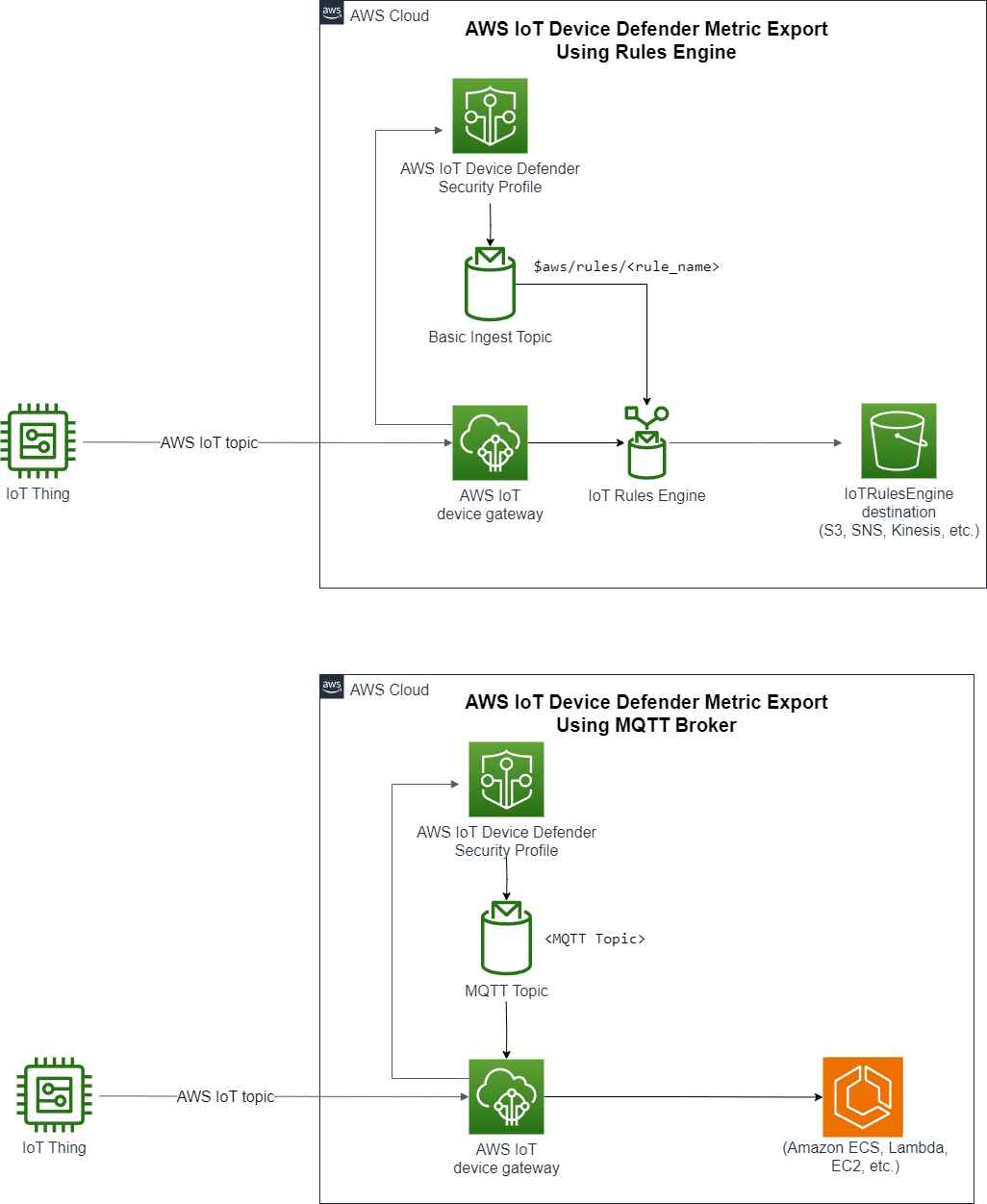
The following illustration shows how you can configure Amazon IoT Device Defender to export metrics. The first diagram demonstrates how to configure export metrics on a Basic Ingest topic. You can then route the exported metrics to various destinations supported by Amazon IoT Rules. The second diagram shows how to configure Amazon IoT Device Defender to publish data to an MQTT topic. The MQTT client then subscribes to that topic. You can run an MQTT client in a container on Amazon Elastic Container Service, Lambda, or an Amazon EC2 instance that subscribes to the same MQTT topic. Whenever Amazon IoT Device Defender publishes data, the MQTT client receives and processes it. For more information, see [MQTT topics.](https://docs.aws.amazon.com/iot/latest/developerguide/topics.html)
## How detect metric export works
When you set up a security profile, you choose the metrics for export and specify the MQTT topic. You also configure an IAM role that grants Amazon IoT Device Defender Detect the necessary permissions to publish messages to the configured MQTT topic. You can configure an Amazon IoT Rules Basic Ingest MQTT topic and send the exported metrics to Amazon IoT Rules supported destinations. For instructions on setting up and configuring Amazon IoT Rules, see [Rules for Amazon IoT](https://docs.aws.amazon.com/iot/latest/developerguide/iot-rules.html) in the *Amazon IoT Developer Guide*.
Amazon IoT Device Defender Detect batches metric values for each configured metric and publishes them to a configured MQTT topic at regular intervals. Except for message byte size and total byte size, cloud-side metrics are aggregated by summing metric values for the batched duration. Custom and device-side metrics aren't aggregated. For message byte size, the export values are the minimum, maximum, and total byte size for the batched duration. For disconnect duration, the export value is the disconnect duration—in seconds— for all tracked devices. This occurs every one-hour interval and also for connection or a disconnection events. For connected devices or connection events, the value is zero. For more information on cloud-side metrics, device-side metrics, and custom metrics, see the following topics in the *Amazon IoT Device Defender Developer Guide:*
+ [Custom metrics](https://docs.aws.amazon.com/iot/latest/developerguide/dd-detect-custom-metrics.html)
+ [Cloud-side metrics](https://docs.aws.amazon.com/iot/latest/developerguide/detect-cloud-side-metrics.html)
+ [Device-side metrics](https://docs.aws.amazon.com/iot/latest/developerguide/detect-device-side-metrics.html)
You can export batched metrics to different destinations with Amazon IoT Rules. For a list of supported destinations, see [Amazon IoT rule actions](https://docs.aws.amazon.com/iot/latest/developerguide/iot-rule-actions.html). To send individual metrics within a batched export message to a supported destination, use the batchMode option for Amazon IoT rules actions. If your preferred Amazon IoT Rules destination lacks `batchMode` support, you can still send individual metrics within a batched message by using intermediary actions such as Lambda or Kinesis Data Streams.
## Setting up Detect metrics export in the Amazon IoT console
Create, view, and edit a new security profile that includes metrics export in the console.
### Prerequisites
Before you set up Detect metrics export, make sure you have the following prerequisites:
+ An IAM role. For more information about creating an IAM role, see [Creating IAM role* *](https://docs.aws.amazon.com/IAM/latest/UserGuide/id_roles_create.html) in the *IAM User Guide*.
+ An Amazon account that you can sign in to as an Amazon Identity and Access Management (IAM) user with correct permissions. For more information on Amazon IoT Device Defender Detect permissions, see [Permissions](https://docs.aws.amazon.com/iot/latest/developerguide/device-defender-detect-permissions.html) in the *Amazon IoT Core Developer Guide*.
### Creating a new security profile with metrics export (console)
To export metric behavior data, first configure a security profile to include metric exporting. The following procedure details how to set up a rule-based security profile that includes Detect metrics export.
**To create a new security profile with metrics export**
1. Open the [Amazon IoT console](https://console.aws.amazon.com/iot). On the navigation bar, expand **Security**, **Detect**, **Security profiles**.
1. For **Create Security Profile**, choose **Create Rule-based anomaly Detect profile**.
1. To specify your security profile properties, enter your **Security Profile name** and, for **Target**, choose a group of devices to target for anomalies. (Optional) Include a description and tags to label Amazon resources. Choose **Next.**
1. For **Metric**, choose the metrics to define device behavior. You can define the behavior threshold to alert you when your device doesn't meet behavior expectations.
1. To receive alerts for behavior anomalies, choose **Send an alert (define metric behavior)**, and then specify the **Behavior name** and conditions. To retain the metrics without alerts, choose **Don't send an alert (retain metric)**. Choose **Next**.
1. To configure metrics export, choose **Turn on metrics export**.
1. Enter an MQTT topic name for publishing your metric data to Amazon IoT Core. Choose an IAM role to grant Amazon IoT the permission "Amazon IoT:Publish" to publish messages to the configured topic. Choose the metrics that you want to export, and then choose **Next.**
**Note**
Use the forward slash to represent hierarchical information when entering your MQTT topic name. For example, `$Amazon/rules/rule-name/`.
1. To send alerts sent to your Amazon console when a device violates a set behavior, choose or create an Amazon SNS topic and IAM role. Choose **Next.**
1. Review your configurations, and then choose **Next.**
### Viewing and editing security profile details (console)
**To view and edit security profile details**
1. Open the [Amazon IoT console](https://console.aws.amazon.com/iot). On the navigation bar, expand **Security**, **Detect**, **Security profiles**.
1. Choose the security profile that you created to include metrics export, and then for **Actions**, choose **Edit**.
1. Under **Target**, select the target device groups you want to edit, and then choose **Next.**
1. To edit metric behavior configurations, choose **Alert me (Define metric behavior)** and then define the conditions when the metric behaviors are met. Choose **Next.**
1. To turn off metrics export configurations, choose **Turn off export metrics.** Choose** Next**.
1. To configure Amazon SNS to send alerts to your Amazon IoT console when a device violates a set behavior, choose or create an Amazon SNS topic and IAM role. Choose **Next.**
1. Review your configurations, then choose **Next.**
## Creating a security profile to enable metrics export
Use the `create-security-profile` command to create your security profile and enable metrics export.
**To create a security profile with metrics export**
1. To enable metrics export and indicate if Detect needs to export the corresponding metrics, set the value `exportMetric` as true in both `Behavior` and `AdditionalMetricsToRetainV2`.
1. Include the value for `MetricsExportConfig`. This specifies the MQTT topic and role Amazon Resource Name (ARN) required for metrics export.
**Note**
Include `mqttTopic` so that Amazon IoT Device Defender Detect can publish messages. The role ARN has permission to publish MQTT messages, after which Amazon IoT Device Defender Detect can assume the role and publish messages on your behalf.
```
aws iot create-security-profile \
--security-profile-name CreateSecurityProfileWithMetricsExport \
--security-profile-description "create security profile with metrics export enabled" \
--behaviors "[{\"name\":\"BehaviorNumAuthz\",\"metric\":\"aws:num-authorization-failures\",\"criteria\":{\"comparisonOperator\":\"less-than\",\"value\":{\"count\":5}, \"consecutiveDatapointsToAlarm\":1,\"consecutiveDatapointsToClear\":1,\"durationSeconds\":300},\"exportMetric\":true}]" \
--metrics-export-config "{\"mqttTopic\":\"\$aws/rules/metricsExportRule\",\"roleArn\":\"arn:aws:iam::123456789012:role/iot-test-role\"}" \
--region us-east-1
```
Output:
```
{
"securityProfileName": "CreateSecurityProfileWithMetricsExport",
"securityProfileArn": "arn:aws:iot:us-east-1:123456789012:securityprofile/CreateSecurityProfileWithMetricsExport"
}
```
## Updating a security profile to enable metrics export (CLI)
Use the `update-security-profile` command to update an existing security profile and enable metrics export.
**To update a security profile to enable metrics export**
1. To enable metrics export and indicate if Detect needs to export the corresponding metrics, set the value `exportMetric` as true in both `Behavior` and `AdditionalMetricsToRetainV2`.
1. Include the value for `MetricsExportConfig`. This specifies the MQTT topic and role Amazon Resource Name ARN) required for metrics export.
**Note**
Include `mqttTopic` so that Amazon IoT Device Defender Detect can publish messages. The role ARN has permission to publish MQTT messages, after which Amazon IoT Device Defender Detect can assume the role and publish messages on your behalf.
```
aws iot update-security-profile \
--security-profile-name UpdateSecurityProfileWithMetricsExport \
--security-profile-description "update an existing security profile to enable metrics export" \
--behaviors "[{\"name\":\"BehaviorNumAuthz\",\"metric\":\"aws:num-authorization-failures\",\"criteria\":{\"comparisonOperator\":\"less-than\",\"value\":{\"count\":5}, \"consecutiveDatapointsToAlarm\":1,\"consecutiveDatapointsToClear\":1,\"durationSeconds\":300},\"exportMetric\":true}]" \
--metrics-export-config "{\"mqttTopic\":\"\$aws/rules/metricsExportRule\",\"roleArn\":\"arn:aws:iam::123456789012:role/iot-test-role\"}" \
--region us-east-1
```
Output:
```
{
"securityProfileName": "UpdateSecurityProfileWithMetricsExport",
"securityProfileArn": "arn:aws:iot:us-east-1:123456789012:securityprofile/UpdateSecurityProfileWithMetricsExport",
"securityProfileDescription": "update an existing security profile to enable metrics export",
"behaviors": [
{
"name": "BehaviorNumAuthz",
"metric": "aws:num-authorization-failures",
"criteria": {
"comparisonOperator": "less-than",
"value": {
"count": 5
},
"durationSeconds": 300,
"consecutiveDatapointsToAlarm": 1,
"consecutiveDatapointsToClear": 1
},
"exportMetric": true
}
],
"version": 2,
"creationDate": "2023-11-09T16:18:37.183000-08:00",
"lastModifiedDate": "2023-11-09T16:20:15.486000-08:00",
"metricsExportConfig": {
"mqttTopic": "$aws/rules/metricsExportRule",
"roleArn": "arn:aws:iam::123456789012:role/iot-test-role"
}
}
```
## Updating a security profile to turn off metrics export (CLI)
Use the `update-security-profile` command to update an existing security profile and turn off metrics export.
**To update a security profile to turn off metrics export**
+ To update your security profile and remove the metrics export configuration, use the command `--delete-metrics-export-config`.
```
aws iot update-security-profile \
--security-profile-name UpdateSecurityProfileToDisableMetricsExport \
--security-profile-description "update an existing security profile to disable metrics export" \
--behaviors "[{\"name\":\"BehaviorNumAuthz\",\"metric\":\"aws:num-authorization-failures\",\"criteria\":{\"comparisonOperator\":\"less-than\",\"value\":{\"count\":5}, \"consecutiveDatapointsToAlarm\":1,\"consecutiveDatapointsToClear\":1,\"durationSeconds\":300}}]" \
--delete-metrics-export-config \
--region us-east-1
```
Output:
```
{
"securityProfileName": "UpdateSecurityProfileToDisableMetricsExport",
"securityProfileArn": "arn:aws:iot:us-east-1:123456789012:securityprofile/UpdateSecurityProfileWithMetricsExport",
"securityProfileDescription": "update an existing security profile to disable metrics export",
"behaviors": [
{
"name": "BehaviorNumAuthz",
"metric": "aws:num-authorization-failures",
"criteria": {
"comparisonOperator": "less-than",
"value": {
"count": 5
},
"durationSeconds": 300,
"consecutiveDatapointsToAlarm": 1,
"consecutiveDatapointsToClear": 1
}
}
],
"version": 2,
"creationDate": "2023-11-09T16:18:37.183000-08:00",
"lastModifiedDate": "2023-11-09T16:31:16.265000-08:00"
}
```
For more information, see [Detect Commands](https://docs.aws.amazon.com/iot/latest/developerguide/DetectCommands.html) in the *Amazon IoT Developer Guide*.
## Metrics export CLI commands
You can use the following CLI commands to create and manage Detect metrics export.
+ [CreateSecurityProfile](https://docs.aws.amazon.com/cli/latest/reference/iot/create-security-profile.html)
+ [UpdateSecurityProfile](https://docs.aws.amazon.com/cli/latest/reference/iot/update-security-profile.html)
+ [DescribeSecurityProfile](https://docs.aws.amazon.com/cli/latest/reference/iot/describe-security-profile.html)
## Metrics export API operations
You can use the following API operations to create and manage Detect metrics export.
+ [CreateSecurityProfile](https://docs.aws.amazon.com/iot/latest/apireference/API_CreateSecurityProfile.html)
+ [UpdateSecurityProfile](https://docs.aws.amazon.com/iot/latest/apireference/API_UpdateSecurityProfile.html)
+ [DescribeSecurityProfile](https://docs.aws.amazon.com/iot/latest/apireference/API_DescribeSecurityProfile.html)