# Window examples
The following examples show a sample input data set, the definitions for several windows, and the contents of those windows at various times after 10:00, the time data starts to arrive for this example.
The windows are defined as follows:
```
SELECT STREAM
ticker,
sum(amount) OVER lastHour,
count(*) OVER lastHour
sum(amount) OVER lastThree
FROM Trades
WINDOW
lastHour AS (RANGE INTERVAL '1' HOUR PRECEDING),
lastThree AS (ROWS 3 PRECEDING),
lastZeroRows AS (ROWS CURRENT ROW),
lastZeroSeconds AS (RANGE CURRENT ROW),
lastTwoSameTicker AS (PARTITION BY ticker ROWS 2 PRECEDING),
lastHourSameTicker AS (PARTITION BY ticker RANGE INTERVAL '1' HOUR PRECEDING)
```
## First Example: time-based windows versus row-based windows
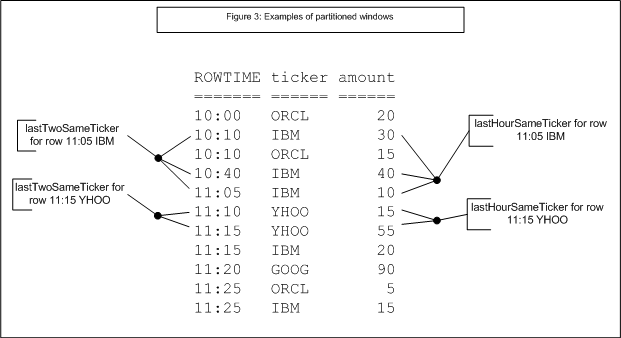
As shown on the right side of the figure below, the time-based lastHour window contains varying numbers of rows, because window membership is defined by time range.
## Examples of windows containing rows
The row-based lastThree window generally contains four rows: the three preceding and the current row. However for the row 10:10 IBM, it only contains two rows, because there is no data before 10:00.
A row-based window can contain several rows whose ROWTIME value is the same, though they arrive at different times (wall-clock times). The order of such a row in the row-based window depends on its arrival time; indeed, the row's arrival time can determine which window includes it.
For example, the middle lastThree window in Figure 1 shows the arrival of a YHOO trade with ROWTIME 11:15 (and the last three trades before it). However, this window excludes the next trade, for IBM, whose ROWTIME is also 11:15 but which must have arrived later than the YHOO trade. This 11:15 IBM trade is included in the 'next' window, as is the 11:15 YHOO trade, its immediate predecessor.
Second Example: zero width windows, row-based and time-based
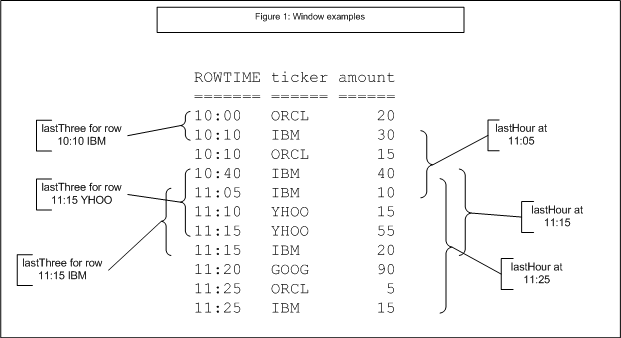
Figure 2: Examples of zero-width windows shows row-based and time-based windows of zero width. The row-based window lastZeroRows includes just the current row, and therefore always contains precisely one row. Note that ROWS CURRENT ROW is equivalent to ROWS 0 PRECEDING.
The time-based window lastZeroSeconds contains all rows with the same timestamp, of which there may be several. Note that RANGE CURRENT ROW is equivalent to RANGE INTERVAL '0' SECOND PRECEDING.
## Third Example: Partitioning applied to row-based and time-based windows
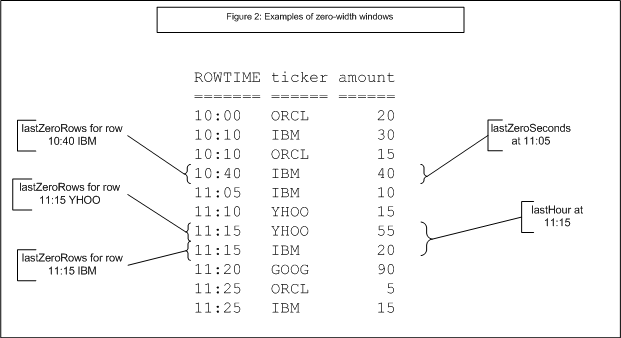
Figure 3 shows windows that are similar to those in Figure 1 but with a PARTITION BY clause. For time-based window lastTwoSameTicker and the row-based window lastHourSameTicker, the window contains rows that meet the window criteria and have the same value of the ticker column. Note: Partitions are evaluated before windows.