# View a key policies
You can view the key policy for an Amazon KMS [customer managed key](concepts.md#customer-mgn-key) or an [Amazon managed key](concepts.md#aws-managed-key) in your account by using the Amazon KMS console or the [GetKeyPolicy](https://docs.amazonaws.cn/kms/latest/APIReference/API_GetKeyPolicy.html) operation in the Amazon KMS API. You cannot use these techniques to view the key policy of a KMS key in a different Amazon Web Services account.
To learn more about Amazon KMS key policies, see [Key policies in Amazon KMS](key-policies.md). To learn how to determine which users and roles have access to a KMS key, see [Determining access to Amazon KMS keys](determining-access.md).
## Using the Amazon KMS console
Authorized users can view the key policy for an [Amazon managed key](concepts.md#aws-managed-key) or a [customer managed key](concepts.md#customer-mgn-key) on the **Key policy** tab of the Amazon Web Services Management Console.
To view the key policy for a KMS key in the Amazon Web Services Management Console, you must have [kms:ListAliases](https://docs.amazonaws.cn/kms/latest/APIReference/API_ListAliases.html), [kms:DescribeKey](https://docs.amazonaws.cn/kms/latest/APIReference/API_DescribeKey.html), and [kms:GetKeyPolicy](https://docs.amazonaws.cn/kms/latest/APIReference/API_GetKeyPolicy.html) permissions.
1. Sign in to the Amazon Web Services Management Console and open the Amazon Key Management Service (Amazon KMS) console at [https://console.amazonaws.cn/kms](https://console.amazonaws.cn/kms).
1. To change the Amazon Web Services Region, use the Region selector in the upper-right corner of the page.
1.
To view the keys in your account that Amazon creates and manages for you, in the navigation pane, choose **Amazon managed keys**. To view the keys in your account that you create and manage, in the navigation pane choose **Customer managed keys**.
1. In the list of KMS keys, choose the alias or key ID of the KMS key that you want to examine.
1. Choose the **Key policy** tab.
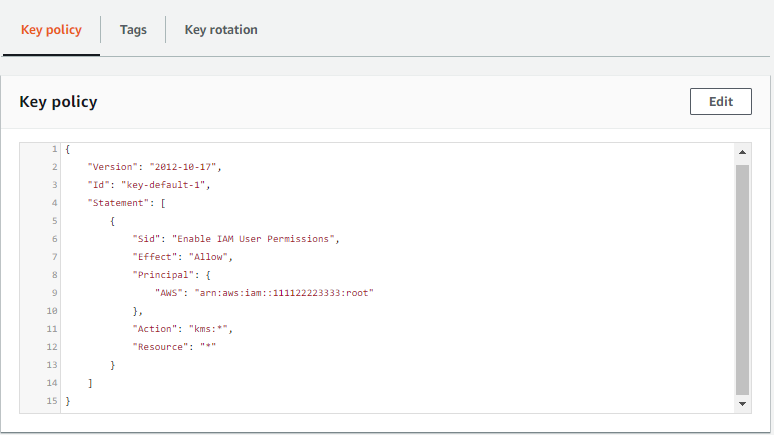
On the **Key policy** tab, you might see the key policy document. This is *policy view*. In the key policy statements, you can see the principals who have been given access to the KMS key by the key policy, and you can see the actions they can perform.
The following example shows the policy view for the [default key policy](key-policy-default.md).
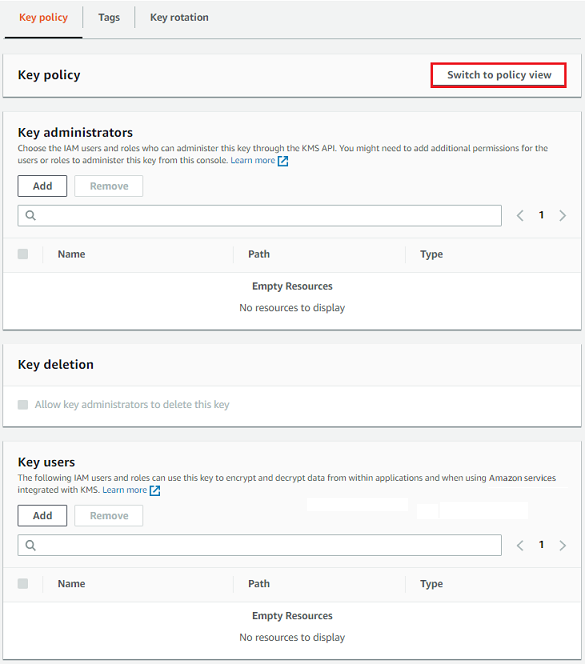
Or, if you created the KMS key in the Amazon Web Services Management Console, you will see the *default view* with sections for **Key administrators**, **Key deletion**, and **Key Users**. To see the key policy document, choose **Switch to policy view**.
The following example shows the default view for the [default key policy](key-policy-default.md).
## Using the Amazon KMS API
To get the key policy for a KMS key in your Amazon Web Services account, use the [GetKeyPolicy](https://docs.amazonaws.cn/kms/latest/APIReference/API_GetKeyPolicy.html) operation in the Amazon KMS API. You cannot use this operation to view a key policy in a different account.
The following example uses the [get-key-policy](https://docs.amazonaws.cn/cli/latest/reference/kms/get-key-policy.html) command in the Amazon Command Line Interface (Amazon CLI), but you can use any Amazon SDK to make this request.
Note that the `PolicyName` parameter is required even though `default` is its only valid value. Also, this command requests the output in text, rather than JSON, to make it easier to view.
Before running this command, replace the example key ID with a valid one from your account.
```
$ aws kms get-key-policy --key-id {{1234abcd-12ab-34cd-56ef-1234567890ab}} --policy-name default --output text
```
The response should be similar to the following one, which returns the [default key policy](key-policy-default.md).
------
#### [ JSON ]
****
```
{
"Version":"2012-10-17",
"Id" : "key-consolepolicy-3",
"Statement" : [ {
"Sid" : "EnableIAMUserPermissions",
"Effect" : "Allow",
"Principal" : {
"AWS" : "arn:aws-cn:iam::{{111122223333}}:root"
},
"Action" : "kms:*",
"Resource" : "*"
} ]
}
```
------