Automatic semantic enrichment for Serverless
Overview
The automatic semantic enrichment feature can help improve search relevance by up to 20% over lexical search. Automatic semantic enrichment eliminates the undifferentiated heavy lifting of managing your own ML (machine learning) model infrastructure and integration with the search engine. The feature is available for all three serverless collection types: Search, Time Series, and Vector.
Semantic search concepts
Traditional search engines rely on word-to-word matching (referred to as lexical search) to find results for queries. Although this works well for specific queries such as television model numbers, it might not return relevant results for more abstract searches. For example, when searching for "shoes for the beach," a lexical search merely matches individual words "shoes," "beach," "for," and "the" in catalog items, potentially missing relevant products like "water-resistant sandals" or "surf footwear" that don't contain the exact search terms.
Semantic search returns query results that incorporate not just keyword matching, but the intent and contextual meaning of the user's search. For example, if a user searches for "how to treat a headache," a semantic search system might return the following results:
-
Migraine remedies
-
Pain management techniques
-
Over-the-counter pain relievers
Model details and performance benchmark
Although this feature handles the technical complexities behind the scenes without exposing the underlying model, the following model description and benchmark results help you make informed decisions about feature adoption in your critical workloads.
Automatic semantic enrichment uses a service-managed, pre-trained sparse model that works effectively without requiring custom fine-tuning.
The model analyzes the fields you specify, expanding them into sparse vectors based on learned associations from diverse training data.
The expanded terms and their significance weights are stored in native Lucene index format for efficient retrieval.
We’ve optimized this process using document-only mode
Performance validation during feature development used the MS MARCO
-
English language - Relevance improvement of 20% over lexical search. It also lowered P90 search latency by 7.7% over lexical search (BM25 is 26 ms, and automatic semantic enrichment is 24 ms).
-
Multi-lingual - Relevance improvement of 105% over lexical search, whereas P90 search latency increased by 38.4% over lexical search (BM25 is 26 ms, and automatic semantic enrichment is 36 ms).
Given the unique nature of each workload, you can evaluate this feature in your development environment using your own benchmarking criteria before making implementation decisions.
Languages supported
The feature supports English. In addition, the model also supports Arabic, Bengali, Chinese, Finnish, French, Hindi, Indonesian, Japanese, Korean, Persian, Russian, Spanish, Swahili, and Telugu.
Set up an automatic semantic enrichment index for serverless collections
You can set up an index with automatic semantic enrichment enabled for your text fields through the console, APIs, and Amazon CloudFormation templates during new index creation. To enable it for an existing index, you must recreate the index with automatic semantic enrichment enabled for text fields.
With the Amazon console, you can create an index with automatic semantic enrichment fields. After you select a collection, you can find the Create index button at the top of the console. After you choose Create index, the console provides options to define automatic semantic enrichment fields. In one index, you can have combinations of automatic semantic enrichment for English and multilingual, as well as lexical fields.
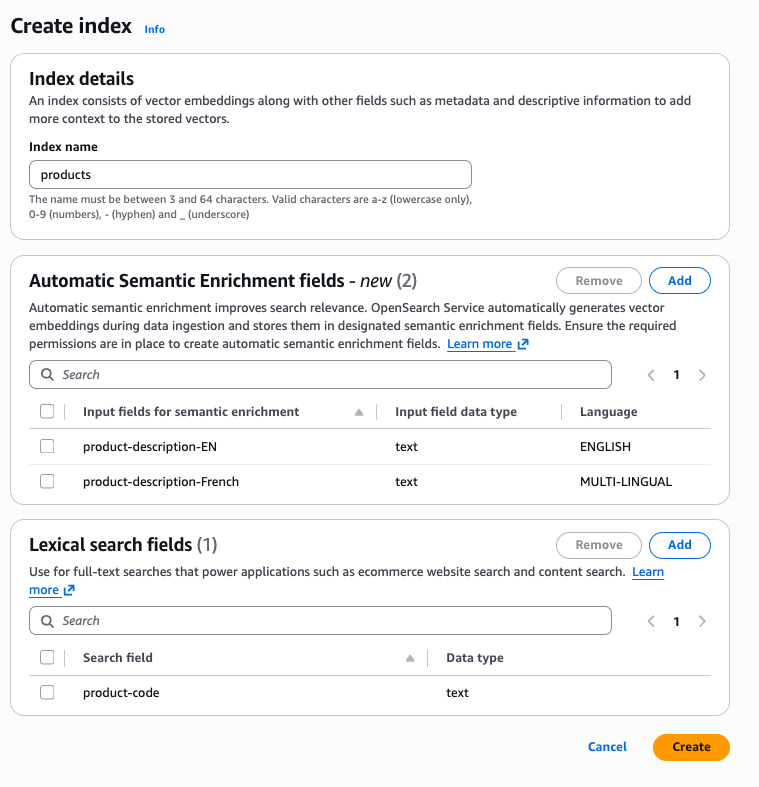
To create an automatic semantic enrichment index using the Amazon Command Line Interface (Amazon CLI), use the create-index command:
aws opensearchserverless create-index \
--id [collection_id] \
--index-name [index_name] \
--index-schema [index_body] \
In the following example index-schema, the title_semantic field has a field type set to text and has parameter
semantic_enrichment set to status ENABLED.
Setting the semantic_enrichment parameter enables automatic semantic enrichment on the title_semantic field.
You can use the language_options field to specify either english or multi-lingual.
    aws opensearchserverless create-index \
    --id XXXXXXXXX \
    --index-name 'product-catalog' \
    --index-schema '{
    "mappings": {
        "properties": {
            "product_id": {
                "type": "keyword"
            },
            "title_semantic": {
                "type": "text",
                "semantic_enrichment": {
                    "status": "ENABLED",
                    "language_options": "english"
                }
            },
            "title_non_semantic": {
                "type": "text"
            }
        }
    }
}'
To describe the created index, use the following command:
aws opensearchserverless get-index \
--id [collection_id] \
--index-name [index_name] \
You can also use Amazon CloudFormation templates (Type:AWS::OpenSearchServerless::CollectionIndex) to create semantic search during collection provisioning as well as after the collection is created.
Update an existing index
You can update an existing index to add new semantic enrichment fields, enable or disable
semantic enrichment on existing fields, or add non-semantic text fields. Use the
update-index command and provide only the fields you want to change in the
index-schema. Fields not included in the request are left
unchanged.
Note
Index settings cannot be updated. If you include a
settings block in the request, the operation returns a validation
error. To change index settings, you must delete and recreate the index.
To update an index using the Amazon CLI, use the update-index command:
aws opensearchserverless update-index \
--id [collection_id] \
--index-name [index_name] \
--index-schema [index_body]
Add a new semantic enrichment field
You can add a new text field with semantic enrichment enabled to an
existing index. The service automatically sets up the required ML model, ingest
pipeline, and search pipeline. New documents indexed after the update are enriched
automatically.
Important
Existing documents are not backfilled. To populate the semantic enrichment field on existing documents, you must re-ingest them after the update. Until re-ingested, existing documents will not benefit from semantic search on the new field.
aws opensearchserverless update-index \
--id my-collection-id \
--index-name product-catalog \
--index-schema '{
    "mappings": {
        "properties": {
            "description": {
                "type": "text",
                "semantic_enrichment": {
                    "status": "ENABLED",
                    "language_options": "english"
                }
            }
        }
    }
}'
Disable semantic enrichment on a field
To disable semantic enrichment on a field that currently has it enabled, set
status to DISABLED. The field is removed from the ingest
and search pipelines. The underlying text field and its embedding field remain in the
index but are no longer enriched.
aws opensearchserverless update-index \
--id my-collection-id \
--index-name product-catalog \
--index-schema '{
    "mappings": {
        "properties": {
            "title_semantic": {
                "type": "text",
                "semantic_enrichment": {
                    "status": "DISABLED"
                }
            }
        }
    }
}'
Update limitations
The following operations are not supported by update-index and require
you to delete and recreate the index:
-
Changing
language_optionson a field that currently has semantic enrichment enabled. Disable the field first, then re-enable it with the new language option. -
Updating nested fields. Semantic enrichment is only supported on top-level
textfields. -
Updating index
settings.
Note
If the index has a custom ingest or search pipeline that was not created by automatic semantic enrichment, the update operation is blocked. Remove the custom pipeline before adding semantic enrichment fields.
Data ingestion and search
After you create an index with automatic semantic enrichment enabled, the feature works automatically during data ingestion process, no additional configuration required.
Data ingestion: When you add documents to your index, the system automatically:
-
Analyzes the text fields you designated for semantic enrichment
-
Generates semantic encodings using OpenSearch Service managed sparse model
-
Stores these enriched representations alongside your original data
This process uses OpenSearch's built-in ML connectors and ingest pipelines, which are created and managed automatically behind the scenes.
Search: The semantic enrichment data is already indexed, so queries run efficiently without invoking the ML model again. This means you get improved search relevance with no additional search latency overhead.
Configuring permissions for automatic semantic enrichment
Before creating an automated semantic enrichment index, you must configure the required permissions. This section explains the permissions needed and how to set them up.
IAM policy permissions
Use the following Amazon Identity and Access Management (IAM) policy to grant the necessary permissions for working with automatic semantic enrichment:
- Key permissions
-
-
The
aoss:*Indexpermissions enable index management -
The
aoss:APIAccessAllpermission allows OpenSearch API operations -
To restrict permissions to a specific collection, replace
"Resource": "*"with the collection's ARN
-
Configure data access permissions
To set up an index for automatic semantic enrichment, you must have appropriate data access policies that grant permission to access index, pipeline, and model collection resources. For more information about data access policies, see Data access control for Amazon OpenSearch Serverless. For the procedure to configure a data access policy, see Creating data access policies (console).
Data access permissions
[
    {
        "Description": "Create index permission",
        "Rules": [
            {
                "ResourceType": "index",
                "Resource": ["index/collection_name/*"],
                "Permission": [
                  "aoss:CreateIndex",
                  "aoss:DescribeIndex",
                  "aoss:UpdateIndex",
                  "aoss:DeleteIndex"
                ]
            }
        ],
        "Principal": [
            "arn:aws:iam::account_id:role/role_name"
        ]
    },
    {
        "Description": "Create pipeline permission",
        "Rules": [
            {
                "ResourceType": "collection",
                "Resource": ["collection/collection_name"],
                "Permission": [
                  "aoss:CreateCollectionItems",
                  "aoss:DescribeCollectionItems"
                ]
            }
        ],
        "Principal": [
            "arn:aws:iam::account_id:role/role_name"
        ]
    },
    {
        "Description": "Create model permission",
        "Rules": [
            {
                "ResourceType": "model",
                "Resource": ["model/collection_name/*"],
                "Permission": ["aoss:CreateMLResource"]
            }
        ],
        "Principal": [
            "arn:aws:iam::account_id:role/role_name"
        ]
    },
]
Network access permissions
To allow service APIs to access private collections, you must configure network policies that permit the required access between the service API and the collection. For more information about network policies, see Network access for Amazon OpenSearch Serverless .
[
   {
      "Description":"Enable automatic semantic enrichment in a private collection",
      "Rules":[
         {
            "ResourceType":"collection",
            "Resource":[
               "collection/collection_name"
            ]
         }
      ],
      "AllowFromPublic":false,
      "SourceServices":[
         "aoss.amazonaws.com"
      ],
   }
]
To configure network access permissions for a private collection
-
Sign in to the OpenSearch Service console at https://console.aws.amazon.com/aos/home
. -
In the left navigation pane, choose Network policies. Then do one of the following:
-
Choose an existing policy name and choose Edit
-
Choose Create network policy and configure the policy details
-
-
In the Access type area, choose Private (recommended), and then select Amazon service private access.
-
In the search field, choose Service, and then choose aoss.amazonaws.com.
-
In the Resource type area, select the Enable access to OpenSearch endpoint checkbox.
-
For Search collection(s), or input specific prefix term(s), in the search field, select Collection Name. Then enter or select the name of the collections to associate with the network policy.
-
Choose Create for a new network policy or Update for an existing network policy.
Supported Amazon Web Services Regions
Automatic semantic enrichment for OpenSearch Serverless is available in the following Amazon Web Services Regions:
US East (N. Virginia)
US East (Ohio)
US West (Oregon)
Asia Pacific (Mumbai)
Asia Pacific (Singapore)
Asia Pacific (Sydney)
Asia Pacific (Tokyo)
Europe (Frankfurt)
Europe (Ireland)
Europe (Stockholm)
Europe (Spain)
Query rewrites
Automatic semantic enrichment automatically converts your existing “match” queries to semantic search queries without requiring query modifications. If a match query is part of a compound query, the system traverses your query structure, finds match queries, and replaces them with neural sparse queries. Currently, the feature only supports replacing “match” queries, whether it’s a standalone query or part of a compound query. “multi_match” is not supported. In addition, the feature supports all compound queries to replace their nested match queries. Compound queries include: bool, boosting, constant_score, dis_max, function_score, and hybrid.
Limitations of automatic semantic enrichment
Automatic semantic search is most effective when applied to small-to-medium sized fields containing natural language content, such as movie titles, product descriptions, reviews, and summaries. Although semantic search enhances relevance for most use cases, it might not be optimal for certain scenarios. Consider the following limitations when deciding whether to implement automatic semantic enrichment for your specific use case.
-
Very long documents – The current sparse model processes only the first 8,192 tokens of each document for English. For multilingual documents, it’s 512 tokens. For lengthy articles, consider implementing document chunking to ensure complete content processing.
-
Log analysis workloads – Semantic enrichment significantly increases index size, which might be unnecessary for log analysis where exact matching typically suffices. The additional semantic context rarely improves log search effectiveness enough to justify the increased storage requirements.
-
Automatic semantic enrichment is not compatible with the Derived Source feature.
Pricing
Amazon OpenSearch Service bills automatic semantic enrichment based on OpenSearch Compute Units (OCUs) consumed during sparse vector generation at indexing time. You're charged only for actual usage during indexing for the text fields where you enabled automatic semantic enrichment. One Semantic Search OCU can process 11.1 million tokens for English content. To process 2.4 billion tokens, you'd need about 216 Semantic Search OCU-hours (2.4 billion / 11.10 million). With a price of $0.24 per Semantic Search OCU-hour, the cost for processing 10 GB of data for automatic semantic search would be $51 (216 OCU-hours x $0.24/OCU-hour). There are no additional Semantic Search OCU charges during search operations or for data storage.
You can monitor this consumption using the Amazon CloudWatch metric
SemanticSearchOCU. For specific details about model token
limits, volume throughput per OCU, and an example of a sample calculation,
visit OpenSearch Service Pricing