# Adding Amazon Web Services Support costs to your estimates
You can add Amazon Web Services Support costs to your estimates using the Amazon Pricing Calculator. You can either directly choose your preferred support plan, or complete the recommendations that match your usage needs. You can change your Amazon Web Services Support within the calculator at any time.
## Procedure
**To add Amazon Web Services Support costs to your estimates**
1. Open Amazon Pricing Calculator at [https://calculator.amazonaws.cn/](https://calculator.amazonaws.cn/).
1. Choose **Create estimate**.
1. Add a service to your estimate. For more information, see [Create and configure an estimate](bjs-create-estimate.md)
1. In your **My Estimate** page, choose **Add support**.

1. (Optional) Enter a description for your support plan estimate.
1. (Optional) Choose an **Enhanced technical support** level from the dropdown list that appears.
1. (Optional) Choose a **High severity response** time from the dropdown list that appears..
**Note**
Some of the Support recommendation options might not be available. This depends on the **Enhanced technical support** level and **High severity response** times you selected.
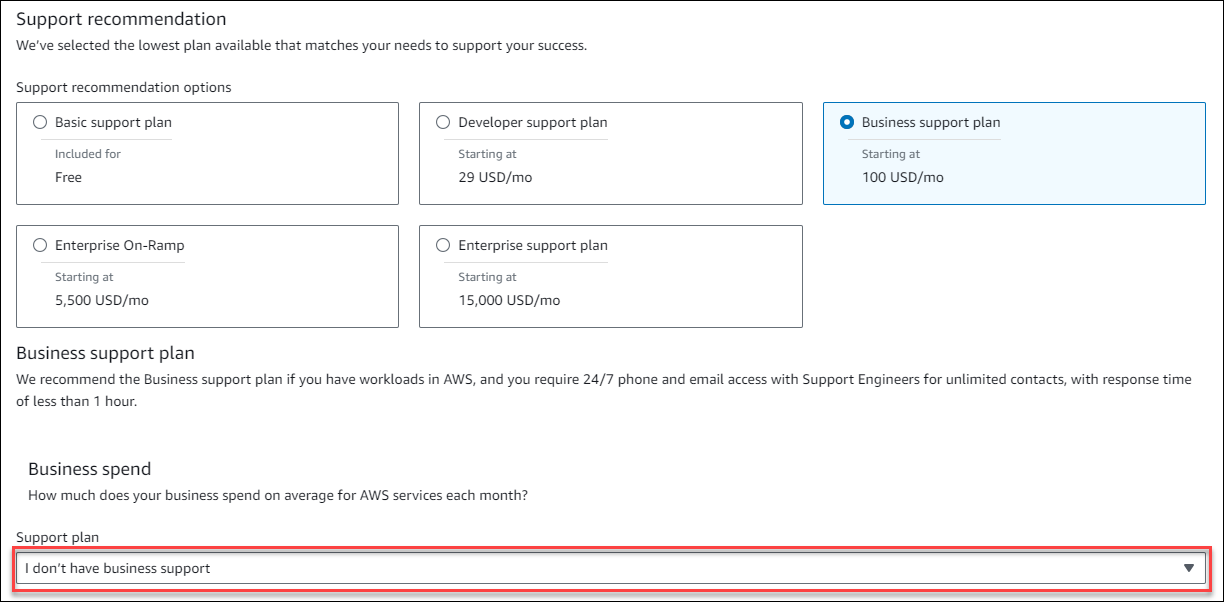
1. Choose a **Support recommendation** option.
1. If you chose a **Business support plan** or **Enterprise support plan**, choose the range of how much your business or enterprise spends on average for Amazon services each month.
1. (Optional) Choose **Show calculations** to review the calculations behind the estimates.
1. Choose **Add to my estimate**.
1. If you chose a **Business support plan** or **Enterprise support plan**, choose **Confirm** in the prompt that appears. Then, choose **Add to my estimate**.