Image Label Verification
Note
Amazon SageMaker Ground Truth is no longer open to new customers. Existing customers can continue to use the service as normal. Amazon continues to invest in security and availability improvements for Ground Truth, but we do not plan to introduce new features.
Building a highly accurate training dataset for your machine learning (ML) algorithm is an iterative process. Typically, you review and continuously adjust your labels until you are satisfied that they accurately represent the ground truth, or what is directly observable in the real world. You can use an Amazon SageMaker Ground Truth image label verification task to direct workers to review a dataset's labels and improve label accuracy. Workers can indicate if the existing labels are correct or rate label quality. They can also add comments to explain their reasoning. Amazon SageMaker Ground Truth supports label verification for Classify image objects using a bounding box and Identify image contents using semantic segmentation labels. You create an image label verification labeling job using the Ground Truth section of the Amazon SageMaker AI console or the CreateLabelingJob operation.
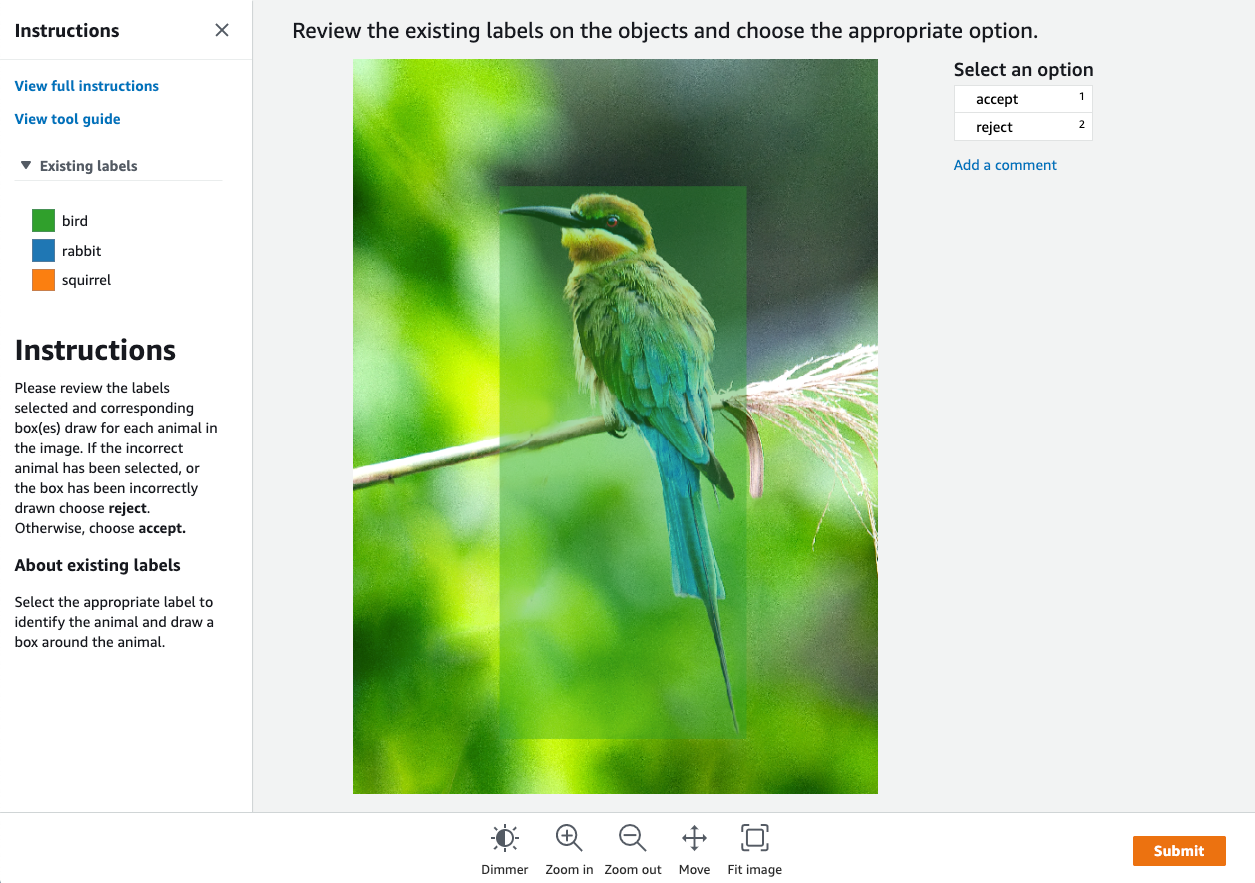
Ground Truth provides a worker console similar to the following for labeling tasks. When you create the labeling job with the console, you can modify the images and content that are shown. To learn how to create a labeling job using the Ground Truth console, see Create a Labeling Job (Console).
You can create a label verification labeling job using the SageMaker AI console or API. To learn
how to create a labeling job using the Ground Truth API operation CreateLabelingJob,
see Create a Labeling Job (API).