# Using a custom vocabulary
Once your custom vocabulary is created, you can include it in your transcription requests; refer to the following sections for examples.
The language of the custom vocabulary you're including in your request must match the language code you specify for your media. If the languages don't match, your custom vocabulary is not applied to your transcription and there are no warnings or errors.
## Using a custom vocabulary in a batch transcription
To use a custom vocabulary with a batch transcription, see the following for examples:
### Amazon Web Services Management Console
1. Sign in to the [Amazon Web Services Management Console](https://console.amazonaws.cn/transcribe/).
1. In the navigation pane, choose **Transcription jobs**, then select **Create job** (top right). This opens the **Specify job details** page.
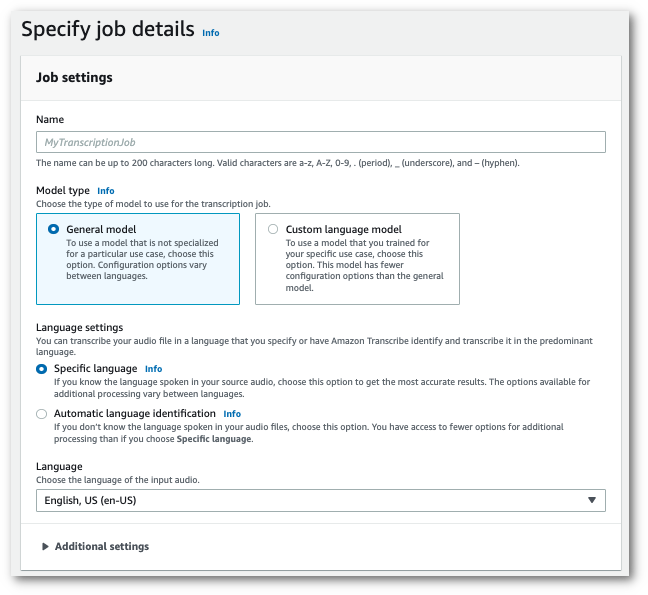
Name your job and specify your input media. Optionally include any other fields, then choose **Next**.
1. At the bottom of the **Configure job** page, in the **Customization** panel, toggle on **Custom vocabulary**.
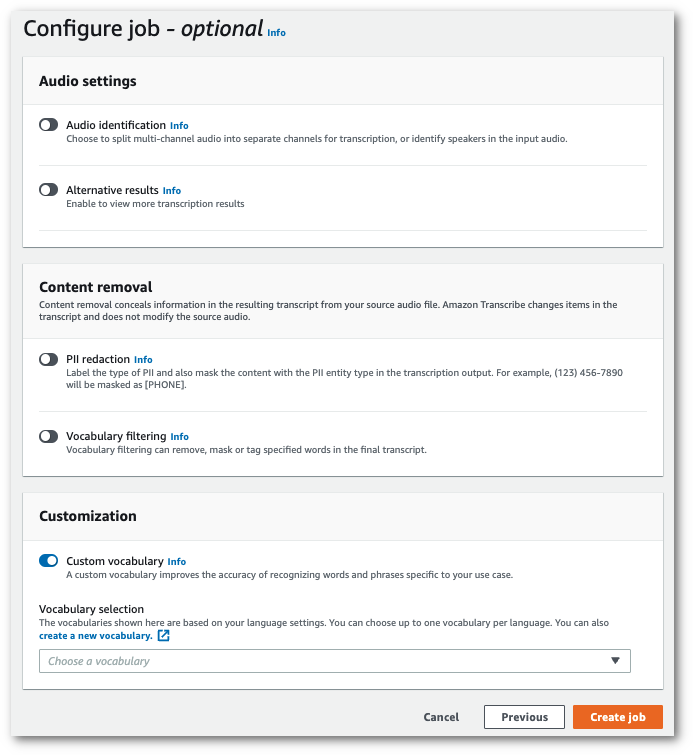
1. Select your custom vocabulary from the dropdown menu.
Select **Create job** to run your transcription job.
### Amazon CLI
This example uses the [start-transcription-job](https://awscli.amazonaws.com/v2/documentation/api/latest/reference/transcribe/start-transcription-job.html) command and `Settings` parameter with the `VocabularyName` sub-parameter. For more information, see [https://docs.amazonaws.cn/transcribe/latest/APIReference/API_StartTranscriptionJob.html](https://docs.amazonaws.cn/transcribe/latest/APIReference/API_StartTranscriptionJob.html) and [https://docs.amazonaws.cn/transcribe/latest/APIReference/API_Settings.html](https://docs.amazonaws.cn/transcribe/latest/APIReference/API_Settings.html).
```
aws transcribe start-transcription-job \
--region {{us-west-2}} \
--transcription-job-name {{my-first-transcription-job}} \
--media MediaFileUri=s3://{{amzn-s3-demo-bucket}}/{{my-input-files}}/{{my-media-file}}.{{flac}} \
--output-bucket-name {{amzn-s3-demo-bucket}} \
--output-key {{my-output-files}}/ \
--language-code {{en-US}} \
--settings VocabularyName={{my-first-vocabulary}}
```
Here's another example using the [start-transcription-job](https://awscli.amazonaws.com/v2/documentation/api/latest/reference/transcribe/start-transcription-job.html) command, and a request body that includes your custom vocabulary with that job.
```
aws transcribe start-transcription-job \
--region {{us-west-2}} \
--cli-input-json file://{{my-first-vocabulary-job}}.json
```
The file *my-first-vocabulary-job.json* contains the following request body.
```
{
"TranscriptionJobName": "{{my-first-transcription-job}}",
"Media": {
"MediaFileUri": "s3://{{amzn-s3-demo-bucket}}/{{my-input-files}}/{{my-media-file}}.{{flac}}"
},
"OutputBucketName": "{{amzn-s3-demo-bucket}}",
"OutputKey": "{{my-output-files}}/",
"LanguageCode": "{{en-US}}",
"Settings": {
"VocabularyName": "{{my-first-vocabulary}}"
}
}
```
### Amazon SDK for Python (Boto3)
This example uses the Amazon SDK for Python (Boto3) to include a custom vocabulary using the `Settings` argument for the [start\_transcription\_job](https://boto3.amazonaws.com/v1/documentation/api/latest/reference/services/transcribe.html#TranscribeService.Client.start_transcription_job) method. For more information, see [https://docs.amazonaws.cn/transcribe/latest/APIReference/API_StartTranscriptionJob.html](https://docs.amazonaws.cn/transcribe/latest/APIReference/API_StartTranscriptionJob.html) and [https://docs.amazonaws.cn/transcribe/latest/APIReference/API_Settings.html](https://docs.amazonaws.cn/transcribe/latest/APIReference/API_Settings.html).
For additional examples using the Amazon SDKs, including feature-specific, scenario, and cross-service examples, refer to the [Code examples for Amazon Transcribe using Amazon SDKs](service_code_examples.md) chapter.
```
from __future__ import print_function
import time
import boto3
transcribe = boto3.client('transcribe', '{{us-west-2}}')
job_name = "{{my-first-transcription-job}}"
job_uri = "s3://{{amzn-s3-demo-bucket}}/{{my-input-files}}/{{my-media-file}}.{{flac}}"
transcribe.start_transcription_job(
TranscriptionJobName = job_name,
Media = {
'MediaFileUri': job_uri
},
OutputBucketName = '{{amzn-s3-demo-bucket}}',
OutputKey = '{{my-output-files}}/',
LanguageCode = '{{en-US}}',
Settings = {
'VocabularyName': '{{my-first-vocabulary}}'
}
)
while True:
status = transcribe.get_transcription_job(TranscriptionJobName = job_name)
if status['TranscriptionJob']['TranscriptionJobStatus'] in ['COMPLETED', 'FAILED']:
break
print("Not ready yet...")
time.sleep(5)
print(status)
```
## Using a custom vocabulary in a streaming transcription
To use a custom vocabulary with a streaming transcription, see the following for examples:
### Amazon Web Services Management Console
1. Sign into the [Amazon Web Services Management Console](https://console.amazonaws.cn/transcribe/).
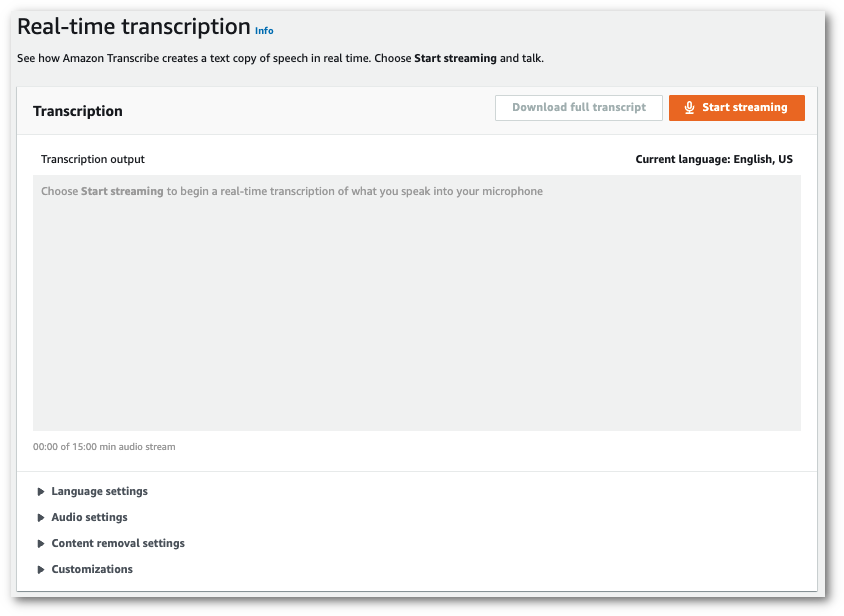
1. In the navigation pane, choose **Real-time transcription**. Scroll down to **Customizations** and expand this field if it is minimized.
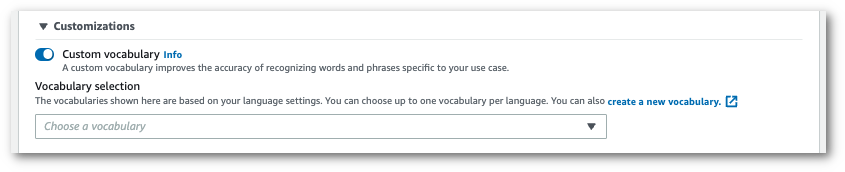
1. Toggle on **Custom vocabulary** and select a custom vocabulary from the dropdown menu.
Include any other settings that you want to apply to your stream.
1. You're now ready to transcribe your stream. Select **Start streaming** and begin speaking. To end your dictation, select **Stop streaming**.
### HTTP/2 stream
This example creates an HTTP/2 request that includes your custom vocabulary. For more information on using HTTP/2 streaming with Amazon Transcribe, see [Setting up an HTTP/2 stream](streaming-setting-up.md#streaming-http2). For more detail on parameters and headers specific to Amazon Transcribe, see [https://docs.amazonaws.cn/transcribe/latest/APIReference/API_streaming_StartStreamTranscription.html](https://docs.amazonaws.cn/transcribe/latest/APIReference/API_streaming_StartStreamTranscription.html).
```
POST /stream-transcription HTTP/2
host: transcribestreaming.{{us-west-2}}.amazonaws.com
X-Amz-Target: com.amazonaws.transcribe.Transcribe.{{StartStreamTranscription}}
Content-Type: application/vnd.amazon.eventstream
X-Amz-Content-Sha256: {{string}}
X-Amz-Date: {{20220208}}T{{235959}}Z
Authorization: AWS4-HMAC-SHA256 Credential={{access-key}}/{{20220208}}/{{us-west-2}}/transcribe/aws4_request, SignedHeaders=content-type;host;x-amz-content-sha256;x-amz-date;x-amz-target;x-amz-security-token, Signature={{string}}
x-amzn-transcribe-language-code: {{en-US}}
x-amzn-transcribe-media-encoding: {{flac}}
x-amzn-transcribe-sample-rate: {{16000}}
x-amzn-transcribe-vocabulary-name: {{my-first-vocabulary}}
transfer-encoding: chunked
```
Parameter definitions can be found in the [API Reference](https://docs.amazonaws.cn/transcribe/latest/APIReference/API_Reference.html); parameters common to all Amazon API operations are listed in the [Common Parameters](https://docs.amazonaws.cn/transcribe/latest/APIReference/CommonParameters.html) section.
### WebSocket stream
This example creates a presigned URL that applies your custom vocabulary to a WebSocket stream. Line breaks have been added for readability. For more information on using WebSocket streams with Amazon Transcribe, see [Setting up a WebSocket stream](streaming-setting-up.md#streaming-websocket). For more detail on parameters, see [https://docs.amazonaws.cn/transcribe/latest/APIReference/API_streaming_StartStreamTranscription.html](https://docs.amazonaws.cn/transcribe/latest/APIReference/API_streaming_StartStreamTranscription.html).
```
GET wss://transcribestreaming.{{us-west-2}}.amazonaws.com:8443/stream-transcription-websocket?
&X-Amz-Algorithm=AWS4-HMAC-SHA256
&X-Amz-Credential={{AKIAIOSFODNN7EXAMPLE}}%2F{{20220208}}%2F{{us-west-2}}%2F{{transcribe}}%2Faws4_request
&X-Amz-Date={{20220208}}T{{235959}}Z
&X-Amz-Expires={{300}}
&X-Amz-Security-Token={{security-token}}
&X-Amz-Signature={{string}}
&X-Amz-SignedHeaders=content-type%3Bhost%3Bx-amz-date
&language-code={{en-US}}
&media-encoding={{flac}}
&sample-rate={{16000}}
&vocabulary-name={{my-first-vocabulary}}
```
Parameter definitions can be found in the [API Reference](https://docs.amazonaws.cn/transcribe/latest/APIReference/API_Reference.html); parameters common to all Amazon API operations are listed in the [Common Parameters](https://docs.amazonaws.cn/transcribe/latest/APIReference/CommonParameters.html) section.