# Allocate EC2 instance data transfer
When you associate a Networking Flexible Cost Allocation (FCA) policy with an Amazon EC2 instance, the data transfer charges for traffic between that instance and a directly connected peer instance in the same VPC are itemized by the peer instance that generated the usage, at the granularity that you choose in the policy. Without a policy, the charges appear only against the instance.
The resource type for these policies is `ec2`.
The following rules apply to Amazon EC2 instance policies:
+ You can allocate the `data-transfer` dimension. There is no data processing charge for an Amazon EC2 instance.
+ The supported reporting granularities are `eni`, `ec2`, `subnet`, `vpc`, `account`, and `cidr`.
+ Allocation applies to traffic between two instances that are directly connected in the same VPC. If a device such as a transit gateway, load balancer, firewall, or NAT gateway is between the two instances, the traffic isn't allocated. To allocate data transfer between instances in different VPCs over a VPC peering connection, use a `pcx` policy instead. For more information, see [Allocate VPC peering data transfer](networking-flex-cost-allocation-pcx.md).
+ Allocation doesn't apply to traffic that goes to the internet. To allocate the cost of traffic that goes to the internet through a NAT gateway, see [Allocate NAT gateway costs](networking-flex-cost-allocation-natgw.md).
+ If the resource that generated the usage for a flow can't be determined, the usage for that flow is billed as usual.
## Example – Allocate data transfer by peer instance
In the following example, instance A is in one Availability Zone of a VPC. It exchanges data with instance B and instance C, which are in another Availability Zone of the same VPC. Data transfer between Availability Zones is charged. You want to know how much of the data transfer charges for instance A each peer instance accounts for.
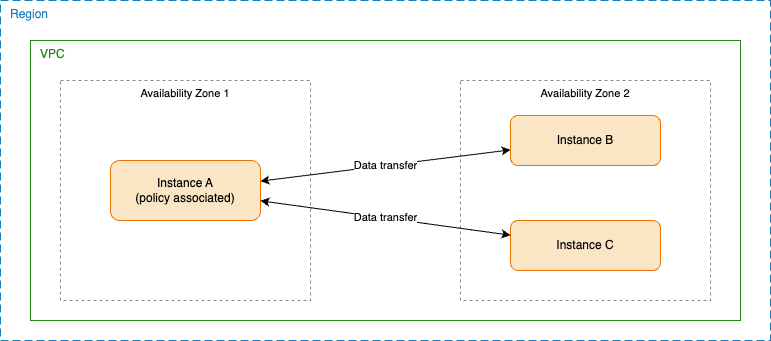
You create the following policy and associate it with instance A, using the Amazon VPC console, the Amazon CLI, or Amazon CloudFormation. The policy allocates data transfer at Amazon EC2 instance granularity.
------
#### [ Amazon Web Services Management Console ]
**To create the policy in the console**
1. Open the Amazon VPC console at [https://console.amazonaws.cn/vpc/](https://console.amazonaws.cn/vpc/).
1. In the navigation pane, choose **Networking flexible cost allocation policies**.
1. Choose **Create policy**.
1. For **Resource type**, choose **EC2 instance**.
1. For **Dimensions**, choose **Data transfer**.
1. For **Reporting granularity**, choose **EC2 instance**.
1. Choose **Next**, select instance A, and then choose **Next**.
1. Review the policy, and then choose **Create policy**.
------
#### [ Amazon CLI ]
Create the policy, and then associate it with instance A.
```
aws ec2 create-networking-flex-cost-allocation-policy \
--network-resource-type ec2 \
--instance-fca-policy-document '{"ReportingGranularity":["ec2"],"Dimensions":["data-transfer"]}' \
--show-back-enabled \
--description "Allocate instance A data transfer by peer instance"
```
```
aws ec2 associate-networking-flex-cost-allocation-policy \
--fca-policy-id fcap-0123456789abcdef0 \
--network-resource-ids i-0aaa1111bbbb2222c
```
------
#### [ Amazon CloudFormation ]
The following template creates the policy and associates it with instance A.
```
AWSTemplateFormatVersion: '2010-09-09'
Description: FCA policy that allocates instance data transfer by peer instance
Parameters:
InstanceId:
Type: AWS::EC2::Instance::Id
Description: The ID of the instance to allocate data transfer for
Resources:
InstanceFcaPolicy:
Type: AWS::EC2::FcaPolicy
Properties:
NetworkResourceType: ec2
InstanceFcaPolicyDocument:
ReportingGranularity:
- ec2
Dimensions:
- data-transfer
ShowBackEnabled: true
Description: Allocate instance A data transfer by peer instance
InstanceFcaPolicyAssociation:
Type: AWS::EC2::FcaPolicyAssociation
Properties:
FcaPolicyId: !GetAtt InstanceFcaPolicy.FcaPolicyId
NetworkResourceId: !Ref InstanceId
```
------
After the policy takes effect and you turn on the data in your Cost and Usage Reports, the data transfer for instance A is itemized by peer instance, as shown in the following table. The first line item is the summary line item for instance A. Without a policy, your report shows only this line item. The values in the table are examples.
| Shared resource | Allocated to | Owner account | Data transfer |
| --- | --- | --- | --- |
| i-0aaa (instance A) | Not applicable | Not applicable | 100 GB |
| i-0aaa (instance A) | i-0bbb (instance B) | 111111111111 | 60 GB |
| i-0aaa (instance A) | i-0ccc (instance C) | 111111111111 | 40 GB |