# Allocate NAT gateway costs
When you associate a Networking Flexible Cost Allocation (FCA) policy with a NAT gateway, the NAT gateway charges are itemized by the resource that generated the usage, at the granularity that you choose in the policy. Without a policy, all of the charges appear as a single charge against the NAT gateway.
The resource type for these policies is `natgw`. Policies apply to both zonal and regional NAT gateways.
The following rules apply to NAT gateway policies:
+ You can allocate the `data-transfer` dimension, the `data-processing` dimension, or both.
+ The supported reporting granularities are `eni`, `ec2`, `subnet`, `vpc`, `account`, and `cidr`.
+ Allocation applies to traffic that the NAT gateway sends to the internet through an internet gateway, or through a gateway VPC endpoint to Amazon S3 or Amazon DynamoDB. If the NAT gateway instead sends the traffic onward to a virtual private gateway, a transit gateway, another VPC, or a peering connection, that traffic isn't allocated.
+ If other VPCs reach the NAT gateway through a transit gateway for internet access, FCA allocates that traffic and itemizes it by the VPC and account that generated it, even if the policy specifies a more specific granularity such as `subnet`, `ec2`, or `eni`. This is by design, and keeps resource-level details from being exposed through the transit gateway.
+ If the resource that generated the usage for a flow can't be determined, the usage for that flow is billed as usual.
+ FCA meters NAT gateway traffic before a subnet network ACL can reject it. If the NAT gateway's subnet has no network ACL that denies the sender's outbound traffic, your bill is unchanged, because FCA only re-itemizes existing usage. If such a network ACL does deny that traffic, FCA includes the denied traffic in the allocated usage, and the data transfer and data processing charges for the NAT gateway can be higher than they would be without a policy. To avoid this, deny the traffic at its source with a security group rule instead.
## Label usage by CIDR range
You can use the `cidr` granularity to label usage by an IP address range that you define, instead of by an Amazon resource. In `CidrRangeSpecifications`, set `PrefixesType` to one of the following values, and provide the ranges and labels in `Prefixes`.
+ `source-prefixes` – Label usage by the IP address of the resource that sends traffic through the NAT gateway.
+ `destination-prefixes` – Label usage by the IP address of the traffic's destination.
`Prefixes` contains from 1 to 100 entries. Each entry has a `CidrRange` and a `CidrLabel`. The following rules apply.
+ A `CidrRange` is a CIDR block, for example `10.0.1.0/24`. You must specify the network address of the range, with all host bits set to zero.
+ A `CidrLabel` is 1–64 characters. It must start with a letter or a number, and can contain letters, numbers, hyphens, and underscores.
+ If ranges overlap, the usage is labeled with the most specific range that contains the address. For example, if you specify `10.0.0.0/8` and `10.0.1.0/24`, the address `10.0.1.5` is labeled with the label for `10.0.1.0/24`.
+ If multiple entries specify the same range, the first entry is used.
+ Traffic that doesn't match any range is billed as usual.
## Examples
The following examples show common ways to allocate NAT gateway costs.
### Example – Label NAT gateway costs by team
In the following example, a NAT gateway in a networking account is shared by two teams. Each team uses its own subnet range. You want the NAT gateway charges attributed to each team.
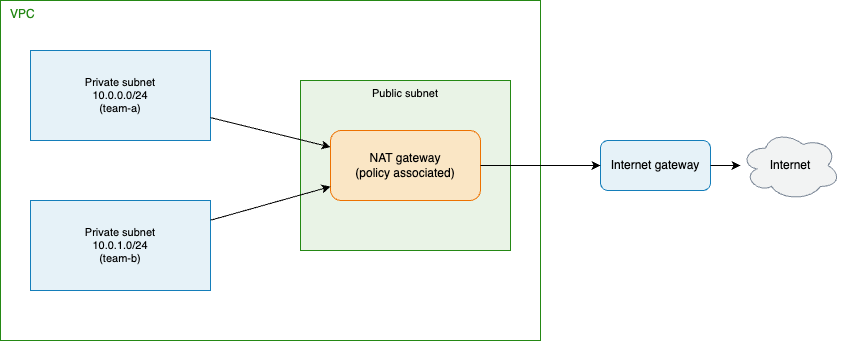
You create the following policy and associate it with the NAT gateway, using the Amazon VPC console, the Amazon CLI, or Amazon CloudFormation. The policy allocates both dimensions and labels usage by source range.
------
#### [ Amazon Web Services Management Console ]
**To create the policy in the console**
1. Open the Amazon VPC console at [https://console.amazonaws.cn/vpc/](https://console.amazonaws.cn/vpc/).
1. In the navigation pane, choose **Networking flexible cost allocation policies**.
1. Choose **Create policy**.
1. For **Resource type**, choose **NAT gateways**.
1. For **Dimensions**, choose **Data transfer** and **Data processing**.
1. For **Reporting granularity**, choose **CIDR**. For **Prefixes type**, choose **Source prefixes**, and add `10.0.0.0/24` with label `team-a` and `10.0.1.0/24` with label `team-b`.
1. Choose **Next**, select the NAT gateway, and then choose **Next**.
1. Review the policy, and then choose **Create policy**.
------
#### [ Amazon CLI ]
Create a file named `nat-policy-document.json` with the policy document.
```
{
"ReportingGranularity": ["cidr"],
"Dimensions": ["data-transfer", "data-processing"],
"CidrRangeSpecifications": {
"PrefixesType": "source-prefixes",
"Prefixes": [
{ "CidrRange": "10.0.0.0/24", "CidrLabel": "team-a" },
{ "CidrRange": "10.0.1.0/24", "CidrLabel": "team-b" }
]
}
}
```
Create the policy, and then associate it with the NAT gateway.
```
aws ec2 create-networking-flex-cost-allocation-policy \
--network-resource-type natgw \
--nat-fca-policy-document file://nat-policy-document.json \
--show-back-enabled \
--description "Allocate shared NAT gateway costs by team"
```
```
aws ec2 associate-networking-flex-cost-allocation-policy \
--fca-policy-id fcap-0123456789abcdef0 \
--network-resource-ids nat-0123456789abcdef0
```
------
#### [ Amazon CloudFormation ]
The following template creates the policy and associates it with the NAT gateway.
```
AWSTemplateFormatVersion: '2010-09-09'
Description: FCA policy that labels NAT gateway costs by team CIDR range
Parameters:
NatGatewayId:
Type: String
Description: The ID of the NAT gateway to allocate costs for
Resources:
NatFcaPolicy:
Type: AWS::EC2::FcaPolicy
Properties:
NetworkResourceType: natgw
NatFcaPolicyDocument:
ReportingGranularity:
- cidr
Dimensions:
- data-transfer
- data-processing
CidrRangeSpecifications:
PrefixesType: source-prefixes
Prefixes:
- CidrRange: 10.0.0.0/24
CidrLabel: team-a
- CidrRange: 10.0.1.0/24
CidrLabel: team-b
ShowBackEnabled: true
Description: Allocate shared NAT gateway costs by team
NatFcaPolicyAssociation:
Type: AWS::EC2::FcaPolicyAssociation
Properties:
FcaPolicyId: !GetAtt NatFcaPolicy.FcaPolicyId
NetworkResourceId: !Ref NatGatewayId
```
------
After the policy takes effect and you turn on the data in your Cost and Usage Reports, the NAT gateway data processing is itemized by team, as shown in the following table. The first line item is the summary line item for the NAT gateway. Without a policy, your report shows only this line item. The values in the table are examples.
| Shared resource | Allocated to | Owner account | Data processing |
| --- | --- | --- | --- |
| arn:aws:ec2:aa-example-1:111111111111:natgateway/nat-0abc | Not applicable | Not applicable | 500 GB |
| arn:aws:ec2:aa-example-1:111111111111:natgateway/nat-0abc | team-a | 111111111111 | 320 GB |
| arn:aws:ec2:aa-example-1:111111111111:natgateway/nat-0abc | team-b | 111111111111 | 180 GB |
### Example – Allocate a centralized NAT gateway to spoke VPCs
In the following example, a networking account runs a NAT gateway in a central egress VPC. Spoke VPCs in other accounts send their internet traffic to the egress VPC through a transit gateway. Without a policy, the networking account sees one NAT gateway charge for all of the spoke VPCs. You want the NAT gateway charges attributed to each spoke VPC.
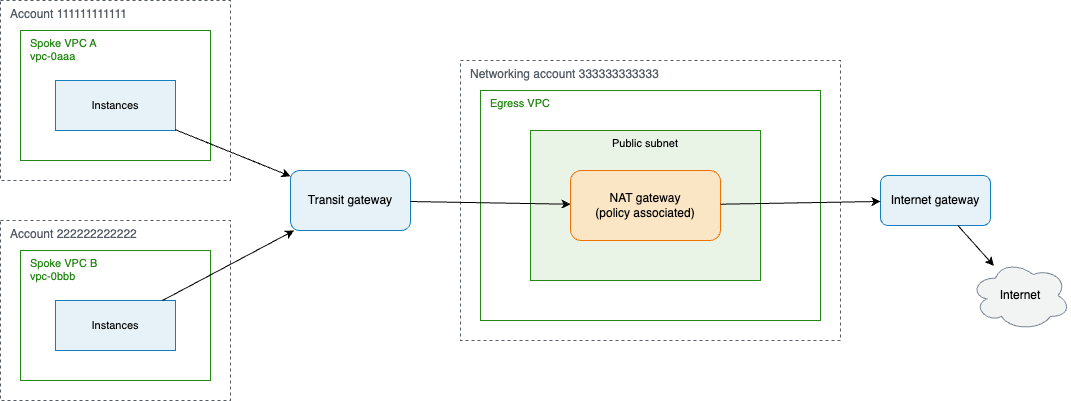
In the networking account, you create the following policy and associate it with the NAT gateway, using the Amazon VPC console, the Amazon CLI, or Amazon CloudFormation. The policy allocates both dimensions at VPC granularity.
------
#### [ Amazon Web Services Management Console ]
**To create the policy in the console**
1. Open the Amazon VPC console at [https://console.amazonaws.cn/vpc/](https://console.amazonaws.cn/vpc/).
1. In the navigation pane, choose **Networking flexible cost allocation policies**.
1. Choose **Create policy**.
1. For **Resource type**, choose **NAT gateways**.
1. For **Dimensions**, choose **Data transfer** and **Data processing**.
1. For **Reporting granularity**, choose **VPC**.
1. Choose **Next**, select the NAT gateway in the networking account, and then choose **Next**.
1. Review the policy, and then choose **Create policy**.
------
#### [ Amazon CLI ]
Create the policy, and then associate it with the NAT gateway in the networking account.
```
aws ec2 create-networking-flex-cost-allocation-policy \
--network-resource-type natgw \
--nat-fca-policy-document '{"ReportingGranularity":["vpc"],"Dimensions":["data-transfer","data-processing"]}' \
--show-back-enabled \
--description "Allocate centralized NAT gateway costs by spoke VPC"
```
```
aws ec2 associate-networking-flex-cost-allocation-policy \
--fca-policy-id fcap-0123456789abcdef0 \
--network-resource-ids nat-0123456789abcdef0
```
------
#### [ Amazon CloudFormation ]
The following template creates the policy and associates it with the NAT gateway.
```
AWSTemplateFormatVersion: '2010-09-09'
Description: FCA policy that allocates a centralized NAT gateway to spoke VPCs
Parameters:
NatGatewayId:
Type: String
Description: The ID of the central NAT gateway to allocate costs for
Resources:
NatFcaPolicy:
Type: AWS::EC2::FcaPolicy
Properties:
NetworkResourceType: natgw
NatFcaPolicyDocument:
ReportingGranularity:
- vpc
Dimensions:
- data-transfer
- data-processing
ShowBackEnabled: true
Description: Allocate centralized NAT gateway costs by spoke VPC
NatFcaPolicyAssociation:
Type: AWS::EC2::FcaPolicyAssociation
Properties:
FcaPolicyId: !GetAtt NatFcaPolicy.FcaPolicyId
NetworkResourceId: !Ref NatGatewayId
```
------
After the policy takes effect, the NAT gateway data processing is itemized by spoke VPC, and each line item also shows the account that owns the VPC, as shown in the following table. The first line item is the summary line item for the NAT gateway. Without a policy, the networking account's report shows only this line item. The values in the table are examples.
| Shared resource | Allocated to | Owner account | Data processing |
| --- | --- | --- | --- |
| arn:aws:ec2:aa-example-1:333333333333:natgateway/nat-0abc | Not applicable | Not applicable | 500 GB |
| arn:aws:ec2:aa-example-1:333333333333:natgateway/nat-0abc | vpc-0aaa | 111111111111 | 300 GB |
| arn:aws:ec2:aa-example-1:333333333333:natgateway/nat-0abc | vpc-0bbb | 222222222222 | 200 GB |
The following considerations apply when the NAT gateway is shared through a transit gateway.
+ Usage from spoke VPCs is itemized by VPC and account only. If the policy specifies the `subnet`, `ec2`, or `eni` granularity, usage from a spoke VPC is itemized by VPC. To itemize by account instead of by VPC, use the `account` granularity.
+ The policy allocates only the NAT gateway charges. Transit gateway charges, such as transit gateway data processing, aren't allocated by this policy.
+ You associate the policy with the NAT gateway in the networking account. You don't associate it with the spoke VPCs or the transit gateway.