Allocate VPC peering data transfer
When you associate a Networking Flexible Cost Allocation (FCA) policy with a VPC peering connection, the data transfer charges for traffic over the connection are itemized at the granularity that you choose in the policy. Without a policy, the charges appear as a single charge.
The resource type for these policies is pcx.
The following rules apply to VPC peering policies:
-
You can allocate the
data-transferdimension. There is no data processing charge for a VPC peering connection. -
The supported reporting granularities are
eni,ec2,subnet,vpc,account,peering-id, andcidr. Thepeering-idgranularity labels usage with the peering connection, and is available only for VPC peering connections. -
Allocation applies to peering connections between VPCs in the same Region.
-
You can associate a VPC peering connection with a policy only from the requester account, which is the account that owns the VPC that requested the peering connection. If you own only the accepter VPC, the request fails with an
UnauthorizedOperationerror. Configure FCA for the connection from the requester account. -
If the peer VPC is in a different account, the peer's resources might not be visible to you. In that case, usage that you specify at the
subnet,ec2, orenigranularity is labeled with the peering connection. -
To label usage by CIDR range, see Label usage by CIDR range. For a peering connection, a
PrefixesTypeofsource-prefixesmatches the IP address of the peer, anddestination-prefixesmatches the IP address of the local resource.
Example – Allocate data transfer by peering connection
In the following example, your VPC has peering connections with two other VPCs. You want to know how much data transfer each peering connection accounts for.
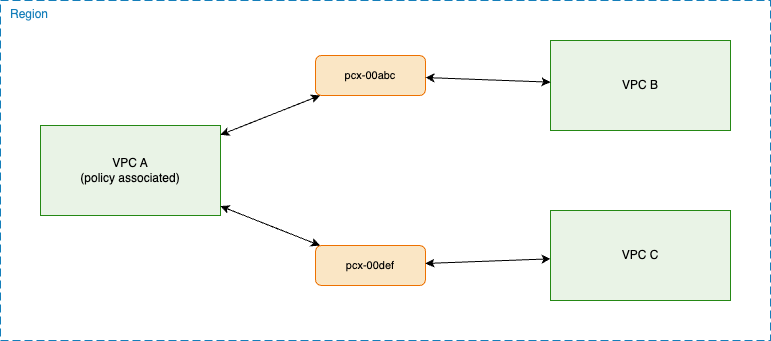
You create the following policy and associate it with your VPC, using the Amazon VPC console, the Amazon CLI, or Amazon CloudFormation. The policy allocates data transfer by peering connection, and applies to every peering connection in the VPC.
After the policy takes effect and you turn on the data in your Cost and Usage
Reports, the data transfer from an instance in your VPC is itemized by peering
connection, and each line item also shows the account that owns the peer VPC, as
shown in the following table. The first line item is the summary line item for the
instance. Without a policy, your report shows only this line item. To itemize by the
peer's account instead, use the account granularity. The values in the
table are examples.
| Shared resource | Allocated to | Owner account | Data transfer |
|---|---|---|---|
| i-0aaa | Not applicable | Not applicable | 50 GB |
| i-0aaa | pcx-00abc | 222222222222 | 30 GB |
| i-0aaa | pcx-00def | 333333333333 | 20 GB |