本文属于机器翻译版本。若本译文内容与英语原文存在差异,则一律以英文原文为准。
# 使用 `explain` 和 `profile` 调整 Gremlin 查询
[[您通常可以在 Amazon Neptune 中调整您的 Gremlin 查询以获得更好的性能,使用您从 Neptune 解释和个人资料中获得的报告中提供的信息。](gremlin-profile-api.md)](gremlin-explain-api.md) APIs为此,了解 Neptune 如何处理 Gremlin 遍历会有所帮助。
**重要**
3.4.11 TinkerPop 版本中进行了更改,提高了查询处理方式的正确性,但目前有时会严重影响查询性能。
例如,这种查询的运行速度可能会慢得多:
```
g.V().hasLabel('airport').
order().
by(out().count(),desc).
limit(10).
out()
```
由于 3.4.11 的更改,极限步骤之后的顶点现在以非最佳方式获取。 TinkerPop 为避免这种情况,您可以通过在 `order().by()` 之后的任何点添加 barrier() 步骤来修改查询。例如:
```
g.V().hasLabel('airport').
order().
by(out().count(),desc).
limit(10).
barrier().
out()
```
TinkerPop [3.4.11 已在 Neptune 引擎版本 1.0.5.0 中启用。](engine-releases-1.0.5.0.md)
## 了解 Neptune 中的 Gremlin 遍历处理
当 Gremlin 遍历发送到 Neptune 时,有三个主要过程可将遍历转换为底层执行计划供引擎执行。它们是解析、转换和优化:

### 遍历解析过程
处理遍历的第一步是将其解析为通用语言。[在 Neptune 中,通用语言是 API 中的一组 TinkerPop 步骤。TinkerPop](http://tinkerpop.apache.org/javadocs/3.4.8/full/org/apache/tinkerpop/gremlin/process/traversal/Step.html)这些步骤中的每一个都代表遍历中的一个计算单位。
您可以将 Gremlin 遍历以字符串或字节码的形式发送给 Neptune。REST 端点和 Java 客户端驱动程序 `submit()` 方法以字符串形式发送遍历,如下例所示:
```
client.submit("g.V()")
```
使用 [Gremlin 语言变体 (GLV)](https://tinkerpop.apache.org/docs/current/tutorials/gremlin-language-variants/) 的应用程序和语言驱动程序以字节码发送遍历。
### 遍历转换过程
处理遍历的第二步是将其步长转换为一组已转换和未转换的 Neptune TinkerPop 步长。Apache TinkerPop Gremlin 查询语言中的大多数步骤都转换为特定于海王星的步骤,这些步骤经过优化,可以在底层 Neptune 引擎上运行。当在遍历中遇到没有 Neptune 等效项的 TinkerPop 步骤时,查询引擎会处理该步骤和遍历中的所有后续步骤。 TinkerPop
有关在什么情况下可以转换哪些步骤的更多信息,请参阅[Gremlin 步骤支持](gremlin-step-support.md)。
### 遍历优化过程
遍历处理的最后一步是通过优化器运行一系列已转换和未转换的步骤,以尝试确定最佳的执行计划。此优化的输出是 Neptune 引擎处理的执行计划。
## 使用 Neptune Gremlin `explain` API 调整查询
Neptune Explain API 与 Gremlin `explain()` 步骤不同。它返回 Neptune 引擎在执行查询时将处理的最终执行计划。由于它不执行任何处理,因此无论使用什么参数,它都会返回相同的计划,并且其输出不包含有关实际执行的统计数据。
考虑以下简单的遍历,它可以找到安克雷奇的所有机场顶点:
```
g.V().has('code','ANC')
```
有两种方法可以通过 Neptune `explain` API 运行此遍历。第一种方法是对 Explain 端点进行 REST 调用,如下所示:
```
curl -X POST https://{{your-neptune-endpoint}}:{{port}}/gremlin/explain -d '{"gremlin":"g.V().has('code','ANC')"}'
```
第二种方法是将 Neptune Workbench 的 [%%gremlin](notebooks-magics.md#notebooks-cell-magics-gremlin) 单元格魔术命令与 `explain` 参数结合使用。这会将单元格正文中包含的遍历传递给 Neptune `explain` API,然后在运行单元格时显示结果输出:
```
%%gremlin explain
g.V().has('code','ANC')
```
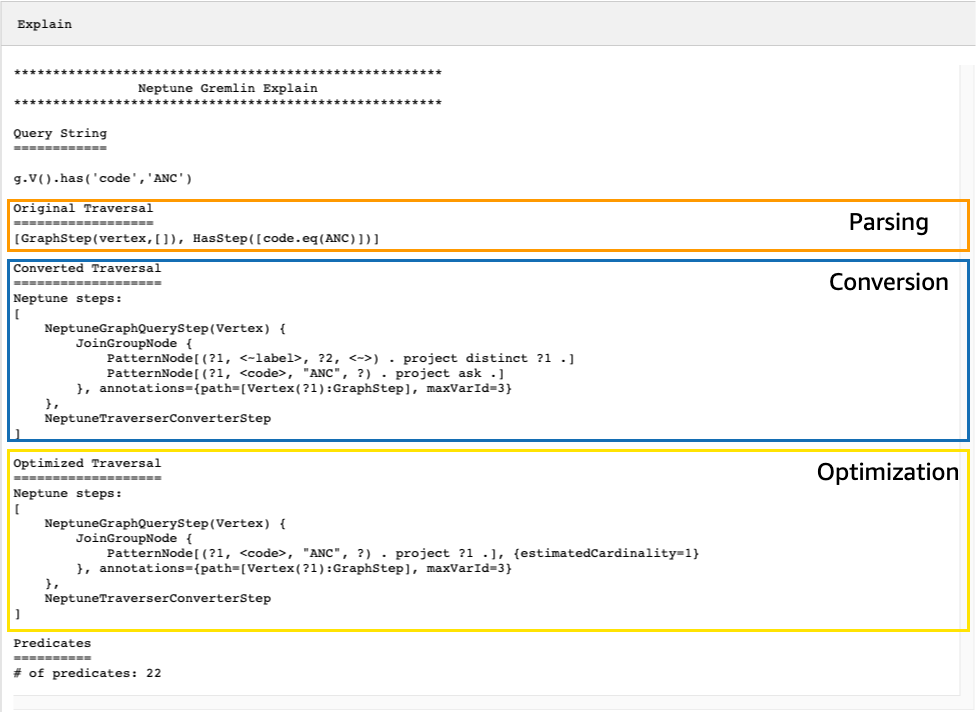
生成的 `explain` API 输出描述了 Neptune 的遍历执行计划。如下图所示,该计划包括处理管道中 3 个步骤的每一个步骤:
### 通过查看未转换的步骤来调整遍历
在 Neptune `explain` API 输出中首先要查找的内容之一是未转换为 Neptune 原生步骤的 Gremlin 步骤。在查询计划中,当遇到无法转换为 Neptune 原生步骤的步骤时,该步骤和计划中的所有后续步骤都将由 Gremlin 服务器处理。
在上述示例中,遍历中的所有步骤均已转换。让我们来看看这个遍历的 `explain` API 输出:
```
g.V().has('code','ANC').out().choose(hasLabel('airport'), values('code'), constant('Not an airport'))
```
如下图所示,Neptune 无法转换 `choose()` 步骤:
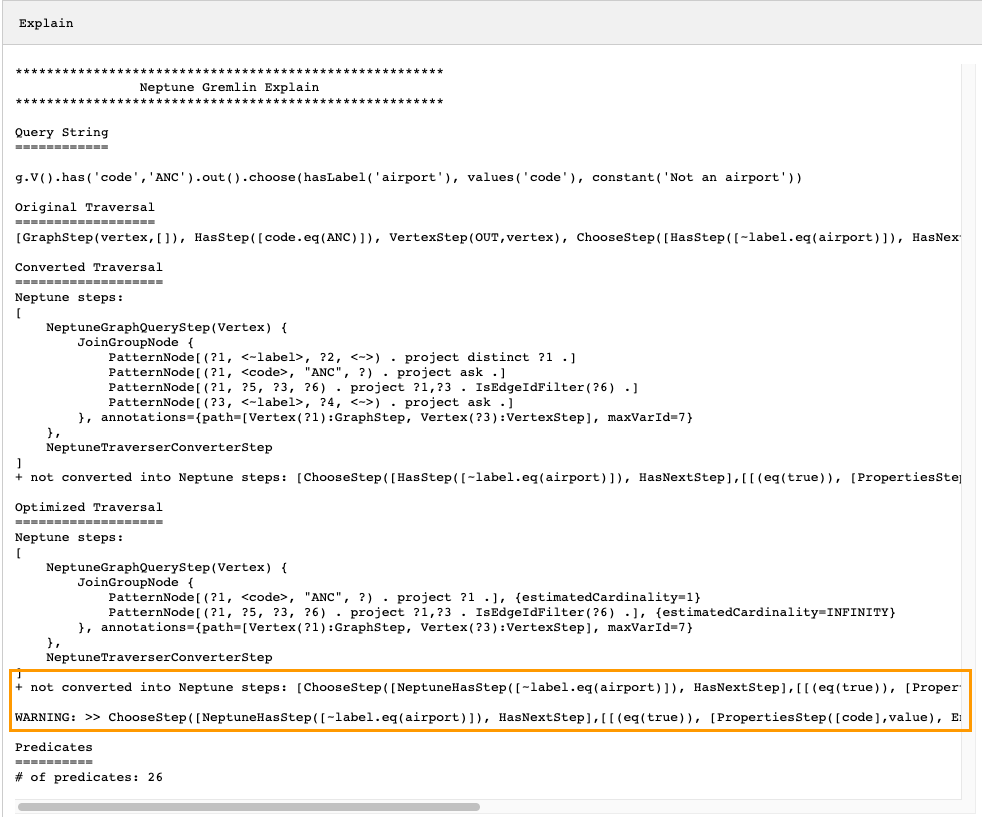
您可以执行几项操作以优化遍历的性能。第一种方法是重写它,以消除无法转换的步骤。另一种方法是将该步骤移到遍历的末尾,这样所有其它步骤都可以转换为原生步骤。
包含未转换的步骤的查询计划并不总是需要调整。如果无法转换的步骤位于遍历的末尾,并且与输出的格式化方式有关,而不是与图型的遍历方式有关,那么它们可能对性能影响不大。
###
在检查 Neptune `explain` API 的输出时,要注意的另一件事是不使用索引的步骤。以下遍历查找航班降落在安克雷奇的所有机场:
```
g.V().has('code','ANC').in().values('code')
```
此遍历的 Explain API 的输出是:
```
*******************************************************
Neptune Gremlin Explain
*******************************************************
Query String
============
g.V().has('code','ANC').in().values('code')
Original Traversal
==================
[GraphStep(vertex,[]), HasStep([code.eq(ANC)]), VertexStep(IN,vertex), PropertiesStep([code],value)]
Converted Traversal
===================
Neptune steps:
[
NeptuneGraphQueryStep(PropertyValue) {
JoinGroupNode {
PatternNode[(?1, <~label>, ?2, <~>) . project distinct ?1 .]
PatternNode[(?1, , "ANC", ?) . project ask .]
PatternNode[(?3, ?5, ?1, ?6) . project ?1,?3 . IsEdgeIdFilter(?6) .]
PatternNode[(?3, <~label>, ?4, <~>) . project ask .]
PatternNode[(?3, ?7, ?8, <~>) . project ?3,?8 . ContainsFilter(?7 in ()) .]
}, annotations={path=[Vertex(?1):GraphStep, Vertex(?3):VertexStep, PropertyValue(?8):PropertiesStep], maxVarId=9}
},
NeptuneTraverserConverterStep
]
Optimized Traversal
===================
Neptune steps:
[
NeptuneGraphQueryStep(PropertyValue) {
JoinGroupNode {
PatternNode[(?1, , "ANC", ?) . project ?1 .], {estimatedCardinality=1}
PatternNode[(?3, ?5, ?1, ?6) . project ?1,?3 . IsEdgeIdFilter(?6) .], {estimatedCardinality=INFINITY}
PatternNode[(?3, ?7=, ?8, <~>) . project ?3,?8 .], {estimatedCardinality=7564}
}, annotations={path=[Vertex(?1):GraphStep, Vertex(?3):VertexStep, PropertyValue(?8):PropertiesStep], maxVarId=9}
},
NeptuneTraverserConverterStep
]
Predicates
==========
# of predicates: 26
WARNING: reverse traversal with no edge label(s) - .in() / .both() may impact query performance
```
输出底部的 `WARNING` 消息之所以出现,是因为无法使用 Neptune 维护的 3 个索引之一来处理遍历中的 `in()` 步骤(请参阅[如何在 Neptune 中为语句编制索引](feature-overview-storage-indexing.md)和[Neptune 中的 Gremlin 语句](gremlin-explain-background-statements.md))。由于 `in()` 步骤不包含边缘筛选条件,因此它无法使用 `SPOG`、`POGS` 或 `GPSO` 索引对其进行解析。相反,Neptune 必须执行联合扫描才能找到请求的顶点,但效率要低得多。
在这种情况下,可通过两种方法来调整遍历。第一种方法是在 `in()` 步骤中添加一个或多个筛选条件,以便可以使用索引查找来解析查询。对于上面的示例,这可能是:
```
g.V().has('code','ANC').in('route').values('code')
```
修改后的遍历的 Neptune `explain` API 的输出不再包含 `WARNING` 消息:
```
*******************************************************
Neptune Gremlin Explain
*******************************************************
Query String
============
g.V().has('code','ANC').in('route').values('code')
Original Traversal
==================
[GraphStep(vertex,[]), HasStep([code.eq(ANC)]), VertexStep(IN,[route],vertex), PropertiesStep([code],value)]
Converted Traversal
===================
Neptune steps:
[
NeptuneGraphQueryStep(PropertyValue) {
JoinGroupNode {
PatternNode[(?1, <~label>, ?2, <~>) . project distinct ?1 .]
PatternNode[(?1, , "ANC", ?) . project ask .]
PatternNode[(?3, ?5, ?1, ?6) . project ?1,?3 . IsEdgeIdFilter(?6) . ContainsFilter(?5 in ()) .]
PatternNode[(?3, <~label>, ?4, <~>) . project ask .]
PatternNode[(?3, ?7, ?8, <~>) . project ?3,?8 . ContainsFilter(?7 in ()) .]
}, annotations={path=[Vertex(?1):GraphStep, Vertex(?3):VertexStep, PropertyValue(?8):PropertiesStep], maxVarId=9}
},
NeptuneTraverserConverterStep
]
Optimized Traversal
===================
Neptune steps:
[
NeptuneGraphQueryStep(PropertyValue) {
JoinGroupNode {
PatternNode[(?1, , "ANC", ?) . project ?1 .], {estimatedCardinality=1}
PatternNode[(?3, ?5=, ?1, ?6) . project ?1,?3 . IsEdgeIdFilter(?6) .], {estimatedCardinality=32042}
PatternNode[(?3, ?7=, ?8, <~>) . project ?3,?8 .], {estimatedCardinality=7564}
}, annotations={path=[Vertex(?1):GraphStep, Vertex(?3):VertexStep, PropertyValue(?8):PropertiesStep], maxVarId=9}
},
NeptuneTraverserConverterStep
]
Predicates
==========
# of predicates: 26
```
如果您正在运行许多此类遍历,另一种选择是在启用了可选 `OSGP` 索引的 Neptune 数据库集群中运行它们(请参阅[启用 OSGP 索引](feature-overview-storage-indexing.md#feature-overview-storage-indexing-osgp))。启用 `OSGP` 索引具有缺点:
+ 在加载任何数据之前,必须在数据库集群中启用它。
+ 顶点和边缘的插入速率可减慢多达 23%。
+ 存储使用量将增加大约 20%。
+ 将请求分散到所有索引上的读取查询可能会增加了延迟。
对于一组受限的查询模式来说,拥有 `OSGP` 索引很有意义,但除非您经常运行这些模式,否则通常最好尽量确保可以使用三个主索引解析您编写的遍历。
### 使用大量谓词
Neptune 将图形中的每个边缘标签和每个不同的顶点或边缘属性名称视为谓词,并且默认设计为使用相对较少的不同谓词。当您的图形数据中有超过几千个谓词时,性能可能会降低。
如果是这样的话,Neptune `explain` 输出会警告您:
```
Predicates
==========
# of predicates: 9549
WARNING: high predicate count (# of distinct property names and edge labels)
```
如果不方便重新设计数据模型以减少标签和属性的数量,从而减少谓词的数量,那么调整遍历的最佳方法是在启用了 `OSGP` 索引的数据库集群中运行遍历,如上所述。
## 使用 Neptune Gremlin `profile` API 调整遍历
Neptune `profile` API 与 Gremlin `profile()` 步骤有很大不同。与 `explain` API 一样,它的输出包括 Neptune 引擎在执行遍历时使用的查询计划。此外,根据设置遍历的参数的方式,`profile` 输出还包括遍历的实际执行统计数据。
再次以找到安克雷奇所有机场顶点的简单遍历为例:
```
g.V().has('code','ANC')
```
与 `explain` API 一样,您可以使用 REST 调用来调用 `profile` API:
```
curl -X POST https://{{your-neptune-endpoint}}:{{port}}/gremlin/profile -d '{"gremlin":"g.V().has('code','ANC')"}'
```
还可以将 Neptune Workbench 的 [%%gremlin](notebooks-magics.md#notebooks-cell-magics-gremlin) 单元格魔术命令与 `profile` 参数结合使用。这会将单元格正文中包含的遍历传递给 Neptune `profile` API,然后在运行单元格时显示结果输出:
```
%%gremlin profile
g.V().has('code','ANC')
```
生成的 `profile` API 输出包含 Neptune 的遍历执行计划和有关计划执行的统计数据,如下图所示:
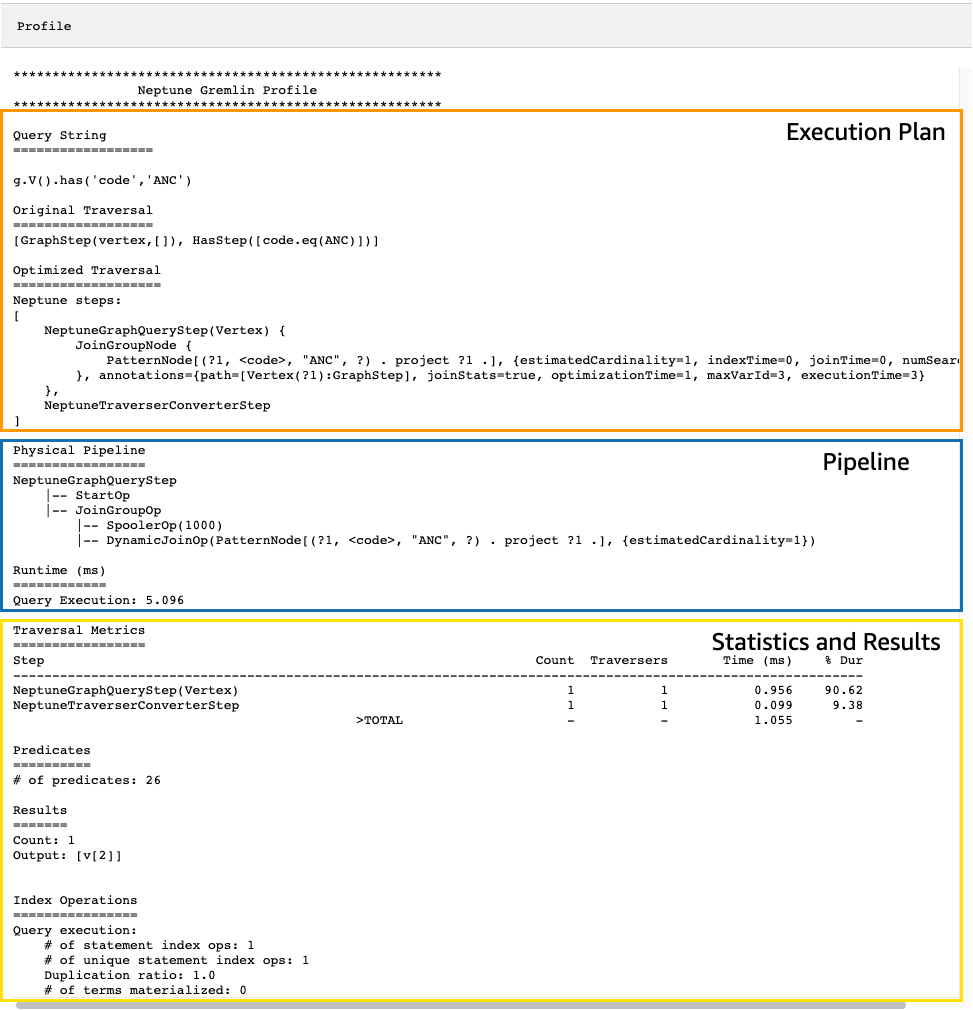
在 `profile` 输出中,执行计划部分仅包含遍历的最终执行计划,不包含中间步骤。管道部分包含已执行的物理管道操作以及遍历执行所花费的实际时间(以毫秒为单位)。运行时系统指标对于比较两个不同版本的遍历在优化时所花费的时间非常有用。
**注意**
遍历的初始运行时间通常比后续运行时更长,因为第一个遍历会导致相关数据被缓存。
`profile` 输出的第三部分包含执行统计数据和遍历的结果。要了解这些信息在调整遍历时有何用处,可以考虑以下遍历,它可以找到名称以“Anchora”开头的每个机场,以及从这些机场转乘两次即可到达的所有机场,同时返回机场代码、航班线路和距离:
```
%%gremlin profile
g.withSideEffect("Neptune#fts.endpoint", "{your-OpenSearch-endpoint-URL").
V().has("city", "Neptune#fts Anchora~").
repeat(outE('route').inV().simplePath()).times(2).
project('Destination', 'Route').
by('code').
by(path().by('code').by('dist'))
```
### Neptune `profile` API 输出中的遍历指标
所有 `profile` 输出中可用的第一组指标是遍历指标。这些指标与 Gremlin `profile()` 步骤指标类似,但有一些区别:
```
Traversal Metrics
=================
Step Count Traversers Time (ms) % Dur
-------------------------------------------------------------------------------------------------------------
NeptuneGraphQueryStep(Vertex) 3856 3856 91.701 9.09
NeptuneTraverserConverterStep 3856 3856 38.787 3.84
ProjectStep([Destination, Route],[value(code), ... 3856 3856 878.786 87.07
PathStep([value(code), value(dist)]) 3856 3856 601.359
>TOTAL - - 1009.274 -
```
遍历指标表的第一列列出了遍历执行的步骤。前两个步骤通常是 Neptune 特定的步骤 `NeptuneGraphQueryStep` 和 `NeptuneTraverserConverterStep`。
`NeptuneGraphQueryStep` 表示可以由 Neptune 引擎在原生环境中转换和执行的整个遍历部分的执行时间。
`NeptuneTraverserConverterStep`表示将这些已转换步骤的输出转换为 TinkerPop 遍历器的过程,这些遍历器允许处理无法转换的步骤(如果有),或者以兼容的格式返回结果。 TinkerPop
在上面的示例中,我们有几个未转换的步骤,因此我们看到每个 TinkerPop 步骤 (`ProjectStep`,`PathStep`) 随后都作为一行出现在表中。
[表中的第二列报告通过该步骤的*表示*遍历器的数量,而第三列报告通过该步骤的遍历器数量,如配置步骤文档中所TinkerPop述。`Count``Traversers`](https://tinkerpop.apache.org/docs/current/reference/#profile-step)
在我们的示例中,`NeptuneGraphQueryStep` 返回了 3856 个顶点和 3856 个遍历器,在剩下的处理过程中,这些数字保持不变,因为 `ProjectStep` 和 `PathStep` 正在格式化结果,而不是筛选结果。
**注意**
与之不同的是 TinkerPop,Neptune 引擎不会通过增加和*步数*来优化性能。`NeptuneGraphQueryStep` `NeptuneTraverserConverterStep`Bulking 是一种将遍历器组合在同一个顶点上以减少操作开销的 TinkerPop操作,这就是导致和数字出现差异的原因。`Count` `Traversers`由于批量仅发生在 Neptune 委托 TinkerPop给的步骤中,而不发生在 Neptune 本机处理的步骤中,因此和列很少有区别。`Count` `Traverser`
“时间”列报告该步骤所花费的毫秒数,而 `% Dur` 列报告该步骤占总处理时间的百分比。这些指标通过显示花费时间最多的步骤来告诉您调整工作要集中在哪里。
### Neptune `profile` API 输出中的索引操作指标
Neptune Profile API 输出中的另一组指标是索引操作:
```
Index Operations
================
Query execution:
# of statement index ops: 23191
# of unique statement index ops: 5960
Duplication ratio: 3.89
# of terms materialized: 0
```
它们报告:
+ 索引查找的总数。
+ 执行的唯一索引查找的次数。
+ 索引查找总数与唯一索引查找次数的比率。比率越低,表示冗余越少。
+ 从术语词典中具体化的术语数量。
### Neptune `profile` API 输出中的重复指标
如果您的遍历使用如上例所示的 `repeat()` 步骤,则 `profile` 输出中将显示包含重复指标的部分:
```
Repeat Metrics
==============
Iteration Visited Output Until Emit Next
------------------------------------------------------
0 2 0 0 0 2
1 53 0 0 0 53
2 3856 3856 3856 0 0
------------------------------------------------------
3911 3856 3856 0 55
```
它们报告:
+ 一行的循环次数(`Iteration` 列)。
+ 循环访问的元素数量(`Visited` 列)。
+ 循环输出的元素数量(`Output` 列)。
+ 循环输出的最后一个元素(`Until` 列)。
+ 循环发出的元素数量(`Emit` 列)。
+ 从循环传递到后续循环的元素数量(`Next` 列)。
这些重复指标对于了解遍历的分支因子非常有帮助,以了解数据库完成了多少工作。您可以使用这些数字来诊断性能问题,尤其是当同一个遍历在不同的参数下性能大相径庭时。
### Neptune `profile` API 输出中的全文搜索指标
当遍历使用[全文搜索](full-text-search.md)查找时(如上例所示),`profile` 输出中会出现一个包含全文搜索 (FTS) 指标的部分:
```
FTS Metrics
==============
SearchNode[(idVar=?1, query=Anchora~, field=city) . project ?1 .],
{endpoint=your-OpenSearch-endpoint-URL, incomingSolutionsThreshold=1000, estimatedCardinality=INFINITY,
remoteCallTimeSummary=[total=65, avg=32.500000, max=37, min=28],
remoteCallTime=65, remoteCalls=2, joinTime=0, indexTime=0, remoteResults=2}
2 result(s) produced from SearchNode above
```
这显示了发送到 ElasticSearch (ES) 集群的查询,并报告了与之交互的几个指标 ElasticSearch ,这些指标可以帮助您查明与全文搜索相关的性能问题:
+ 有关 ElasticSearch 索引调用的摘要信息:
+ 所有 remoteCall 满足查询所需的总毫秒数 (`total`)。
+ 在一个 remoteCall 中花费的平均毫秒数 (`avg`)。
+ 在一个 remoteCall 中花费的最小毫秒数 (`min`)。
+ 在一个 remoteCall 中花费的最大毫秒数 (`max`)。
+ 远程调用 ElasticSearch () `remoteCallTime` 所消耗的总时间。
+ 向 ElasticSearch () `remoteCalls` 发出的远程呼叫数。
+ ElasticSearch 结果联接所花费的毫秒数 ()。`joinTime`
+ 在索引查找中花费的毫秒数 (`indexTime`)。
+ ElasticSearch (`remoteResults`) 返回的结果总数。