本文属于机器翻译版本。若本译文内容与英语原文存在差异,则一律以英文原文为准。
# 将 Amazon Transfer Family 服务器终端节点类型从 VPC\_ENDPOINT 更新到 VPC
你可以使用 Amazon Web Services 管理控制台 Amazon CloudFormation、或 Transfer Family API 将服务器`EndpointType`从更新`VPC_ENDPOINT`为`VPC`。以下各部分提供了使用每种方法更新服务器端点类型的详细过程和示例。如果您在多个 Amazon 区域和多个 Amazon 账户中拥有服务器,则可以使用下一节中提供的示例脚本进行修改,使用需要更新的`VPC_ENDPOINT`类型来识别服务器。
**Topics**
+ [使用 `VPC_ENDPOINT` 端点类型识别服务器](#id-servers)
+ [使用更新服务器端点类型 Amazon Web Services 管理控制台](#update-endpoint-console)
+ [使用更新服务器端点类型 Amazon CloudFormation](#update-endpoint-cloudformation)
+ [EndpointType 使用 API 更新服务器](#update-endpoint-cli)
## 使用 `VPC_ENDPOINT` 端点类型识别服务器
您可以使用 `VPC_ENDPOINT` 来识别哪些服务器正在使用 Amazon Web Services 管理控制台。
**识别通过控制台使用 `VPC_ENDPOINT` 端点类型的服务器**
1. 打开 Amazon Transfer Family 控制台,网址为[https://console.aws.amazon.com/transfer/](https://console.amazonaws.cn/transfer/)。
1. 在导航窗格中选择**服务器**,显示该区域中您账户中的服务器列表。
1. 按**端点类型**对服务器列表进行排序,以查看所有使用 `VPC_ENDPOINT` 的服务器。
**要识别`VPC_ENDPOINT`跨多个 Amazon 地区和账户使用的服务器**
如果您在多个 Amazon 区域和多个 Amazon 账户中拥有服务器,则可以使用以下示例脚本(经过修改)来识别使用`VPC_ENDPOINT`终端节点类型的服务器。示例脚本使用 Amazon EC2 [DescribeRegions](https://docs.amazonaws.cn/AWSEC2/latest/APIReference/API_DescribeRegions.html)和 Transfer Famil [https://docs.amazonaws.cn/transfer/latest/APIReference/API_ListServers.html](https://docs.amazonaws.cn/transfer/latest/APIReference/API_ListServers.html)y API 操作。如果您有许多 Amazon 账户,如果您使用身份提供商的会话配置文件进行身份验证,则可以使用具有只读审计员访问权限的 IAM 角色遍历您的账户。
1. 以下是一个简单示例。
```
import boto3
profile = input("Enter the name of the Amazon account you'll be working in: ")
session = boto3.Session(profile_name=profile)
ec2 = session.client("ec2")
regions = ec2.describe_regions()
for region in regions['Regions']:
region_name = region['RegionName']
if region_name=='ap-northeast-3': #https://github.com/boto/boto3/issues/1943
continue
transfer = session.client("transfer", region_name=region_name)
servers = transfer.list_servers()
for server in servers['Servers']:
if server['EndpointType']=='VPC_ENDPOINT':
print(server['ServerId'], region_name)
```
1. 获得要更新的服务器列表后,您可以使用以下各部分中描述的方法之一将 `EndpointType` 更新为 `VPC`。
## 使用更新服务器端点类型 Amazon Web Services 管理控制台
1. 打开 Amazon Transfer Family 控制台,网址为[https://console.aws.amazon.com/transfer/](https://console.amazonaws.cn/transfer/)。
1. 在导航窗格中,选择**服务器**。
1. 选中要更改其端点类型的服务器的复选框。
**重要**
您必须先停止服务器,然后才能更改其终端节点。
1. 对于**操作**,选择**停止**。
1. 在出现的确认对话框中,通过选择**停止**来确认您要停止服务器。
**注意**
在继续下一步之前,请等待服务器的**状态**变为**离线**;这可能需要几分钟。您可能必须在**服务器**页面上选择**刷新**才能查看状态更改。
1. 状态更改为**离线**后,选择服务器以显示服务器详细信息页面。
1. 在**端点详细信息**部分中,选择**编辑**。
1. 为**端点类型**选择 **VPC 托管**。
1. 选择**保存**
1. 在**操作**中,选择**启动**,然后等待服务器状态更改为**在线**;这可能需要几分钟。
## 使用更新服务器端点类型 Amazon CloudFormation
本节介绍 Amazon CloudFormation 如何使用将服务器更新`EndpointType`为`VPC`。对于使用部署的 Transfer Family 服务器,请使用此过程 Amazon CloudFormation。在此示例中,用于部署 Transfer Family 服务器的原始 Amazon CloudFormation 模板如下所示:
```
Amazon TemplateFormatVersion: '2010-09-09'
Description: 'Create Amazon Transfer Server with VPC_ENDPOINT endpoint type'
Parameters:
SecurityGroupId:
Type: Amazon::EC2::SecurityGroup::Id
SubnetIds:
Type: List
VpcId:
Type: Amazon::EC2::VPC::Id
Resources:
TransferServer:
Type: Amazon::Transfer::Server
Properties:
Domain: S3
EndpointDetails:
VpcEndpointId: !Ref VPCEndpoint
EndpointType: VPC_ENDPOINT
IdentityProviderType: SERVICE_MANAGED
Protocols:
- SFTP
VPCEndpoint:
Type: Amazon::EC2::VPCEndpoint
Properties:
ServiceName: com.amazonaws.us-east-1.transfer.server
SecurityGroupIds:
- !Ref SecurityGroupId
SubnetIds:
- !Select [0, !Ref SubnetIds]
- !Select [1, !Ref SubnetIds]
- !Select [2, !Ref SubnetIds]
VpcEndpointType: Interface
VpcId: !Ref VpcId
```
模板已更新,其中包含以下更改:
+ `EndpointType` 已更改为 `VPC`。
+ `AWS::EC2::VPCEndpoint` 资源已删除。
+ `SecurityGroupId`、`SubnetIds`、和 `VpcId` 已移至`EndpointDetails`资源`AWS::Transfer::Server`部分,
+ `VpcEndpointId` 的 `EndpointDetails` 属性已删除。
更新后的模板如下所示:
```
Amazon TemplateFormatVersion: '2010-09-09'
Description: 'Create Amazon Transfer Server with VPC endpoint type'
Parameters:
SecurityGroupId:
Type: Amazon::EC2::SecurityGroup::Id
SubnetIds:
Type: List
VpcId:
Type: Amazon::EC2::VPC::Id
Resources:
TransferServer:
Type: Amazon::Transfer::Server
Properties:
Domain: S3
EndpointDetails:
SecurityGroupIds:
- !Ref SecurityGroupId
SubnetIds:
- !Select [0, !Ref SubnetIds]
- !Select [1, !Ref SubnetIds]
- !Select [2, !Ref SubnetIds]
VpcId: !Ref VpcId
EndpointType: VPC
IdentityProviderType: SERVICE_MANAGED
Protocols:
- SFTP
```
**要更新使用部署的 Transfer Family 服务器的端点类型 Amazon CloudFormation**
1. 使用以下步骤停止要更新的服务器。
1. 打开 Amazon Transfer Family 控制台,网址为[https://console.aws.amazon.com/transfer/](https://console.amazonaws.cn/transfer/)。
1. 在导航窗格中,选择**服务器**。
1. 选中要更改其端点类型的服务器的复选框。
**重要**
您必须先停止服务器,然后才能更改其终端节点。
1. 对于**操作**,选择**停止**。
1. 在出现的确认对话框中,通过选择**停止**来确认您要停止服务器。
**注意**
在继续下一步之前,请等待服务器的**状态**变为**离线**;这可能需要几分钟。您可能必须在**服务器**页面上选择**刷新**才能查看状态更改。
1. 更新堆 CloudFormation 栈
1. 打开 Amazon CloudFormation 控制台,网址为[https://console.aws.amazon.com/cloudformation](https://console.amazonaws.cn/cloudformation/)。
1. 选择用于创建 Transfer Family 服务器的堆栈。
1. 选择**更新**。
1. 选择**替换当前模板**
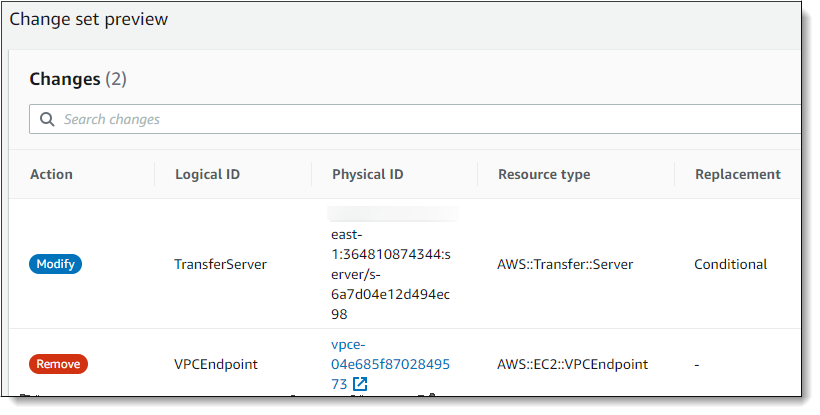
1. 上传新模板。 CloudFormation 更改集可帮助您在实施模板更改之前了解模板更改将如何影响正在运行的资源。在此示例中,将修改 Transfer 服务器资源,并删除 VPCEndpoint 资源。VPC 端点类型服务器代表您创建 VPC 端点,替换原始 `VPCEndpoint` 资源。
上传新模板后,更改集将与以下所示类似:
1. 更新堆栈。
1. 堆栈更新完成后,导航至 Transfer Family 管理控制台,网址为[https://console.aws.amazon.com/transfer/](https://console.amazonaws.cn/transfer/)。
1. 重新启动服务器。选择您更新的服务器 Amazon CloudFormation,然后从 “**操作**” 菜单中选择 “**启动**”。
## EndpointType 使用 API 更新服务器
您可以使用 [describe-server](https://docs.amazonaws.cn/cli/latest/reference/transfer/update-server.html) Amazon CLI 命令或 [UpdateServer](https://docs.amazonaws.cn/transfer/latest/APIReference/API_UpdateServer.html) API 命令。以下示例脚本停止 Transfer Family 服务器、更新 EndpointType、移除 VPC\_ENDPOINT 并启动服务器。
```
import boto3
import time
profile = input("Enter the name of the Amazon account you'll be working in: ")
region_name = input("Enter the Amazon Region you're working in: ")
server_id = input("Enter the Amazon Transfer Server Id: ")
session = boto3.Session(profile_name=profile)
ec2 = session.client("ec2", region_name=region_name)
transfer = session.client("transfer", region_name=region_name)
group_ids=[]
transfer_description = transfer.describe_server(ServerId=server_id)
if transfer_description['Server']['EndpointType']=='VPC_ENDPOINT':
transfer_vpc_endpoint = transfer_description['Server']['EndpointDetails']['VpcEndpointId']
transfer_vpc_endpoint_descriptions = ec2.describe_vpc_endpoints(VpcEndpointIds=[transfer_vpc_endpoint])
for transfer_vpc_endpoint_description in transfer_vpc_endpoint_descriptions['VpcEndpoints']:
subnet_ids=transfer_vpc_endpoint_description['SubnetIds']
group_id_list=transfer_vpc_endpoint_description['Groups']
vpc_id=transfer_vpc_endpoint_description['VpcId']
for group_id in group_id_list:
group_ids.append(group_id['GroupId'])
if transfer_description['Server']['State']=='ONLINE':
transfer_stop = transfer.stop_server(ServerId=server_id)
print(transfer_stop)
time.sleep(300) #safe
transfer_update = transfer.update_server(ServerId=server_id,EndpointType='VPC',EndpointDetails={'SecurityGroupIds':group_ids,'SubnetIds':subnet_ids,'VpcId':vpc_id})
print(transfer_update)
time.sleep(10)
transfer_start = transfer.start_server(ServerId=server_id)
print(transfer_start)
delete_vpc_endpoint = ec2.delete_vpc_endpoints(VpcEndpointIds=[transfer_vpc_endpoint])
```