Generating custom subsegments with the X-Ray SDK for Go
Note
X-Ray SDK/Daemon Maintenance Notice – On February 25th, 2026, the Amazon X-Ray SDKs/Daemon will enter maintenance mode, where Amazon will limit X-Ray SDK and Daemon releases to address security issues only. For more information on the support timeline, see X-Ray SDK and Daemon Support timeline. We recommend to migrate to OpenTelemetry. For more information on migrating to OpenTelemetry, see Migrating from X-Ray instrumentation to OpenTelemetry instrumentation .
Subsegments extend a trace's segment with details about work done in order to serve a request. Each time you make a call with an instrumented client, the X-Ray SDK records the information generated in a subsegment. You can create additional subsegments to group other subsegments, to measure the performance of a section of code, or to record annotations and metadata.
Use the Capture method to create a subsegment around a function.
Example main.go – Custom subsegment
func criticalSection(ctx context.Context) {
  //this is an example of a subsegment
  xray.Capture(ctx, "GameModel.saveGame", func(ctx1 context.Context) error {
    var err error

    section.Lock()
    result := someLockedResource.Go()
    section.Unlock()

    xray.AddMetadata(ctx1, "ResourceResult", result)
  })
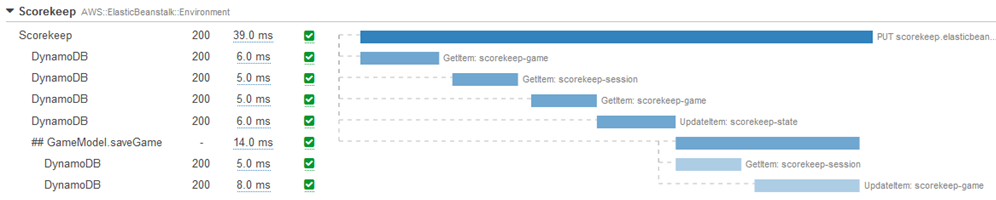
The following screenshot shows an example of how the saveGame subsegment might
appear in traces for the application Scorekeep.