本文属于机器翻译版本。若本译文内容与英语原文存在差异,则一律以英文原文为准。
使用连接到 RISE Amazon VPN
允许使用 VP Amazon Site-to-Site N 从您的远程网络访问带有 SAP VPC 的 RISE。 Amazon Site-to-Site VPN 使用互联网协议安全 (IPsec) 对 Amazon 云端和您的本地位置之间的流量进行加密,并通过互联网上的安全隧道进行传输。此选项的实现速度比 Di Amazon rect Connect 等专用专用连接更快。有关更多信息,请参阅使用 Amazon 虚拟专用网络将您的 VPC 连接到远程网络。
您可以使用以下两个选项之一配置 VPN 隧道的带宽容量:
-
标准带宽:每条隧道最高可达 1.25 Gbps(默认)
-
大型带宽隧道 (LBT):每条隧道最高可达 5 Gbps
默认情况下,每个 VPN 连接包括两条隧道。
有关更多信息,请参阅 Amazon Site-to-Site VPN 连接的隧道选项。
注意
定价示例仅用于说明目的,可能会发生变化。有关当前定价,请参阅 Amazon Site-to-Site VPN 定价
标准带宽:每条隧道最高可达 1.25 Gbps
下图显示了使用 SAP VPC 与 RISE 建立标准带宽 Site-to-Site VPN 连接的架构。
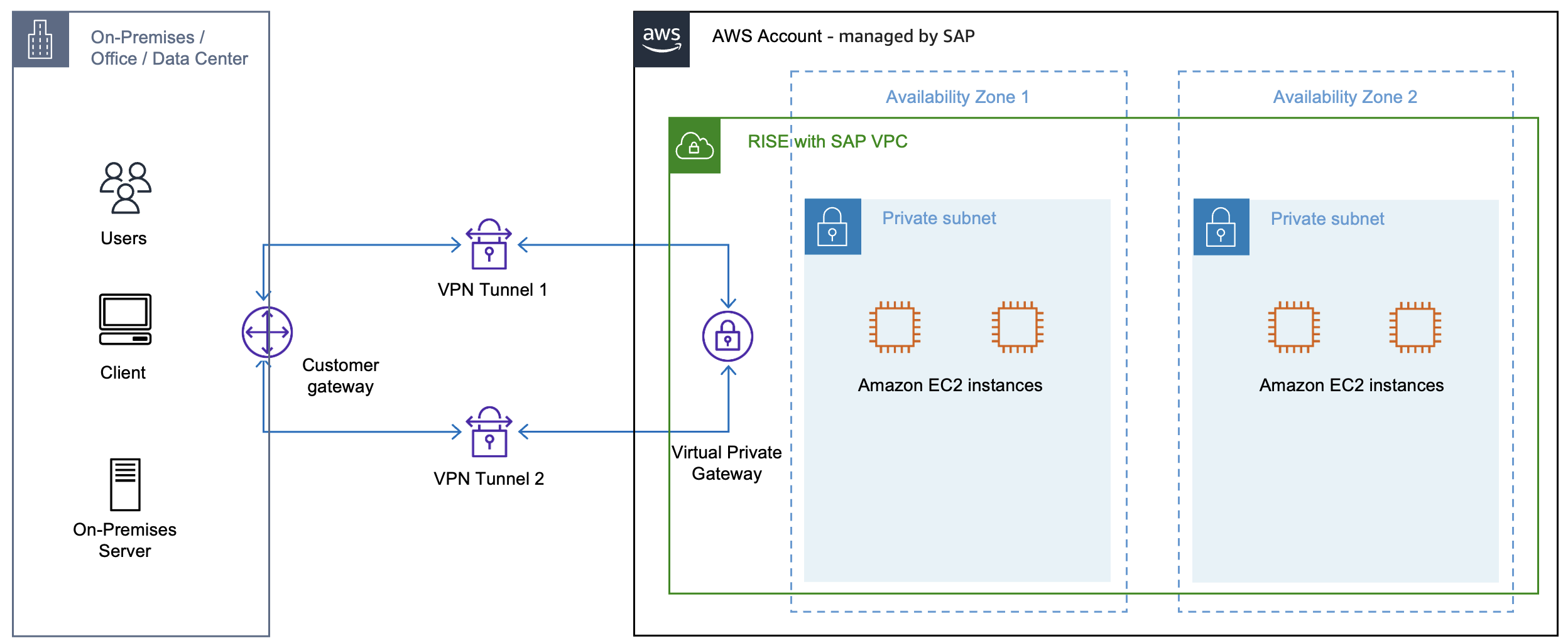
使用此选项时,SAP 需要以下详细信息并代表您处理 Amazon-side 配置:
-
BGP ASN
-
您设备的 IP 地址
您可以从本地 Amazon VPN 设备获取这些详细信息。
为了实现冗余,请配置第二个 VPN 连接。
定价示例 1:单个 1.25 Gbps VPN 连接 Site-to-Site
注意
费用因 Amazon 地区而异。有关更多信息,请参阅 Amazon EC2 定价数据传输
Site-to-Site VPN 连接已创建并直接连接到美国东部(俄亥俄州)的 RISE 账户 VPC。该连接每天 24 小时处于活动状态 30 天,传输量为 1 TB。
-
Amazon Site-to-Site VPN 连接费(1.25 Gbps):美国东部(俄亥俄州)每个 VPN 连接每小时 0.05 美元,每月连接费为 36.00 美元。
-
数据传输费:前 100 GB 是免费的,剩下 924 GB(1 TB = 1,024 GB)的费用为每 GB 0.09 美元,每月费用为 83.16 美元。
估计每月的总费用约为119.16美元。
当您使用 Amazon Site-to-Site VPN 将远程网络直接连接到 RISE 时,RISE 订阅将支 Amazon 付 VPN 连接和数据传输费用。
注意
由于与 “客户网关设备”( Site-to-Site Amazon VPN 连接端的物理设备或软件应用程序)的生命周期和运行相关的成本各不相同,因此本文档不考虑这一点。
大型带宽隧道:每条隧道高达 5 Gbps
使用大型带宽隧道,您可以配置每条隧道支持高达 5 Gbps 带宽的 VP Site-to-Site N 隧道,而标准带宽为 1.25 Gbps。有关更多信息,请参阅大型带宽隧道。
大型带宽隧道仅适用于连接到 Transit Gateway 或 Amazon Cloud WAN 的 VPN 连接。它们不适用于虚拟专用网关,因此您无法使用它们通过 SAP VPC 直接从远程网络连接到 RISE。要使用大带宽隧道,请通过您自己的 Amazon 托管账户路由流量。有关此架构模式的更多信息,请参阅使用您的单一 Amazon 账户连接到 RISE。
下图显示了通过您自己的 Amazon 账户与带有 SAP VPC 的 RISE 的大型带宽隧道 VPN 连接的架构。
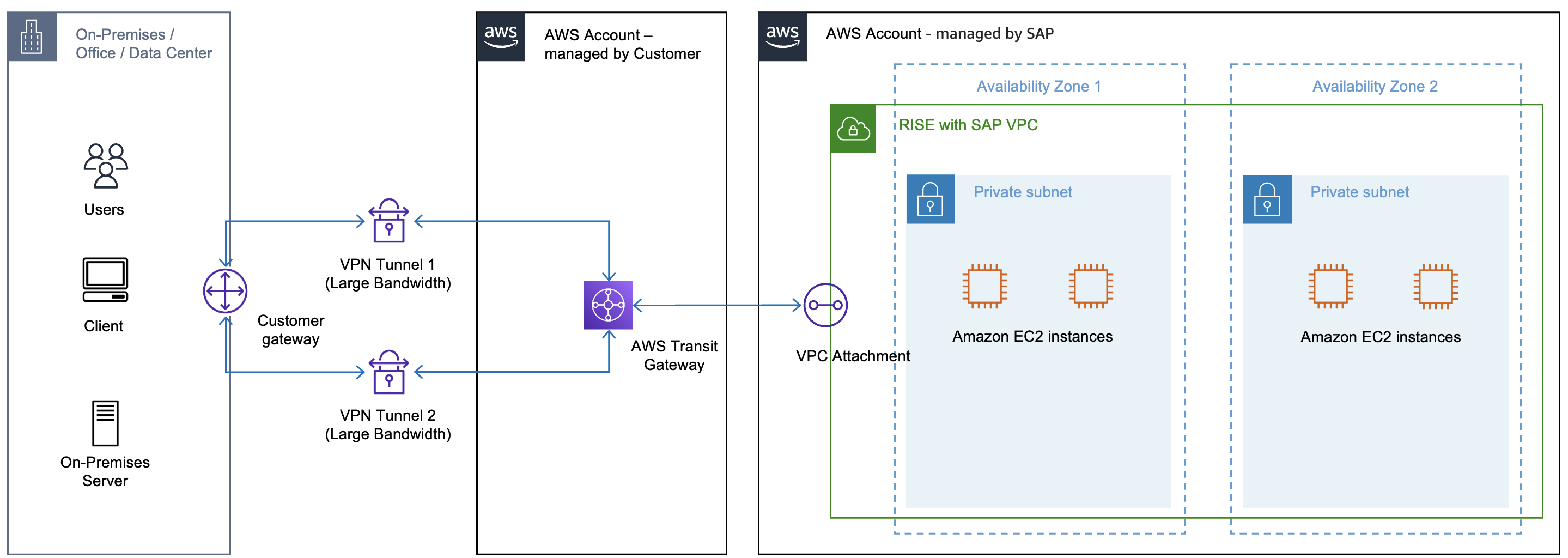
使用此选项时,您需要对配置负责。有关更多信息,请参阅创建 Amazon Site-to-Site VPN 连接和介绍 VP Amazon Site-to-Site N 5 Gbps 隧道以支持高吞吐量
由于您在此选项中使用的是自己的 Amazon 帐户,因此这些费用不包含在RISE订阅中。
定价示例 2:单个 5 Gbps VPN Site-to-Site
注意
费用因 Amazon 地区而异。有关更多信息,请参阅 Amazon EC2 定价数据传输
在您的 Amazon VPC 中创建大带宽 V Site-to-Site PN 连接,终止于美国东部(俄亥俄州)的 T Amazon ransit Gateway。该连接每天 24 小时处于活动状态 30 天,传输量为 1 TB。
-
Amazon Site-to-Site VPN 连接费 (5 Gbps):美国东部(俄亥俄州)每个 VPN 连接每小时 0.60 美元,每月连接费为 432.00 美元。
-
Amazon Transit Gateway 费用:在美国东部(俄亥俄州),每个附件每小时0.05美元,一个附件的月费为36.00美元。
-
Amazon Transit Gateway 数据处理费:按每 GB 0.02 美元计算,月费为 20.48 美元。
-
数据传输费:前 100 GB 是免费的,剩下 924 GB(1 TB = 1,024 GB)的费用为每 GB 0.09 美元,每月费用为 83.16 美元。
估计每月的总费用约为571.64美元。
有关更多信息,请参阅 Amazon Site-to-Site VPN 定价
由于您通过VPN连接到自己的 Amazon 帐户,然后该帐户连接到RISE帐户,因此这些费用将在您和RISE订阅之间分担,具体取决于数据流量的方向。
注意
由于与 “客户网关设备”( Site-to-Site Amazon VPN 连接端的物理设备或软件应用程序)的生命周期和运行相关的成本各不相同,因此本文档不考虑这一点。
要扩展到单个大型带宽隧道的 5 Gbps 吞吐量之外,请参阅使用与传输网关关联的多个 Site-to-Site VPN 隧道实现 ECMP 路由
Summary
-
标准 VPN(高达 1.25 Gbps):直接连接到 RISE VPC。RISE 订阅涵盖了这些费用。最适合在没有自己的 Amazon 账户时使用。
-
大型带宽隧道(最高 5 Gbps):通过 Transit Gateway 通过您自己的 Amazon 账户进行路由。费用(每月约572美元)将根据数据流量方向在您的账户和RISE订阅之间分配。除了订阅之外,您可能会产生一些额外费用。
-
ECMP(高于 5 Gbps):通过 Transit Gateway 聚合多个 VPN 连接,将带宽扩展到 5 Gbps 以上。费用分摊模式与上述相同,但每增加一个 VPN 连接,成本就会线性扩展。
有关如何连接到 RISE 的完整决策树 Amazon,请参阅连接到 RISE 的决策树。