本文属于机器翻译版本。若本译文内容与英语原文存在差异,则一律以英文原文为准。
使用 ACM 证书保护 Kubernetes 工作负载
您可以将可导 Amazon Certificate Manager 出的公共证书与 Kubernetes Amazon 控制器 (ACK) 一起使用,从 ACM 颁发公有 TLS 证书并将其导出到您的 Kubernetes 工作负载。这种集成使您能够保护亚马逊 Elastic Kubernetes Service (Amazon EKS) pod 并终止 Kubernetes Ingress 上的 TLS。要开始使用,请参阅开启的适用于 Kubernetes 的
提示
如果您在 Kub ernetes 集群中使用证书管理器
Amazon Controllers for Kubernetes (ACK) 扩展了 Kubernetes API,使用原生 Kubernetes 清单管理资源 Amazon 。适用于 ACM 的 ACK 服务控制器在您的 Kubernetes 工作流程中提供自动证书生命周期管理。当您在 Kubernetes 中创建 ACM 证书资源时,ACK 控制器会执行以下操作:
-
向 ACM 请求证书,ACM 会生成证书签名请求 (CSR)。
-
等待域名验证完成以及 ACM 颁发证书。
-
如果指定了该
exportTo字段,则导出颁发的证书和私钥,并将它们存储在您指定的 Kubernetes Secret 中。 -
如果指定了该
exportTo字段且证书符合续订条件,则在到期前使用续订的证书更新 Kubernetes 密钥。
公开发布的证书需要进行域名验证后,ACM 才能颁发这些证书。您可以使用适用于 Amazon Route 53 的
证书使用选项
您可以通过以下几种方式在 Kubernetes 中使用 ACM 证书:
-
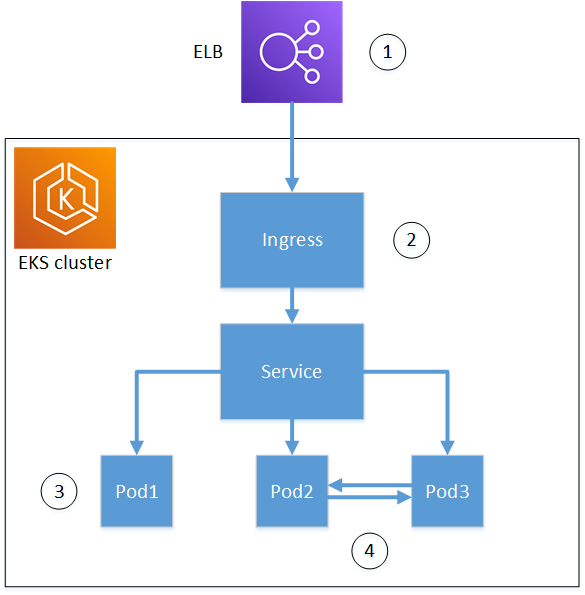
终止负载均衡器(不导出):通过 ACK 颁发证书,并使用它们在 Amazon 负载均衡器上终止 TLS。证书保留在 ACM 中,由Amazon 负载均衡器控制器
自动发现。这种方法不需要导出证书。 -
入口终止(含导出):从 ACM 导出证书并将其存储在 Kubernetes Secrets 中,以便在入口级别终止 TLS。这使您可以直接在 Kubernetes 工作负载中使用证书。
注意
有关需要私有证书的用例,请参阅证书管理器插件适用于 Kubernetes 的Amazon 私有 CA 连接器。
先决条件
在安装适用于 ACM 的 ACK 服务控制器之前,请确保您具备以下条件:
-
一个 Kubernetes 集群。
-
头盔已安装。
-
kubectl配置为与集群通信。 -
eksctl安装用于在 EKS 上配置 pod 身份关联。
安装 ACM 的 ACK 服务控制器
使用 Helm 在您的亚马逊 EKS 集群中安装 ACM 的 ACK 服务控制器。
-
为 ACK 控制器创建命名空间。
$ kubectl create namespace ack-system --dry-run=client -o yaml | kubectl apply -f - -
为 ACK 控制器创建 Pod 身份关联。
CLUSTER_NAME替换为您的集群名称REGION和您的 Amazon 区域。$ eksctl create podidentityassociation --clusterCLUSTER_NAME--regionREGION\ --namespace ack-system \ --create-service-account \ --service-account-name ack-acm-controller \ --permission-policy-arns arn:aws:iam::aws:policy/AWSCertificateManagerFullAccess -
登录亚马逊 ECR 公共注册表。
$ aws ecr-public get-login-password --region us-east-1 | helm registry login --username AWS --password-stdin public.ecr.aws -
安装 ACM 的 ACK 服务控制器。
REGION替换为您的 Amazon 地区。$ helm install -n ack-system ack-acm-controller oci://public.ecr.aws/aws-controllers-k8s/acm-chart --set serviceAccount.create=false --set serviceAccount.name=ack-acm-controller --set aws.region=REGION -
验证控制器正在运行。
$ kubectl get pods -n ack-system
有关 Pod 身份关联的更多信息,请参阅 Amazon EKS 用户指南中的 EKS Pod 身份。
示例:在入口处终止 TLS
以下示例演示如何导出 ACM 证书并使用它在 Kubernetes 入口级别终止 TLS。此配置创建 ACM 证书,将其导出到 Kubernetes 密钥,并将入口资源配置为使用该证书终止 TLS。
在本示例中:
-
创建密钥是为了存储导出的证书 (
exported-cert-secret) -
ACK 证书资源从 ACM 为您的域请求证书,并将其导出到
exported-cert-secret密钥。 -
入口资源引用
exported-cert-secret以终止传入流量的 TLS。
将 ${HOSTNAME} 替换为您的域名。
apiVersion: v1
kind: Secret
type: kubernetes.io/tls
metadata:
  name: exported-cert-secret
  namespace: demo-app
data:
  tls.crt: ""
  tls.key: ""
---
apiVersion: acm.services.k8s.aws/v1alpha1
kind: Certificate
metadata:
  name: exportable-public-cert
  namespace: demo-app
spec:
  domainName: ${HOSTNAME}
  options:
    certificateTransparencyLoggingPreference: ENABLED
  exportTo:
    namespace: demo-app
    name: exported-cert-secret
    key: tls.crt
---
apiVersion: networking.k8s.io/v1
kind: Ingress
metadata:
  name: ingress-traefik
  namespace: demo-app
spec:
  tls:
  - hosts:
    - ${HOSTNAME}
    secretName: exported-cert-secret
  ingressClassName: traefik
  rules:
  - host: ${HOSTNAME}
    http:
      paths:
      - path: /
        pathType: Prefix
        backend:
          service:
            name: whoami
            port:
              number: 80
部署后,ACM 的 ACK 服务控制器会自动管理证书生命周期,包括续订。当 ACM 续订证书时,控制器会使用新证书更新exported-cert-secret密钥,从而确保您的 Ingress 无需人工干预即可继续使用有效证书。